



DaveChap
Known Participant
October 25, 2023
Answered

Fix Transcript Partial Sentence Breaks

  • October 25, 2023
  • 1 reply
  • 646 views

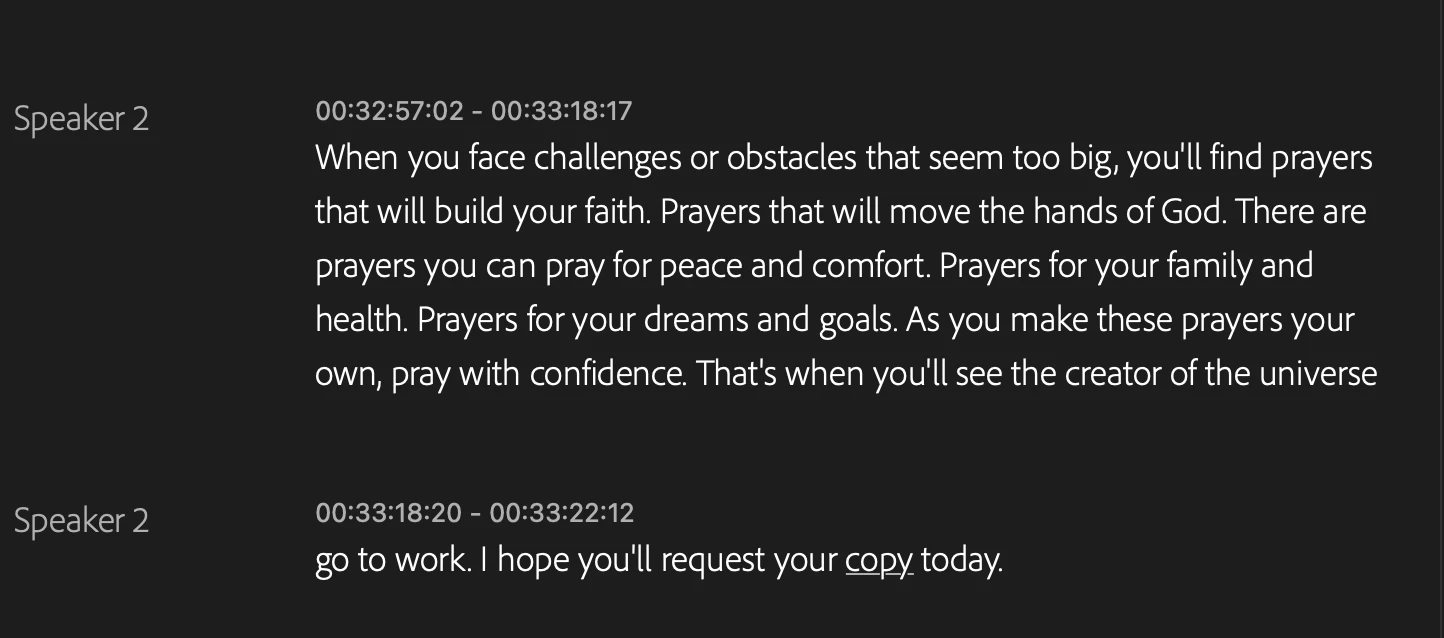
I'm not finding a way to fix sentence breaks where Premiere has decided something shuold be in a new paragraph, even though it's part of the previous. Is there not a way to merge a sentence with the previous paragraph? I hate when a sentence is broken out like this...


Initually there was a period and the new line started with a capital letter, but I removed the period and lower cased the next word. But there doesn't seem to be a way to merge it back to the paragraph above.
 

This topic has been closed for replies.
Correct answer Kevin-Monahan

Hi @DaveChap,

Try this: Select the captions and click the Merge Captions button at the top of the Text window. Does that work for you? Let us know.


Thanks,
Kevin

1 reply

Kevin-Monahan
Community Manager
Kevin-MonahanCommunity ManagerCorrect answer
Community Manager
October 25, 2023

Hi @DaveChap,

Try this: Select the captions and click the Merge Captions button at the top of the Text window. Does that work for you? Let us know.


Thanks,
Kevin

Kevin Monahan - Sr. Community & Engagement Strategist – Pro Video and Audio
DaveChap
DaveChapAuthor
Known Participant
October 25, 2023

Thanks! That was it. I had to go to the source tab at the bottom left instead of the sequence tab for the transcript.

Kevin-Monahan
Community Manager
Community Manager
October 25, 2023

Cool. Glad to hear it @DaveChap!


Kevin

Kevin Monahan - Sr. Community & Engagement Strategist – Pro Video and Audio