


Participating Frequently
February 26, 2021
Question

Fixing Color Shift on Export

  • February 26, 2021
  • 3 replies
  • 5877 views

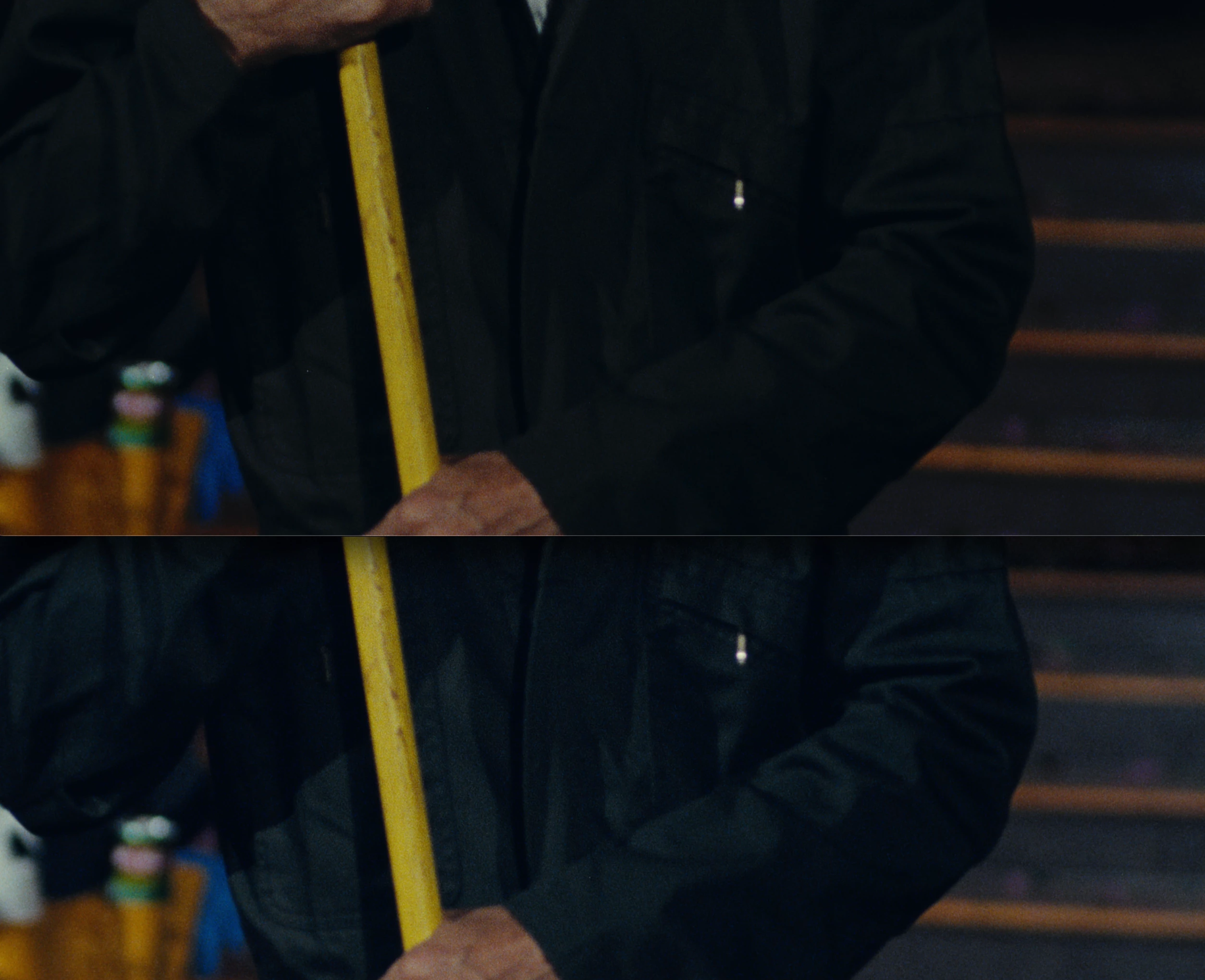
Importing a ProRes4444 file - select "New Sequence from Clip" - Export using Match Sequence Settings and there is a noticeable color shift.  Export as Apple Quicktime ProRes 4444 without selecting max depth or max render quality.  Color shift is still present.  Comparing the two  images in QuickTime Player.


Anyone know what's going on here? The top image is the original.  The bottom image is passed through Premiere.
This topic has been closed for replies.

3 replies

R Neil Haugen
Brainiac
February 27, 2021

Andy's a great help on here for so many things. But for this ... I'm not in agreement with him. Now, everyone's mileage always differs, so that's fine.


But there are some things in color management we need to learn how to handle to get the best common denominator material out the door. And to me, this is not the way I would suggest anyone working professionally handle their color. It could work fine for someone just feeding a YouTube channel from a PC though. (Especially if you aren't concerned how it looks on non-Mac devices and screens.)


First thing is he's not talking at all about the Mac Colorsync issues, being as he is based in PCs. As noted in my earlier (and other) posts on that, it's a major problem and one that you can't game your way around. Sadly. I was on a zoom with a noted teaching colorist yesterday, who naturally is very Mac based, and he had some choice comments about Apple's color management mess. Yea, it's there, and unfortunately there's no one-size-fits-all solution.


He can create a file so it will match a very specific look on the Mac after ColorSync is applied, either "manually" or by using the "Rec.709A" export option. Then take that file back into Resolve with proper color management settings on his Mac, and check it in his nice Flanders reference monitor fed by the BlackMagic i/o device. This is to get the signal out of the computer without the OS touching the signal. And yup. Crushed blacks, too deep shadows, over-saturated when viewed under full Rec.709 standards.


The standards he has to meet for all his broadcast and streaming service professional deliverables. And that file will not pass any QC machine on the planet.


Even though that same file played in Qt player or a browser on that Mac looks fine. Again, there's no way to game the Mac color management variance from standards.


Second, applying the adjustment layer to the file in Premiere Pro is a bit different in result than applying say their "Mac" LUT on export.


Export the file with the adjustment layer set in Premiere so you like the look, now open in it QT player. It's going to do exactly the same thing it would if you didn't apply the adjustment layer ... it will lift the shadows and give a 'desaturated' feel to the image compared to how that file looked in PrPro with the AL applied. Played outside PrPro on the Mac, the file will be different.


The "Mac" LUT Adobe provides to use on export will make the file look nearly the same outside of PrPro (on a Mac only!) as it did inside PrPro. Which is the entire point. With the image inside PrPro still being correct Rec.709, as it does not have the LUT applied.


But again ... take that file exported from PrPro with the "Mac" LUT applied, view it in any system with full-on proper color management, and ... not good.


The "Rec.709A" export option in Resolve as noted uses a different (and not normally used) NLC tag in the file header so the Qt player handles it with proper Rec.709 settings. Unfortunately, with that NLC tag attached it makes the file appear with blacks crushed, shadows too dark, and over-saturated in everything other than a Mac running a Retina and ColorSync.


For colorists, this is a big but known hassle. So many of their clients view things on a Mac, so it's something they deal with all the time. Most pro colorists are Mac people anyway.


A couple have an intriguing 'solution'. They note that actually one of the more recent iPads, if you turn off several of the 'helpful' viewing settings, give a pretty decent match to the image on their Flanders monitors with BlackMagic i/o signal and high-end calibration. So they own a stack of those iPads in their shop, and when they take on a client, supply them with those iPads for the duration of the project. And specify in their contracts that all change-work requests must be based on viewing the material either in-person in their suite, or via one of those iPads.


Because the goal that you can achieve is to match the pro standards across properly setup gear. Then your material will look ... relatively, on any screen ... the same as all other properly produced pro material made to standards.


None of the movies and streaming shows you watch on your Mac were graded based on how they look on a Mac. Not one.


They were graded to either full-on Rec.709 or if for a few shows now, full-on HDR. Which requires monitors costing around $30,000 USD to work with. Among other things. And is why very, very few colorists can yet actually deliver full HDR for pro deliverables.


Neil

Everyone's mileage always varies ...
Participating Frequently
March 1, 2021

Thanks for this, Neil.  Wrapping my head around this issue leads me to suspect that my colorist must have outputted the file with a Rec.709a so that it matched his work when viewed on QT Player.  After I outputted in PP as normal Rec. 709 it no longer played well in QT.   So for someone in my situation (on a mac handling a properly colored file) it seemd we just have to trust that our output file beyond what it looks like on QT or another viewer and insist it never be screened that way. 

I am happy to report that Vimeo handled the colors correctly once uploaded.   

R Neil Haugen
Brainiac
March 1, 2021

This is all rather frustrating, isn't it? I was on a large zoom meetup of colorists a couple weeks back, and naturally this whole Colorsync mess came up, and one of them nearly screamed "this should NOT be such a hard problem!"


He's a Mac guy, too ... but like all of them they note how freaking easy it would be for the major vendors ... there's only a few, Apple, Microsoft, and the people for Chrome, Firefox, and Safari ... to get together and set a common practice.


But as noted by others, they haven't in 20+ years, they ain't gonna do it now.


Apple is the biggest "outlier" in being farther off from accepted standards than the others. But none of them are squeaky-clean on color managmenent.


Neil

Everyone's mileage always varies ...
R Neil Haugen
Brainiac
February 26, 2021

Let me state this again:


When you are watching that in QuickTime Player, you are not seeing the proper image. Period.


It's that Mac that's messing things up, not PrPro.


So if your colorist is working on a grade 1 reference monitor, and exporting 'normal' Rec.709 (not rec.709A) then what you see in PrPro on that rig with the Display Color Management turned on is pretty correct.


What you are seeing outside Premiere on that Mac in anything else is nearly always wrong.


Because that Mac does not apply the correct standards to the file.


Neil

Everyone's mileage always varies ...
Participating Frequently
February 27, 2021

Thank you, Neil.  I understand better what's going on and feel confident that the file is not being managed properly in QT Player.  What I still don't get for the sake of understanding is why the file I recieved from the colorist maintained it's color in QT player but once I run it through Premiere Pro and view in QT Player its color is different than the original file.  

R Neil Haugen
Brainiac
February 26, 2021

What is your OS, and what color management steps including calibration have you taken? Those make a huge difference 'here'.


First thing, QuickTime player is not known for color accuracy across platforms. PrPro is built to follow Rec.709 broadcast standards to the letter. And assumes the user sets their monitor up by the book (including calibration & profiling it) for Rec.709 standards. Those are a bit later in this answer.


Is this on a Mac? If so, the issue is that Apple chose in their infinite wisdom to approach color management uniquely.


The standards for Rec.709 are sRGB primaries, D65 white point, Rec. 709 profile including both the scene and display transform functions, gamma 2.4 (semi-darkened room) or 2.2 (bright room), 100 nits monitor brightness. Premiere follows those correctly.


The ColorSync utility in the Macs for "Rec,709" is sRGB primaries, D65 white point, Rec. 709 profile but only applying the scene transform function, specifically does not apply the display transform function, gamma 1.95 (or 1.96 depending on who measures it) and of course, the Retina monitors are set way above 100nits brightness.


If instead this is on a PC ... then the issue is the differences are in the QuickTime player, which can be also "unique". Not guaranteed at all to be following proper standards, and I don't have a clue what your computer color management is set for.


Does the file look correct when re-imported back into Premiere Pro? Do you have the Display Color management option set in the Preferences?


Neil

Everyone's mileage always varies ...
Participating Frequently
February 26, 2021

Thanks for this Neil.


I'm on a mac (OS 11.2.1) 


Display Color Management is selected and the colors in Premiere match the source Prores file (viewed in QT Player).  And when I re-import the file it looks good. But when I export and view (in QT Player) both the original file (never sent through Premiere) and the file exported from Premiere look different like the image above. 


I'm testing a file viewed on the same monitor with the same computer and the same QT Player.  Sending through Premiere and comparing it to the original on the same monitor, computer, and QT Player.  Why does the file that hasn't gone through Premiere look as it should and as it does within Premiere but the Premiere export looks different? Wouldn't it have to do with some export color handling issue/setting within Premiere? 


Participating Frequently
February 27, 2021

The video link below might be helpful.


Thank you, Andy!