

Participating Frequently
March 9, 2024
Question

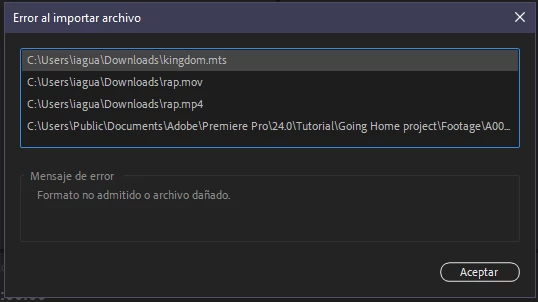
Formato no admitido o archivo dañado

  • March 9, 2024
  • 5 replies
  • 579 views

Hola, Tengo este problema al intentar importar videos, ya que probado con diferentes formatos, borrando cache, cambiando el codex, cambiando la version, reinstalando premiere y aun no encuentro una solución.

agradeceria mucho la ayuda  
    This topic has been closed for replies.

    5 replies

    R Neil Haugen
    Legend
    March 9, 2024

    So the file in question is an mts?

    Everyone's mileage always varies ...
    Participating Frequently
    March 9, 2024

    he probado con muchos archivos .mts  .mov   .mp4   .mpg  .dxp y con todos me da el mismo error 

    Peru Bob
    Community Expert
    Community Expert
    March 9, 2024

    Delete the Media Cache and Media Cache files:
    https://community.adobe.com/t5/premiere-pro/faq-how-to-clear-your-media-cache-in-30-seconds-in-premiere-pro-2020/m-p/11017257/thread-id/260446?page=1

    If that doesn't work, try resetting the preferences:
    https://community.adobe.com/t5/premiere-pro/faq-how-to-reset-trash-preferences-in-premiere-pro/td-p/8236158?page=1

    If that doesn't work, try resetting the Workspaces:
    Reset a workspace
    Reset the current workspace to return to its original, saved layout of panels.
    1. Do one of the following:
    • Click the Workspace menu icon and select Reset to Saved Layout.
    • Choose Window > Workspace > Reset to Saved Layout.
    from here:
    https://helpx.adobe.com/premiere-pro/using/workspaces.html

    If that doesn't work, try Preferences > Audio Hardware and set Input to None.

    Make sure to use a Studio Driver from NVIDIA (NOT the Game Driver), but not the latest version - it has issues with Premiere Pro.


    If that doesn't work, try creating a new project and import the old one into it.

    Participating Frequently
    March 9, 2024

    aplique los pasos, sin embargo aun persiste el error, mi tarjeta grafica es AMD no se si eso tendra algun tipo de relación (tengo los drivers actualizados)

    Peru Bob
    Community Expert
    Community Expert
    March 9, 2024

    Please use the free MediaInfo and post a screenshot of the properties of your media in tree view:
    https://mediaarea.net/en/MediaInfo

    Many users are having issues with VFR. If the file is variable frame rate, use Handbrake to convert to constant frame rate before importing into Premiere Pro:
    https://handbrake.fr/downloads.php
    Here is a tutorial:
    https://www.youtube.com/watch?time_continue=34&v=xlvxgVREX-Y

    Shutter Encoder may also be used to convert to Constant Frame Rate:
    https://www.shutterencoder.com/en/

    Participating Frequently
    March 9, 2024

    no funciono, la verdad no creo que sea un error en los videos ya que ni siquiera los de muestra me deja importar, creo que puede ser un error en el programa quiza

    kglad
    Community Expert
    Community Expert
    March 9, 2024

    in the future, to find the best place to post your message, use the list here, https://community.adobe.com/

    p.s. i don't think the adobe website, and forums in particular, are easy to navigate, so don't spend a lot of time searching that forum list. do your best and we'll move the post (like this one has already been moved) if it helps you get responses.


    <"moved from using the community">
    kglad
    Community Expert
    Community Expert
    March 9, 2024

    what app?

    Participating Frequently
    March 9, 2024

    Premiere pro