

Filmus
Known Participant
November 20, 2025
Beantwortet

Full screen preview on another monitor

  • November 20, 2025
  • 3 Antworten
  • 380 Ansichten
  1. Hi,

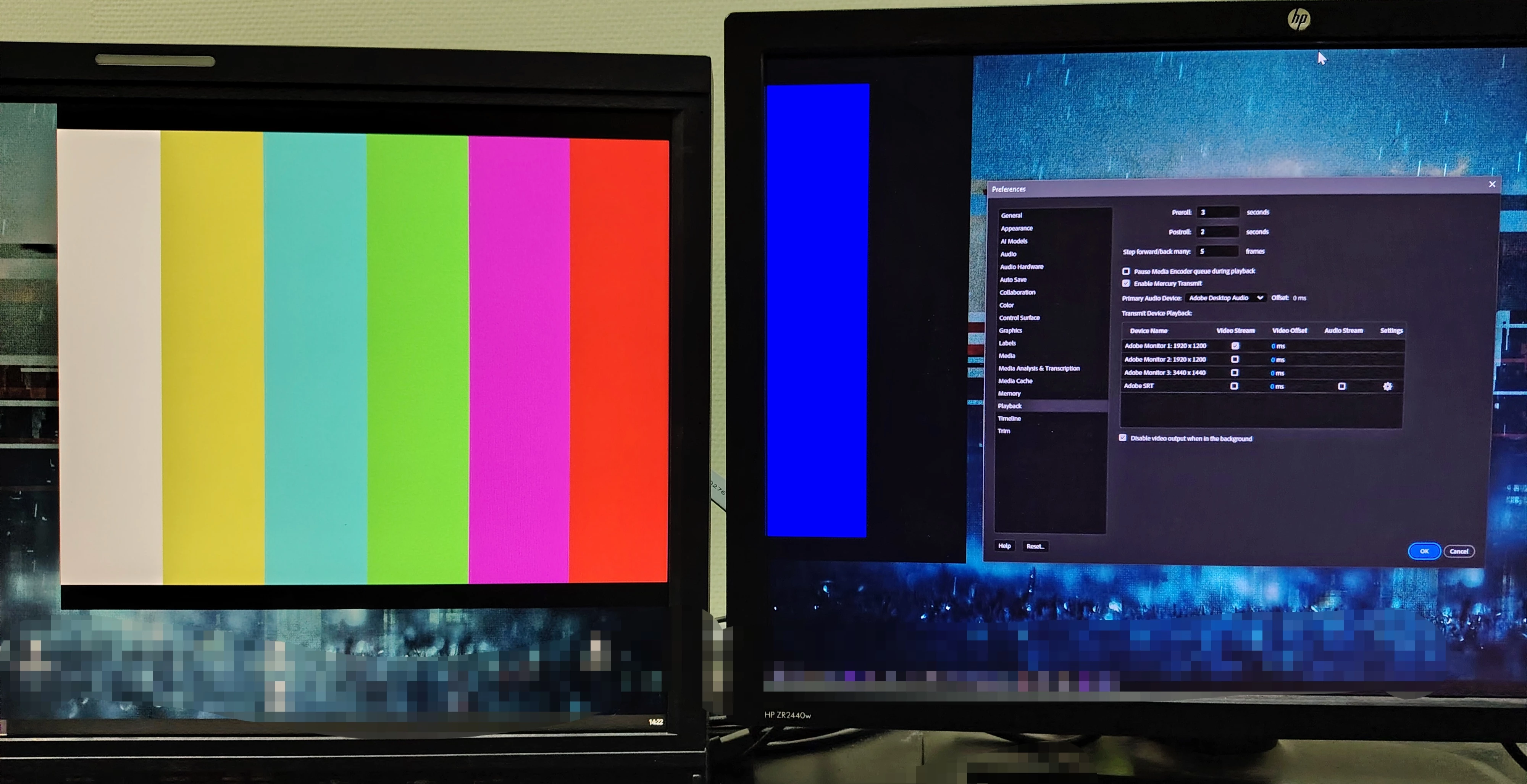
I am not able to get a full-screen peek on another monitor. There are 3 monitors in total. In any case, a part of window is displayed, and more often it is separated between adjacent monitors. Perhaps there is some kind of plugin? I don't have any additional output hardware yet, and I want to solve this problem programmatically.

Yes, I have updated versions, drivers, tried all possible connection configurations - all in vain. I got the impression that I was being motivated to buy equipment.


My system:  Windows 10, Nvidia RTX 3090Ti, Premier Pro 25.x
Beste Antwort von R Neil Haugen

First, you must be using 'extend to this screen' rather than the simple 'it's all space' type option. Each screen must be a different space in the OS.


Second, the Premiere main window should have the Program monitor in it, with the menu bar on the top, and it really needs to be on the 'main' UI screen of the computer. 


Third ... no panel of Premiere on any screen should ever bleed even one line of pixels onto another screen, or mayhem will ensue. This can be hard to see.


In my case my 2nd monitor always holds a panel group that covers very carefully nearly the entire screen, but with a very thin but visible line of my gray screen backgound on all four edges. That panel group is my Production and Project panels, and typically Effects panel also. I run nine custom workspaces.


My 3rd monitor is always the one for Transmit Out ... and my 4th monitor is for additional mostly temporary needs. And it just works.

3 Antworten

R Neil Haugen
Legend
November 20, 2025

First, you must be using 'extend to this screen' rather than the simple 'it's all space' type option. Each screen must be a different space in the OS.


Second, the Premiere main window should have the Program monitor in it, with the menu bar on the top, and it really needs to be on the 'main' UI screen of the computer. 


Third ... no panel of Premiere on any screen should ever bleed even one line of pixels onto another screen, or mayhem will ensue. This can be hard to see.


In my case my 2nd monitor always holds a panel group that covers very carefully nearly the entire screen, but with a very thin but visible line of my gray screen backgound on all four edges. That panel group is my Production and Project panels, and typically Effects panel also. I run nine custom workspaces.


My 3rd monitor is always the one for Transmit Out ... and my 4th monitor is for additional mostly temporary needs. And it just works.

Everyone's mileage always varies ...
Filmus
FilmusAutor
Known Participant
November 20, 2025
quote

First, you must be using 'extend to this screen' rather than the simple 'it's all space' type option. Each screen must be a different space in the OS.


Second, the Premiere main window should have the Program monitor in it, with the menu bar on the top, and it really needs to be on the 'main' UI screen of the computer. 


Third ... no panel of Premiere on any screen should ever bleed even one line of pixels onto another screen, or mayhem will ensue. This can be hard to see.


In my case my 2nd monitor always holds a panel group that covers very carefully nearly the entire screen, but with a very thin but visible line of my gray screen backgound on all four edges. That panel group is my Production and Project panels, and typically Effects panel also. I run nine custom workspaces.


My 3rd monitor is always the one for Transmit Out ... and my 4th monitor is for additional mostly temporary needs. And it just works.


By @R Neil Haugen

I just removed the timecode panel from the second monitor and got a full-screen preview. It's strange that the timecode panel can't be attached anywhere. Thank you.
p.s. It is also strange that Adobe did not add the ability to place panels on different monitors, and at the same time not to lose full-screen viewing on one of them.

Stan Jones
Community Expert
Community Expert
November 20, 2025

@Filmus,


I recently started using this again, and it "just works." But I think that is because I only have 2 monitors, and my preview monitor happens to be in the right place. But I see other posts that suggests there are gotchas.


Here's the helpx guide:

https://helpx.adobe.com/after-effects/using/video-preview-using-mercury-transmit.html


It didn't point out one of my discoveries today that if you have the PR interface on one monitor, preview will not show there if you send transmit to that monitor. Which is logical, really. In any event, see this thread that illustrates some of the other issues, such as system/main PR UI window. 

https://community.adobe.com/t5/premiere-pro-discussions/mercury-transmit-bug-please-fix/td-p/13988015


Let us know what works for you.


Stan


Community Manager
November 20, 2025

Hi Filmus,


Have you enabled Mercury Transmit under Edit > Preferences > Playback & selected the monitor to which you want to send the video preview?


Thanks,

Sumeet

Filmus
FilmusAutor
Known Participant
November 20, 2025

Thank you for responding. The settings window is right in front of you in the photo. As you can see, Mercury Transmit is on. The monitor is also selected.