

s.despins
Known Participant
March 10, 2024
Question

Fullscreen Preview Split | Multiple Displays

  • March 10, 2024
  • 5 replies
  • 2156 views

I've encountered a minor bug and I'm curious if anyone else has experienced it. The issue arises when previewing a video in full screen using the hotkey (CTRL + `). Instead of displaying the entire screen, it splits it in half, showing only the right portion in full screen mode. This occurs specifically in setups with three monitors; however, I tested it with two monitors and didn't encounter the issue.


This glitch seems to be triggered when there are panels positioned outside of the main monitor, as illustrated in the example I've shared.
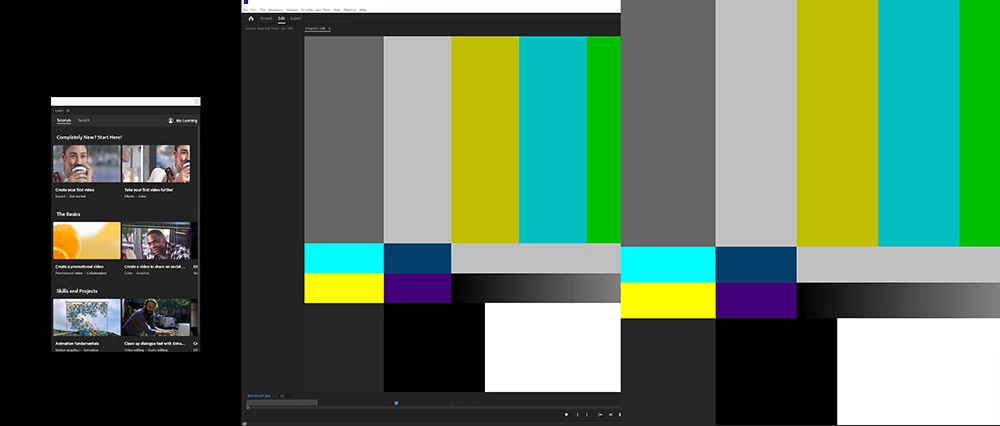


***A simple workaround is to minimize Adobe Premiere and then reopen it, which resolves the issue and displays the video in full screen upon reopening.***


OS: Windows 10 Pro

Premiere Version: 24.2.1

This topic has been closed for replies.

5 replies

Participating Frequently
September 10, 2024

I have two monitor setup and have the same issue, although instead of the fullscreen video being split vertically, it's split horizontally. 


Both of my monitors (main and secondary) are 21:9. The main monitor is regualt landscape, and the second monitor is portrait oriented (90 degrees).


The fix of minimizing then maximizing PP works, but only if fullscreen preview is enabled (which means I have to maximize using the taskbar on the second monitor since I can't see taskbar on the main monitor previewing the split footage)


I am on Windows 11 pro with the latest version of PP (24.6.1) using Nvidia Drivers

Kevin J. Monahan Jr.
Community Manager
Community Manager
August 17, 2024

Hi @s.despins,

I'll move your post to the discussions forum while we await your reply. Please let us know if you are stil seeing the issue in version 24.5 or later.


Thanks,
Kevin

Kevin Monahan - Sr. Community and Engagement Strategist – Adobe Pro Video and Audio
s.despins
s.despinsAuthor
Known Participant
September 6, 2024

I'm still using 24.3 for workflow reasons. I'll keep you posted on when I update - thanks!

s.despins
s.despinsAuthor
Known Participant
September 11, 2024

Update* I just installed beta version 25.1.0 (Build 😎 still an issue.

Kevin J. Monahan Jr.
Community Manager
Community Manager
June 18, 2024

Hi @s.despins,

Thanks for the added info. Are you still seeing this in 24.4.1? Please let us know.


Thanks,
Kevin

Kevin Monahan - Sr. Community and Engagement Strategist – Adobe Pro Video and Audio
s.despins
s.despinsAuthor
Known Participant
March 12, 2024

OS: Windows 10 Pro | 22H2

Premiere Version: 24.2.1 (Build 2)


Workstation:

CPU | 12900k
GPU | 4070 Ti SUPER | Version 551.61
RAM | 128 GB
SSD | 500GB


Video Format:
The example shared was just a Bars and Tone placeholder
any video or sequence settings gives the same results.

Kevin J. Monahan Jr.
Community Manager
Community Manager
March 11, 2024

Hi @s.despins,

Thanks for reporting the bug. It sounds very frustrating. I appreciate the info you've already given, but can you please give the developers more details so they can reproduce the issue? Here is the preferred format: How do I write a bug report?


I hope others having the same issue will upvote this bug and provide additional input. Thanks for any additional info you can provide.


Cheers,

Kevin

Kevin Monahan - Sr. Community and Engagement Strategist – Adobe Pro Video and Audio