ivanb81780302
Known Participant
September 13, 2018
Answered

General Questions and Title Issues

  • September 13, 2018
  • 5 replies
  • 622 views

Hello I have built my 1st timeline sequence with a mixed bag of still, video etc, I wish to add title media as well but seem to have some issues I cannot find a fix for either in videos, or the blogosphere.  I'm thinking the way I have panels setup or some mistakes I've made along the way are causing me grief.

Issue 1:  In a nutshell when I activate title using the "T" symbol I get a cursor in my program panel and a new line in my timeline at V2.  I cannot get the text box to expand it stays red and remains small.  When I attempt to activate graphics the entire screen changes and my program panel and timeline disappear.   All that remains on screen is my bin, my source panel and the graphics panel appears.

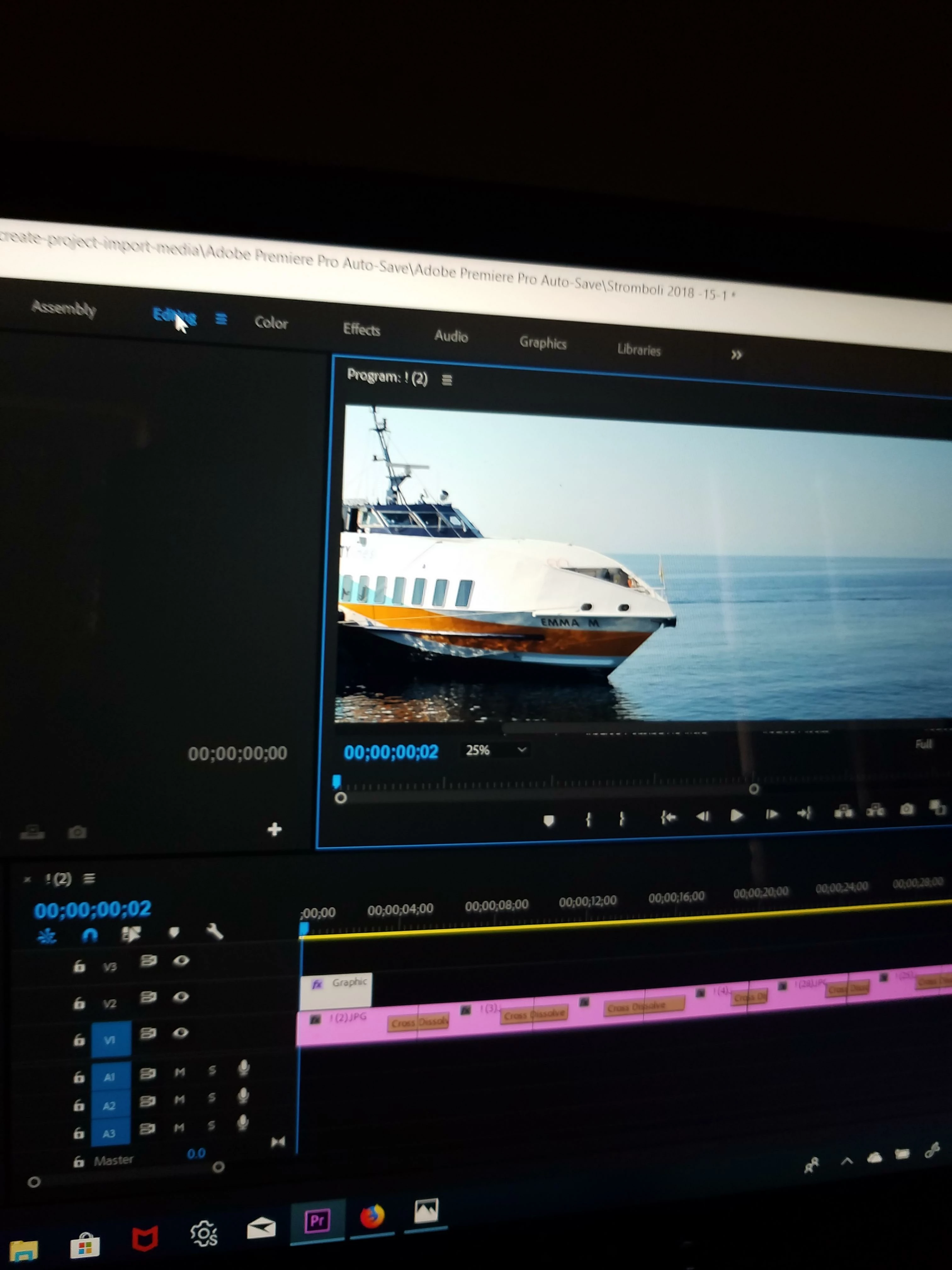
Issue 2:  my basic panels seem to not be arranged as they should be by default or don't behave in a manner I have watched while viewing tutorials.  I have some symbols in the top left of my program and timeline panels I have not been able to figure out.  For example I have "Program ! (2)" what does the exclamation point and (2) actually mean, I have the same symbol set up on my timeline as well.  Please see attached photo below.

Thanks everyone.
    This topic has been closed for replies.
    Correct answer Meg The Dog

    Issue 1: Start typing in the red box. It will expand as needed as you enter more type.

    When you switch to the graphics workspace, go to the menu Window > Workspaces > Reset to Saved Layout.

    Issue 2: That is what you have named your sequence. To change the name, right click on the name in either the Program Monitor or the Timeline and choose Reveal Sequence in Project. When the sequence is revealed, right click in the Project Panel and choose Rename.

    MtD

    5 replies

    New Participant
    September 28, 2018

    I'm looking to change the background colour from the current blue on a default lower third title in Premiere Pro. I can't seem to find anything in the edit panel to adjust it. I can change the font colour no problem. Surely it's customisable?

    Ann Bens
    Community Expert
    September 28, 2018

    The background is most likely a rectangular...

    Kevin-Monahan
    Community Manager
    Community Manager
    September 27, 2018

    IvanB,

    Are you still having issues? Please let us know.

    Thanks,
    Kevin

    Kevin Monahan - Sr. Community & Engagement Strategist – Pro Video and Audio
    ivanb81780302
    Known Participant
    September 27, 2018

    So yes and no on my issues. I still think there is something amiss in the

    way my panels are working. They just don't behave like the tutorials show

    or how they behave on you tube videos either. I did work my way around it

    by finding the standard title templates, saving them as my favorites and

    then dragging them into my timeline and editing them.

    On Thu, Sep 27, 2018 at 2:22 PM Kevin-Monahan <forums_noreply@adobe.com>

    Meg The DogCorrect answer
    Inspiring
    September 14, 2018

    Issue 1: Start typing in the red box. It will expand as needed as you enter more type.

    When you switch to the graphics workspace, go to the menu Window > Workspaces > Reset to Saved Layout.

    Issue 2: That is what you have named your sequence. To change the name, right click on the name in either the Program Monitor or the Timeline and choose Reveal Sequence in Project. When the sequence is revealed, right click in the Project Panel and choose Rename.

    MtD

    Peru Bob
    Community Expert
    September 13, 2018

    If the suggestion by rodneyb56060189 doesn't work, try resetting the preferences:

    FAQ: How to reset preferences in Premiere Pro?

    If that doesn’t work,try updating or rolling back your graphics driver directly from the video card manufacturer’s site.

    Brainiac
    September 13, 2018

    this is old cs6 version..yours may be slightly different