


Inspiring
October 18, 2018
Answered

GPU Acceleration not available in PP CC 2019

  • October 18, 2018
  • 11 replies
  • 60735 views

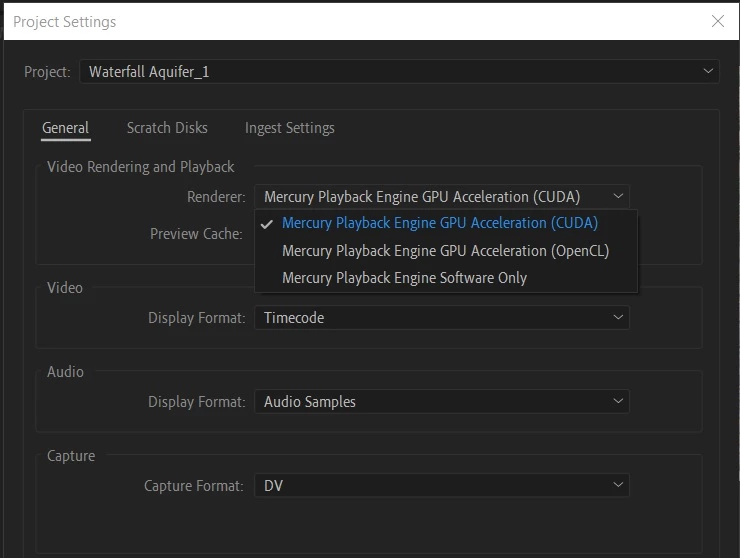
Mercury Playback engine GPU acceleration (CUDA) doesn't work / isn't available in PP CC 2019 version.

Luckily, I've learned my lesson and kept previous version this time (2018) in which the Mercury Playback engine GPU acceleration (CUDA) was and still is available every time.

Intel Core I7-5930K @ 3.5 ghz

64gb RAM

GeForce GTX 980 Ti
This topic has been closed for replies.
Correct answer jerryr80850391

Latest Nvidia drivers worked for me.

MSI GS65 Stealth Thin 8RF

Windows 10 Home Version 10.0.17134 Build 17134

NVidia GeForce 1070 with Max-Q Design

Cuda acceleration now listed.

11 replies

Participant
September 17, 2019

Hi Everyone, 

I am completely new to Premiere Pro and trying to figure out why GPU acceleration is not available when i run it.

I have a iMac (21.5-inch, Mid 2011)   /   Processor: 2.7 GHz Intel Core i5   /   Graphics: AMD Radeon HD 6770M 512MB

Memory: 4GB 

What do i need to do to get my GPU Acceleration going? 

From reading the comments below, i am getting the idea that i will need to update drivers or computer even! (hope not, I'm a college student with a negative budget, haha.)

Any help will truly be appreciated.

Legend
October 23, 2019

Unfortunately, you cannot use GPU acceleration at all with that system. Premiere Pro 2019 now requires a minimum of 2 GB of VRAM (but more importantly, recommends 4 GB or more VRAM) just to even enable GPU acceleration at all. Your GPU has only 512 MB of VRAM - not enough to even enable GPU acceleration at all in any version of Premiere Pro that supported it. Even CS6, the earliest version of Premiere Pro that supported OpenCL for OSX laptops, required a minimum of 1 GB of VRAM just to even enable GPU acceleration at all.

CJCARNAHAN
Inspiring
June 12, 2019

I've had this issue for the last 3 years with a GeForce GTX 980TI.

The option has been grayed out for the last 3 years, so naturally I thought it was already enabled.

I just stumbled upon this forum, and now I feel physically ill that it's been turned off for the last 3 years.

All that wasted time ....


I happen to agree with the rest of the thread, reinstalling drivers every time there's an update is a bit cumbersome, but I understand. I can't tell you how many times updates have necessitated a rollback. I keep an uninterrupted CS6 installed on this machine for that exact reason.

Wes Howell
Adobe Employee
Adobe Employee
June 12, 2019

Sorry to hear that!

FWIW - this is not an issue specific to Adobe or Premiere Pro.

With all the software and hardware involved there are so many moving parts...  as things evolve, the OS may require a new component that motivates the need for a new driver... or a card manufacturer... or a feature on the Premiere side that requires newer components / drivers....   

It can be frustrating. I hear you. We have been and will continue to work on improving this experience.

Wes

Participant
May 25, 2019

All I know is that I pretty much have to reinstall my nvidia drivers once an update comes out to Adobe Premiere Pro. Like clockwork.

Even if there is no newer driver. Like in this case, I have the latest version but it just refuses to use ANY HARDWARE ACCELERATION. I swear the dev team just can't leave things along.

They always have to mess with something, always have to change an item. You want to add a feature? Sure, I'm all for it. Just stop breaking one of the main things people use in this program, my god. Other programs don't have near the issues this one does, and I just don't understand why.

There is a reason people make fun of Adobe software for constantly breaking and being full of bugs in general, it's things like this.

And no, this system isn't old.

Intel Xeon 2186M

Nvidia P4200

Intel P630

32GB Ram

Participant
May 19, 2019

Hello users, can someone help me to sort it out, I have installed premeire pro cc2019 and cuda is not available in the system only system engine has been set by default.my machine is Lenovo thinkpad T530 with Nvidia NVS 5400m graphic card. I tried to update the drivers but after that it still not enable that. So kindly help.

Thanks

Legend
May 19, 2019

I'm sorry to say this, but the Quadro NVS 5400m is officially obsolete: That GPU is/was a Fermi-generation GPU whose driver support ended last year at a security-patched variant of driver version 375. That driver only supported CUDA 8.0; however, no newer driver version worked at all on any of the Fermi Quadros. Premiere Pro 13.x now requires full CUDA 9.2 or higher support to even enable GPU acceleration at all in the Project Settings tab.

Participant
May 19, 2019

Thank you for your response. So you mean my nvidia is not supporting GPU for premiere pro 2019 and there is no way to enable it?

fdsgsdgfds
Participating Frequently
April 24, 2019

Hi all,

I run a Dual Xeon E5-2609 - 2.4ghz setup with 48gb DDR3, Quadro K2200 and GTX 960 Windforce, both 4GB GPU's.

Since updating Premiere Pro, CUDA is not working, this is even after updating drivers for Nvidia itself and the two graphics cards to verisons that I've been told will fix my problem.  CUDA is not greyed out, but when selected it does not improve rendering. The GPU Graph shows the K2200 getting at most 7% but mostly 1% and the GTX 960 doesn't budge at all.

In my previous build the GTX 960 sounded like it was taking off when it was rendering but it was damn quick. So I know that it's not doing anything at all.  I exported the same file twice, firsty with CUDA on and then Software Only, The one woth CUDA on, took longer!

Has anyone figured this out, I run a couple of Youtube Channels and this is causing me a nightmare. 

R Neil Haugen
Legend
April 24, 2019

Of course, the GPUs are only involved in rendering when there are GPU accelerated things involved in the clips ... such as Lumetri, Warp, some others. In general non-GPU-accelerated renders/exports, the GPU's are not normally involved much. And when involved, the GPU's only work as the CPU sends them data to chew on.

So ... the first question is always, how much off the GPU-Accelerated list is involved?

GPU Accelerated Effects: https://helpx.adobe.com/premiere-pro/using/effects.html

And of course, what are you exporting to ... H.264, probably?
Neil
Everyone's mileage always varies ...
Inspiring
May 2, 2019

Well one quick test would be to run the same timeline through CC2018 and 2019 and see the results. You can sometimes open a timeline from a newer version by exporting an AAF and then importing it into the older version and sometimes dynamic link will work (using media browser to open the specific timeline).

Known Participant
April 4, 2019

It's April 2019, Adobe Premiere, AE and AME hang or crash pretty regularly on my system.  I have a shortcut to kill all unresponsive programs handy and it always finds adobe things.  This is on a fresh install W10x64 with the latest drivers for everything. (6 core 5820, GTX 1070 (latest drivers, 64GB RAM, 1TB 950 pro Cache, 1TB 950 working drive)  In Premiere, I have hardware acceleration and it's choppy as hell as it is for countless others the first few seconds of play or at random (CPU Spikes, then settles after 2-3 seconds)  Other NLEs can play the same video 8 at a time without a problem so please let's not blame my hardware and insult my intelligence Adobe or paid forum folks. 

Rant over, now my real question is that when I export a sequence to AME and choose hardware encoding from the drop down (H264), it says "Your system does not support hardware encoding" which is interesting as Premiere is using Mercury fine during the edit or so it claims. It just seems like the hand off to AME is where it fails.  Don't expect a solution, but thought I'd ask anyway.

R Neil Haugen
Legend
April 4, 2019

That isn't about the GPU, it's about whether the app 'sees' an available Intel QuickSync option within your CPU. I don't see QuickSync listed on the info for that CPU, so I don't think it's available.

If QuickSync is available and "active" for your CPU, you can use "Hardware encoding" for the export which tells the app to use the CPU's builtin H.264 encoder. If you don't have a QuickSync capable CPU (I don't either) ... then you will always see 'software encoding' in the Summary section.

But my 1060 is still used for everything Pr uses a GPU for. Which does not include basic export encoding.

Neil

Everyone's mileage always varies ...
Known Participant
April 4, 2019

Thank you for taking the time to answer and look into my chip specifics.  They should fix the issue or take your answer and put it in a balloon over the setting when an error occurs.  

Mo Moolla
Legend
March 11, 2019

Hang tight everyone

With a new version release in PP soon, the rendering issues should be sorted out soon

Mo

jerryr80850391Correct answer
Participant
January 22, 2019

Latest Nvidia drivers worked for me.

MSI GS65 Stealth Thin 8RF

Windows 10 Home Version 10.0.17134 Build 17134

NVidia GeForce 1070 with Max-Q Design

Cuda acceleration now listed.

Participant
February 6, 2019

Regards, How did you get it? I have a core i9 8950hk and GPU GTX 1070, the updated drivers and I can not get it activated.

Kevin-Monahan
Community Manager
Community Manager
November 6, 2018

Hi,

Have you gotten GPU acceleration to work after updating drivers? Let us know.

Thanks,
Kevin

Kevin Monahan - Sr. Community & Engagement Strategist – Pro Video and Audio
Ann Bens
Community Expert
Community Expert
October 19, 2018

You need to update your driver (visit the nvidia site on a regular basis and always install the latest one)

Adobe Premiere Pro CC System Requirements

Participant
November 30, 2018

Thank you, this finally helped me! I had my NVIDIA drivers updated to the most current version, but it seems that CC 2019 is only compatible with Version 411.63. I've always been a fan of CC and have never had problems with the updates, but the CC 2019 update has honestly been a nightmare. Hopefully fixes are made soon.