



GPU Render Errors never stop.
I'm as sick of making these posts are you folks are of seeing them. What is going on here? It seems like Adobe has a major issue and isn't addressing it. Years upon years of "GPU Render Error" posts exist, all with the same "Switch to CPU Accel" answer (Which is a workaround not an answer.) given.
I spend 10 hours working on a video to end up with this error that I cannot shake. I seem to end up lucky and getting a video to render after hours of making minor changes here and there, exporting with CPU acceleration, or whatever. However this project, no trick I try makes any difference. CPU Accel. still fails, same as GPU Render. It seems to all be down to Lumetri Color. If I remove lumetri from individual clips, then render them, it is fine. If I put Lumetri color back on then render, it fails.
I know I'm just raging but I am sick and tired of this. If I were making more of a living with Premiere I'd absolutely kick Adobe to the curb. How do serious editors deal with this? Do you simply not have these problems? I'm only posting this because if I try to submit problem ticket the damn support area sends me to the forum or asks me to call during a weekday.
And don't you dare respond with "Just remove Lumetri color then". That is the equivalent of a doctor saying "Well don't touch it, if it hurts when you touch it." I shoot my footage expecting to correct in post, I am not completely redoing a project to get inferior results because of a software issue.
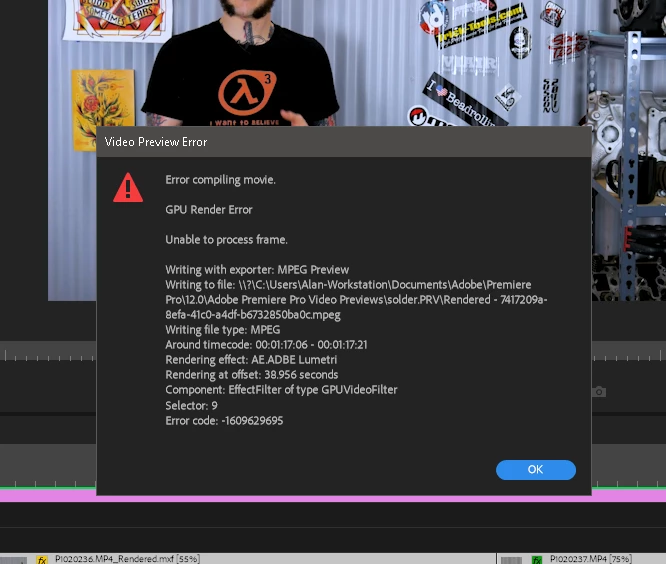
I also don't understand the jargon in the error. It seems to indicate the error occurs "Around timecode: 1:17:06" but the clip I'm rendering is on at "34:01" so that isn't even possible. Unless Premiere is looking at a clip somewhere else.
Computer is:
-AMD Ryzen 5 1600
-16GB GSkill DDR 4 Ram
-GTX660 Nvidia Graphics card (old card I know, running latest recommended drivers by Nvidia)
-Western Digital 256GB Nvme PCI-E M.2 Storage Drive for Scratch Disk
-Windows 10 (Up To Date)
-Adobe Premiere Pro 2018 (Up To Date)
 AdChoices