Copy link to clipboard
Copied
Hello forum,
When I import file with the following properties I can't play the file and the preview of the file is green. Any idea?
I'm using the latest version of premiere pro creative cloud. Is premiere supports AVC Coding?
Type: QuickTime Movie
File Size: 178.39 MB
Image Size: 4096 x 2048
Frame Rate: 0.02
Source Audio Format: 48000 Hz - 16 bit - Stereo
Project Audio Format: 48000 Hz - 32 bit floating point - Stereo
Total Duration: 00;00;49;03
Pixel Aspect Ratio: 1.0
QuickTime Details:
Movie contains 1 video track(s), 1 audio track(s), 0 closed caption track(s), and 0 timecode track(s).
Video:
There are 1180 frames with a duration of 1/24th.
Video track 1:
Duration is 0;02;27;19
Average frame rate is 24.01 fps
Video track 1 contains 1 type(s) of video data:
Video data block #1:
Frame Size = 4096 x 2048
Compressor = AVC Coding
Quality = Least (1.00)
Audio:
Audio track 1 contains 1 type(s) of audio data:
Audio data block #1:
Format = 16 bit - Stereo
Rate = 48000 Hz
Compressor = MPEG 4 Low Complexity AAC
VR Projection: Equirectangular
VR Layout: Monoscopic
VR Captured View: 360° Horizontal by 180° Vertical
"Average frame rate is 24.01 fps"
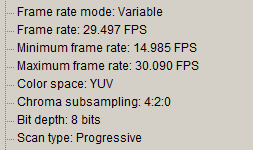
That would appear to be VFR ... variable frame rate video, and PrPro really only plays nicely with CFR ... constant ... video. I'm used to looking at the "full" Tree view of MediaInfo for this data ... and that includes the information as to whether the media has a frame-rate mode of constant of variable ... the clip as shown in the bit of a Tree-view from MediaInfo below, is Variable ... VFR.
If you've got VFR media, I highly recommend using HandBrake to convert
...Copy link to clipboard
Copied
"Average frame rate is 24.01 fps"
That would appear to be VFR ... variable frame rate video, and PrPro really only plays nicely with CFR ... constant ... video. I'm used to looking at the "full" Tree view of MediaInfo for this data ... and that includes the information as to whether the media has a frame-rate mode of constant of variable ... the clip as shown in the bit of a Tree-view from MediaInfo below, is Variable ... VFR.
If you've got VFR media, I highly recommend using HandBrake to convert to CFR prior to importing into PrPro.
HandBrake download page: https://handbrake.fr/downloads.php
And ... they did something I find strange, in that even IF you check the box to convert to CFR, if you leave the frame-rate setting alone, or use "Same as source" ... the export will still be VFR!
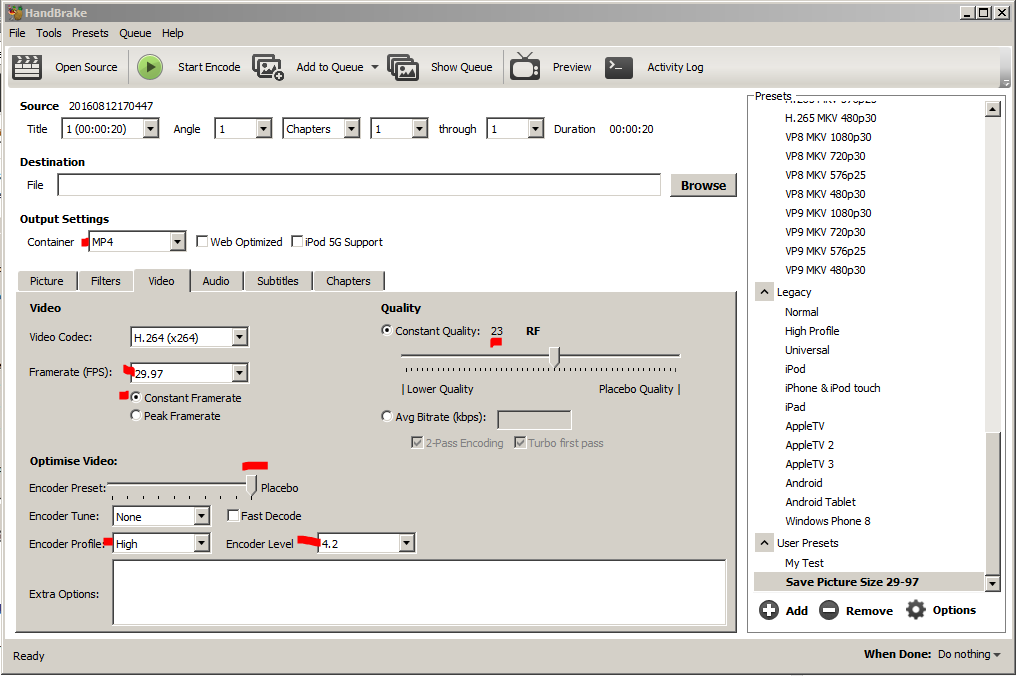
The settings above get me a CFR output file of 29.97fps at about 50-52Mbps. This preserves my Samsung S7 4k video for frame-size, frame-rate in CFR, and "covers" the original 47.5Mbps data rate.
Oh ... the included presets are all 1080 or smaller. To get an export that is for 4k, you need to Add a preset, and in the options for that, include the option "Always use Source resolution" to it.
Neil

Get ready! An upgraded Adobe Community experience is coming in January.
Learn more


