


amyh68282795
Participating Frequently
July 25, 2018
Answered

H.264 exporting corrupt file

  • July 25, 2018
  • 3 replies
  • 25647 views

All of a sudden, when I export my H.264 videos, it does NOT work.


I make sure my timeline is highlighted, go to export, pick H.264 because that is the quality i need, and leave the settings standard, save it to a folder, and hit export. It exports like normal. But when I go to the folder to look at the video I get a "cant play" message.


This is the message i get when i try to play the exported video:
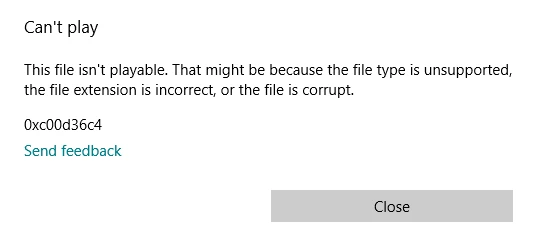


I already tried resetting all the settings & preferences, uninstalling and reinstalling, and calling support with no answer.... I have plenty of storage space also and tried to clear the cache.


PLEASE HELP this is extremely frustrating.


Thank you.
This topic has been closed for replies.
Correct answer SAFEHARBOR11

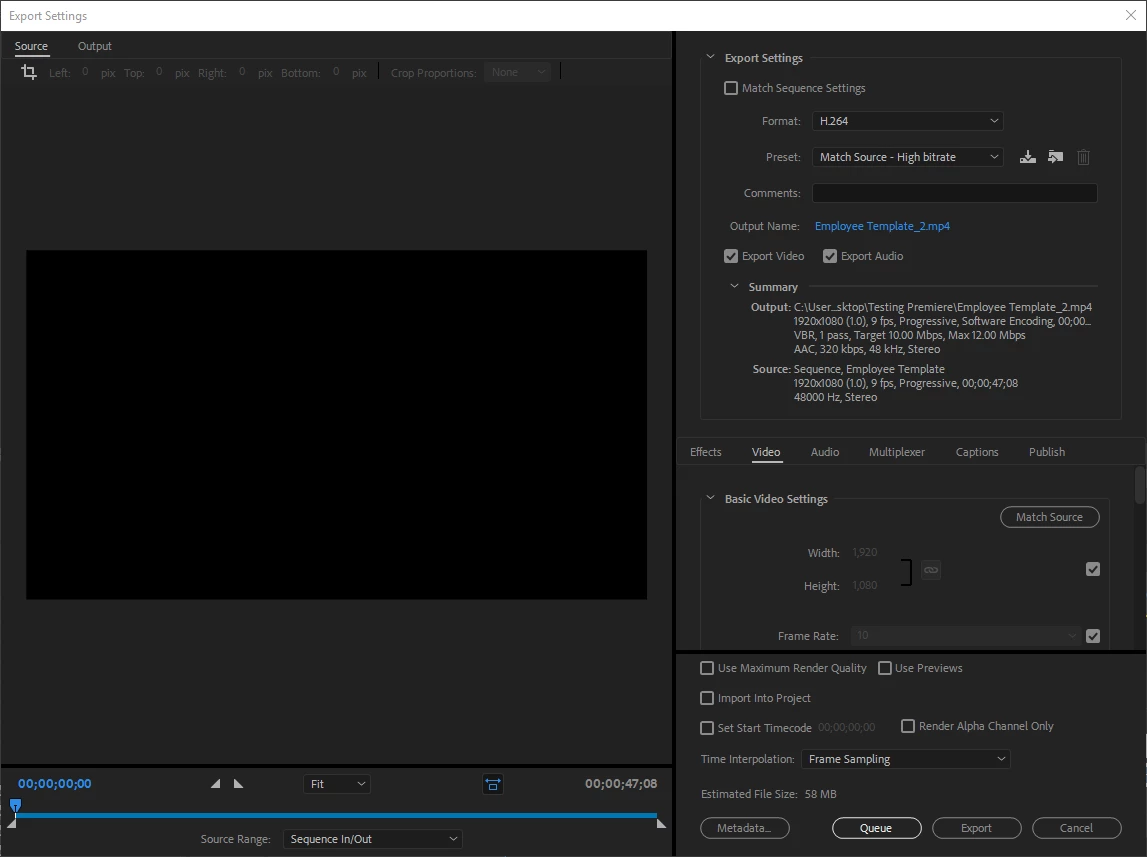
Is this the correct screen you're asking for?


Yes, thank you. I'm think the 9fps could be an issue, very non-standard. Typical frame rate would be 29.97 or 30fps, even 15fps should work perhaps, but 9 may be the problem there. Seems you may be using a source that was a screen capture software?


Thanks

Jeff

3 replies

Participant
May 28, 2022

Another solution to this can be to lower the Audio Sample Rate.

Vidya Sagar
Adobe Employee
Adobe Employee
July 26, 2018

Hi amyh68282795,

Sorry for the issue with export file. Have you tried importing the exported file back into Premiere Pro? Please try & let us know the status.

Thanks,

Vidya

amyh68282795
Participating Frequently
July 26, 2018

Yes. It does not work. I have gotten these error messages. But thank you for trying.

Participating Frequently
July 26, 2018

Please post a screen shot of the Export Settings panel so we can see exactly what it is that you are actually exporting, or we are all just guessing. Exporting an .mp4 using the H.264 format from Premiere should have nothing to do with QuickTime so that error doesn't make sense right now.

Thanks

Jeff

jasontcox
Inspiring
July 25, 2018

Hmmm have you tried playing the file in another other player? Are you trying Windows Media Player? Have you tried VLC or importing back into Premiere? That obviously doesn't solve the problem, but trying to narrow down if the issue could be with the player vs the file. Feel free to post a sample video for one of us to try as well.

And when you say you "leave the settings standard," do you mean you have the preset Match Source High Bitrate selected? Just curious.

amyh68282795
Participating Frequently
July 26, 2018

Yes I have tried to open it up in different players and it does not work. But thank you for the suggestion!! And yes, that is the preset selected.

Legend
July 26, 2018

Use VLC or PotPlayer only.  Report back.