
Participant
November 11, 2017
Answered

Help! Timeline disappeared!

  • November 11, 2017
  • 18 replies
  • 177426 views

Hello, I was just editing, I pressed some key and my timeline disappeared! Not the timeline window itself but the actual sequence. To make matters worse I can't find the sequence in my project to reopen it!

Help is much appreciated.
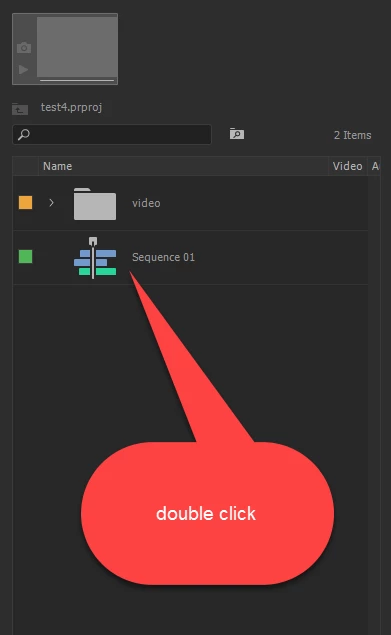
Correct answer Ann Bens

18 replies

Participant
November 1, 2024

This hasn't worked for me. Timeline goes the minute I click on it
!

Christopher (Kit) Lukas
Participant
July 16, 2023

Adobe this is so dumb why are you so insistent on making the timeline disappear when it's the key to editing in the first place.  I don't understand the logic of you guys making the timeline disappear so much please change on the update.


Gadgetsjon
Participant
February 15, 2022

I thought a similar thing had happened to me. I remember saving my timeline and I had exported a rush of the project, so I know everything was there.


SOLUTION: Because I had opened and started the project while another project was open, the sequence saved in the old project, under a different name. So when I closed Premiere, it saved the project with the imports in it separately to the sequence I was working on.


Search your previous project for the sequence. Panic over.

Participating Frequently
August 31, 2021

Hi There,
Unfortunately this trick doenst work in my case.
No timeline visible and no idea how to restore this.

Any ideas?

Thx.

P.S: I am sure this is a smart function. But what is the sense behind??


Participating Frequently
August 31, 2021

Hi There,

is it true that all the project is lost because the timeline window was closed and can't be opened?
The built-in autosave function makes sure that you can not go back to the old version.
I cant believe that this is true.

Best,

Participant
March 25, 2021

I had the same problem. What I eventually figured out was that I used an image to start the process, IMG 097, which by default ended up as the project name, which of course made no sense. (and it was buried in a folder)


I went to click on a nested segment while editing but lost my main timeline because it was the file name, not the project name, which I failed to change when starting the project.


I found it after looking at a backup version (always back up/version your pojects!)

I hope this made sense.

Participant
October 15, 2020

Try Window > Timeline. Worked for me!

Gangsta Shots
Participant
September 20, 2020

I accidnetally closed my timeline and I figured out to get it back is to go to Window - Workspace - All Panals. That solved my problem without an issue.

Participant
November 26, 2019

Pls I don't know what is going on with my Adobe premiere pro cc7.0.0 I just instilled it but I didn't see my timeline, is showing me timeline( no sequence 

Ann Bens
Community Expert
Community Expert
November 26, 2019

You need to make a sequence first in order to use the timeline.

Participating Frequently
March 21, 2020

This is quite a little confusing and scary quirk to new users of the software! When you first open the project you can get a blank sequence. I found I had to go into my project (project window) and search for seq (sequences) and I found it there. Thankfully, as I spent a good while editing!!

As I can see I am not the only one, I am quite shocked that the thread dates back three years! We are not all idiots.

Ann Bens
Community Expert
Community Expert
October 2, 2019

Deleted!

Participant
June 26, 2019

so as of today... my timeline will not show upon opening file. it's there - just doesn't show. then i click on something and boom it's back. also when i move the play head - video scrubs but the play head visibly does not move until i hit play (space).

i reinstalled premiere twice but no luck.

win 10 64 1903

hp zbook 17 g5

16gb ram

p5200 16gb ram

xeon 32 core 3.4GHz

any thoughts? thank you

Ann Bens
Community Expert
Community Expert
June 26, 2019

You need to give Premiere a chance to properly open before doing anything with the mouse.

If it is still acting weird

FAQ: How to reset (trash) preferences.

RAM is a bit on the lean side. 32 is ok, 64 is better.