

Turn on suggestions
Auto-suggest helps you quickly narrow down your search results by suggesting possible matches as you type.
Exit

- Home
- Premiere Pro
- Discussions
- HELP, to fix my screen view(ok button out of frame...
- HELP, to fix my screen view(ok button out of frame...
0
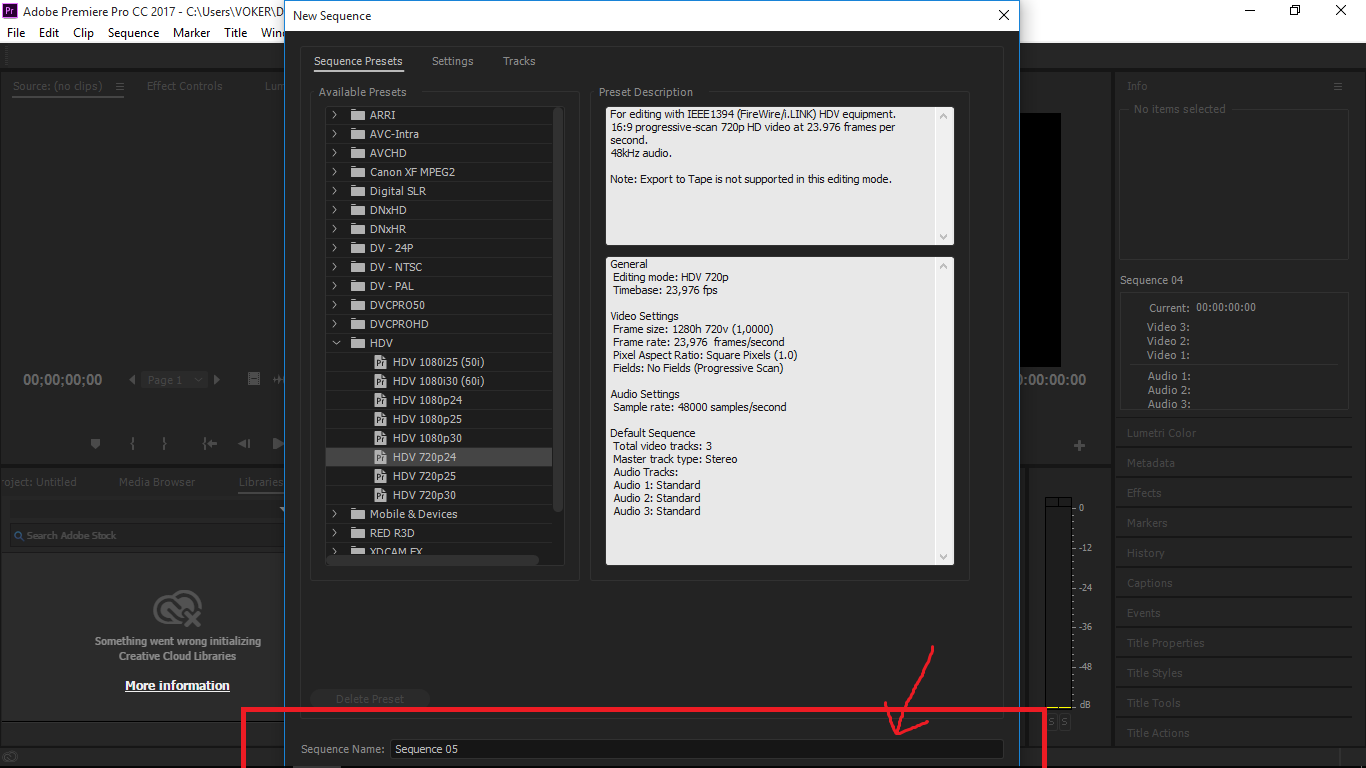
HELP, to fix my screen view(ok button out of frame)

New Here
,
/t5/premiere-pro-discussions/help-to-fix-my-screen-view-ok-button-out-of-frame/td-p/9279265
Aug 16, 2017
Aug 16, 2017
Copy link to clipboard
Copied

Community guidelines
Be kind and respectful, give credit to the original source of content, and search for duplicates before posting.
Learn more

 5
Replies
5
5
Replies
5




Adobe Employee
,
/t5/premiere-pro-discussions/help-to-fix-my-screen-view-ok-button-out-of-frame/m-p/9279266#M95402
Aug 16, 2017
Aug 16, 2017
Copy link to clipboard
Copied
moving to Premiere Pro CC
Community guidelines
Be kind and respectful, give credit to the original source of content, and search for duplicates before posting.
Learn more

LEGEND
,
/t5/premiere-pro-discussions/help-to-fix-my-screen-view-ok-button-out-of-frame/m-p/9279267#M95403
Aug 16, 2017
Aug 16, 2017
Copy link to clipboard
Copied
You need a larger monitor.
I recommend nothing less than 24" 1920 x 1080.
Community guidelines
Be kind and respectful, give credit to the original source of content, and search for duplicates before posting.
Learn more


Community Expert
,
/t5/premiere-pro-discussions/help-to-fix-my-screen-view-ok-button-out-of-frame/m-p/9279268#M95404
Aug 16, 2017
Aug 16, 2017
Copy link to clipboard
Copied
Minimum screen resolution for Premiere is 1280x800.
Community guidelines
Be kind and respectful, give credit to the original source of content, and search for duplicates before posting.
Learn more

Explorer
,
/t5/premiere-pro-discussions/help-to-fix-my-screen-view-ok-button-out-of-frame/m-p/9279269#M95405
Aug 16, 2017
Aug 16, 2017
Copy link to clipboard
Copied
Maybe try grabbing the top corner of the window and scale it down (if it'll let you). Then grab the window and bring it up. This should reveal the Ok button. Or simply hit 'return'.
Community guidelines
Be kind and respectful, give credit to the original source of content, and search for duplicates before posting.
Learn more
Community Expert
,
LATEST
/t5/premiere-pro-discussions/help-to-fix-my-screen-view-ok-button-out-of-frame/m-p/9279270#M95406
Aug 16, 2017
Aug 16, 2017
Copy link to clipboard
Copied
Screen is too small, issue will repeat itself on the export window.
edit: you cannot move the window up.
Community guidelines
Be kind and respectful, give credit to the original source of content, and search for duplicates before posting.
Learn more

Resources
Troubleshooting Software & Hardware
Frequently Asked Questions

Premiere Pro New Features
Get ready! An upgraded Adobe Community experience is coming in January.
Learn more
Copyright © 2025 Adobe. All rights reserved.
 AdChoices