



CGBESSELLIEU
Inspiring
May 10, 2024
Question

HLG Color Space Filesize
  • May 10, 2024
  • 3 replies
  • 424 views


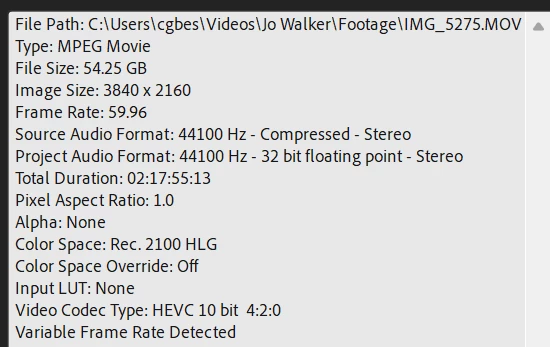
I'm working with the above footage shot in the 2100 HLG Color Space. When exporting and choosing "match sequence preview settings" a 1min clip ends up as 12GB!

What export settings would be ideal where I can set to a more reasonable bitrate that retains the color space? Source file of ~2hrs of footage is 54GB after all.

This topic has been closed for replies.

3 replies

CGBESSELLIEU
Inspiring
May 10, 2024

Update: Adobe support helped solve! To be able to export in H.264 with 2100 HLG color space you need to set the profile to "High10" and then select the HLG color space.


It's rendering at reasonable file sizes for upload now!

R Neil Haugen
Legend
May 10, 2024

You need to use the export presets that already have the correct color space. Use only the presets with HLG in the preset name. They're there.

Everyone's mileage always varies ...
CGBESSELLIEU
Inspiring
May 10, 2024

The issue isn't selecting the correct preset, it's the filesize (need to be able to upload to client, who needs the final project in both 4k and 1080p prepped for Twitter file sizes and also in the correct color space).

I spoke to Adobe on this and they recommended exporting to ProRes 422 HQ initially, and then seeing if you could take that file and convert to H.264 and keep the same color space somehow.
However, even with the current render I'm worried it's going to go beyond 1TB and then have no more space on the HD to complete.

CGBESSELLIEU
Inspiring
May 10, 2024

When I try to select H.264 as an option, it won't let me change to the correct color space, it's greyed out.