


New Participant
November 12, 2016
Answered

How do i change Audio Waveform Display

  • November 12, 2016
  • 1 reply
  • 14395 views

Hello, im trying to change the way i can see the waveform while im editing videos. As it is now i can not see the points where a sound start/stops in my editing area but i can in the source area. How do i change the way it is displayed in the editing area?

Sorry, im still way new to all this and dont know the proper names of things yet. Thanks for your time

I have posted a pic below to clarify what im looking for.
http://i.imgur.com/t5BCsN6.png

This topic has been closed for replies.
Correct answer Meg The Dog

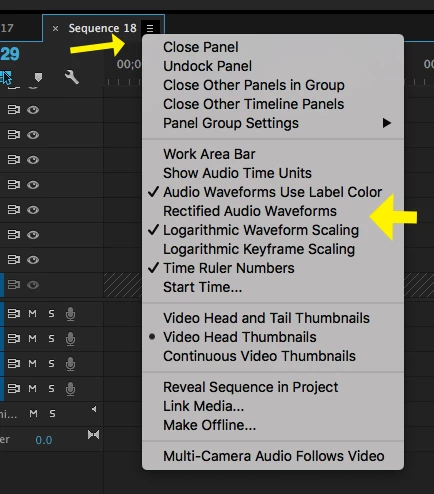
Click on the lines next to the Sequence Name and from the drop down menu UNCHECK "Rectified Audio Waveforms":

MtD

1 reply

Meg The DogCorrect answer
Inspiring
November 12, 2016

Click on the lines next to the Sequence Name and from the drop down menu UNCHECK "Rectified Audio Waveforms":

MtD

Kage_kunAuthor
New Participant
November 12, 2016

Sweet! Thanks for the fast reply. Now to finally get back to editing.