


joeh87907460
Inspiring
February 2, 2018
Question

How do I fix the "Invalid Font" issue?
  • February 2, 2018
  • 8 replies
  • 33423 views

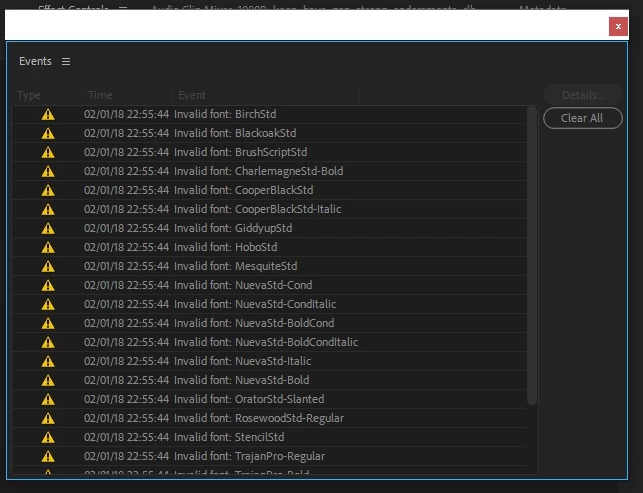
This is what I get every time I open a project, every single time. It never happened until I updated Premiere Pro a couple of weeks ago. Also I was having trouble with Photoshop fonts after updating it. I renamed the CT Font Cache folder to OLD_CT Font Cache folder then restarted photoshop and the problem was solved. But I can find on such folder for Premiere Pro. What gives with this? Does anyone know how to fix this problem with Premiere Pro?

This topic has been closed for replies.

8 replies

Department4
Known Participant
December 18, 2019

Still having this problem almost 2 years later. 

I'm running Premiere 13.1.5, Mac OS Catalina 10.15.2

FYI to those who say to just turn off notifications, the issue is that it DOES become a problem when trying to export sequences via Media Encoder (which can't read the fonts). For whatever reason, Premiere displays my fonts fine, however when trying to expot via Media Encoder, it changes everything to Courier. Frustrating. 

Participant
March 17, 2019

I'm running Premiere Pro CC v12.12 build 69 on Windows 7 (64-bit), and I just started seeing this a couple days ago. Every time I open a project, I see a yellow pop-up error about an invalid Roboslab font and I see a yellow warning icon in the lower-right corner of the application. If I click the icon, I see the list that's shown in the screenshot below. I've cleared my media cache and media cache files, and this won't go away. I am not using any of these fonts in my projects; I've never used any of them for that matter.

R Neil Haugen
Legend
March 17, 2019

If it's not affecting anything ignore them. Occassionally Pr gets this on internal fonts. Besides annoying it's just  a thing.

Neil

Everyone's mileage always varies ...
Participant
March 17, 2019

For what it's worth, I tried clearing the media cache again and doing a reboot, just figuring it was worth another try. It seems to have gone away now, at least for the time being. So, that still might be worth a try. But it's good to know that even if it doesn't go away, it's not actually causing any problems and can just be ignored. Thank you!

Participating Frequently
November 21, 2018

I have the same problem on Windows 7-64 with Premiere Pro CC 2017.

The font is complains about is TeamViewer13, which isn't used in the project.

paulb98984837
Participating Frequently
May 2, 2018

I fixed my problem!  I upgraded my MacOS to 10.13.4.  Premiere runs like normal again.

Community Expert
May 2, 2018

Greetings ! but if any issues, hoping none will happen again, always share your OS and system specs

to help us help you faster

paulb98984837
Participating Frequently
May 2, 2018

Will do.  Thanks Carlos. Hopefully the OP Joe found his solution too and will post it so others will know what worked for him.

May 1, 2018

I had this problem in Premiere 2018. For the life of me, I could not figure it out. So I opened Apple Pages and wrote a few lines using the font that Premiere did not like. Suddenly, Premiere began recognizing the font in my sequence. I still get the error messages, but my sequence now has all the lower-thirds I created with the "Invalid Font." Worth a shot.

Community Expert
May 1, 2018

01. Preferences - General - Uncheck 'Show Event Indicator'

02. If you have Teamviewer and updated it, roll back to a previous version

Known Participant
April 2, 2020

Hi Carlos.

I've been working on a project for ages now and I too always get this message about invalid fonts and have to clear them. I previously worked on a Mac, so I assumed its got to do with that. I've got the latest CC and Premiere is 13.1.5 (Build 47) on a Windows system (10) on a laptop with high specs. Your suggestion: 'Preferences - General - Uncheck 'Show Event Indicator'. I don't see this in my display.

Any suggestions?

Several hours later - I did find and try what you suggested but still get the same exclamation mark and then lists of fonts with a clear button. 

Community Expert
May 6, 2020

you need to be signed in to creative cloud and have your fonts synced to adobe fonts

paulb98984837
Participating Frequently
May 1, 2018

Same problem here.  I tried this with no solution: "The font dictionary can't be read" error in After Effects

Fonts were fine before the last update.  I guess I'm going to downgrade and try that.

GermanTV
Inspiring
February 2, 2018

Try solution number 2 (should work for your programs, too): "The font dictionary can't be read" error in After Effects

Found it in this thread: Adobe CC 2018 PrePro/AE Invalid Font

joeh87907460
Inspiring
February 24, 2018

Thank you for trying to help. I couldn't make that work though.