


UnicornsOnLSD
Participant
April 23, 2017
Answered

How to align text in the new text tool?

  • April 23, 2017
  • 4 replies
  • 102829 views

Hello!

In the new update for Premiere Pro, I'm having issues aligning text to the centre of the screen. I don't mean  aligning the text like

this

or this

or this.

I mean moving the text box as a whole to the centre of the screen to align it perfectly. Also, how do you feel about the new update? I personally wish I could get the old text editor back so I know what to do. Thanks for any replies!
This topic has been closed for replies.
Correct answer Roei Tzoref

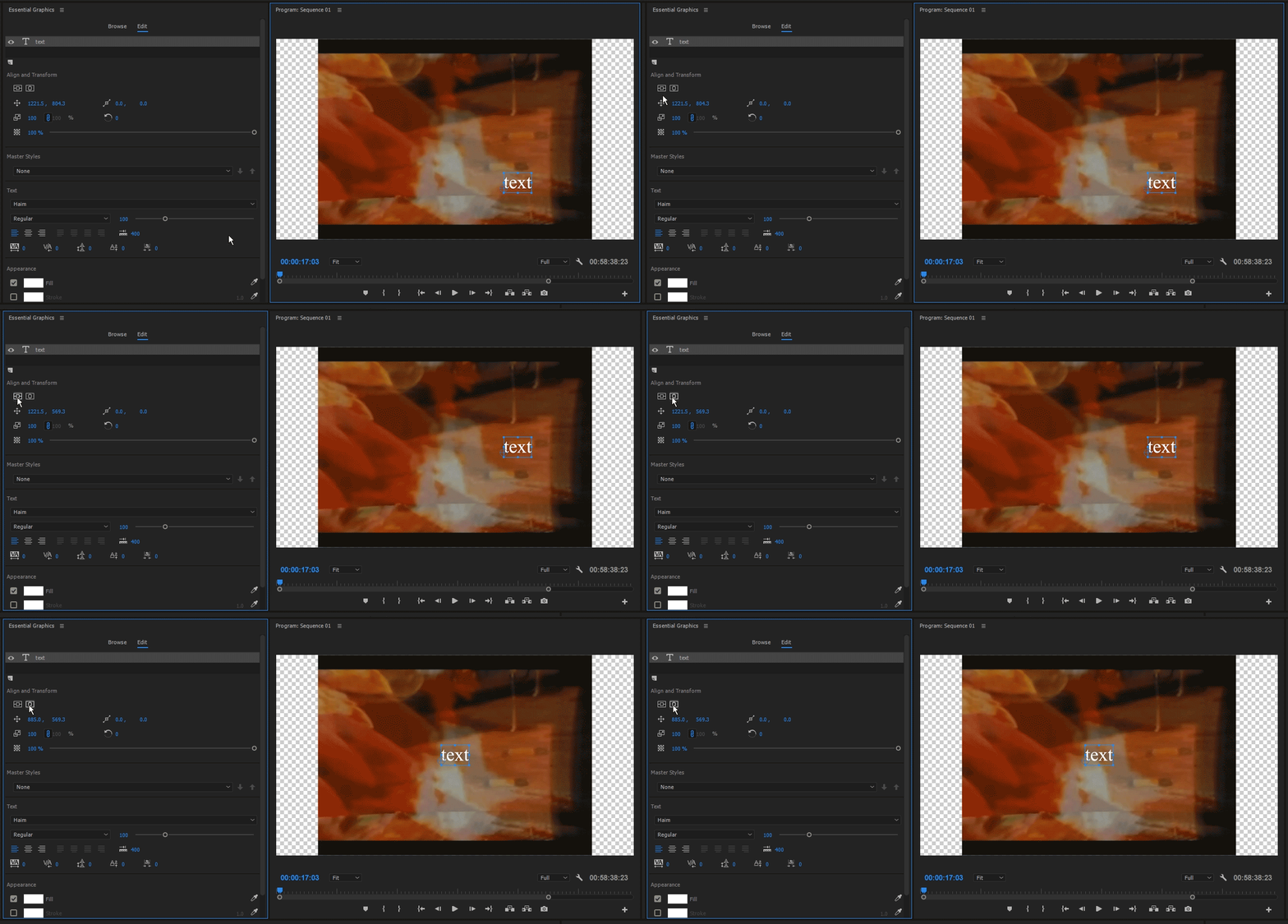
you manipulate your text parameters through the essential graphics panel. open it, choose edit and you have the familiar two icons for vertical and horizontal center.

here's some more info about it: Create title graphics |

4 replies

Inspiring
March 8, 2018

What I'm looking for and maybe what the original question was about is when you just select the text tool and start typing - it doesn't open the essential graphics panel, just a text control panel in the source window. In there, I can't see anywhere to center text within the frame.

R Neil Haugen
Legend
March 8, 2018

Easiest is to open the EGP to work with this process. Some of the controls are in the EGP for text control/placement, while the ECP is the primary control are for animation of text/graphic objects.

Neil

Everyone's mileage always varies ...
Dazzling_user15D5
Known Participant
February 6, 2018

That's not there in build 224. 2018-02-05_2017

A jack-of-all-trades is a master of none, but often times better than a master of one.
Julanka
Known Participant
February 15, 2018

Hi all,

I'd like to know how to distribute text elements with the latest Premiere (12.0.1).

Cheers.

R Neil Haugen
Legend
February 15, 2018

NOT sure what you mean by "distribute".

Everyone's mileage always varies ...
Roei Tzoref
Roei TzorefCorrect answer
Legend
April 23, 2017

you manipulate your text parameters through the essential graphics panel. open it, choose edit and you have the familiar two icons for vertical and horizontal center.

here's some more info about it: Create title graphics |

Michael Stanley TN
Participant
January 20, 2022

I love Horizontal Center. I use it constantly. However, how do you dynamically KEEP it centered?

Everyday of my life I am editing the same text box and have to click on "horizontal Center" after I change the length of the text. Is there a way to KEEP the text box centered as I type the text to a different length? 

Ann Bens
Community Expert
Community Expert
January 20, 2022

Turn on Snap in Program Monitor (wrench).

Ann Bens
Community Expert
Community Expert
April 23, 2017

For the old text editor go to File / New / Legacy Title.

Ann Bens
Community Expert
Community Expert
April 23, 2017

Workaround for me is Transform/Position reset and centre text.