Legend
June 3, 2020
Answered

How to create Proxy files for Raw Files " Please Help"

  • June 3, 2020
  • 2 replies
  • 2525 views

Hello Everyone.


I have many Canon C-200 Raw Clips. I have an option when shooting Raw In C-Fast Card, to use the Sub Record Format, and create a Duplicate file Inside the SD Card, as XF-AVC, or MP4.

Is It Better to have Premiere create a Duplicate Proxy file, or create Duplicate files from the actual C-200, and later edit them In Premiere?

Since the Raw Files are so big, it is very hard to edit them inside Premiere.

So technically do I have to color grade the actual proxy files or the Raw Files?

Please let me know my options.

This Is my Computer Info:

Windows 10, 64-bit operating system Intel (R) Core (TM) i7-7700 CPU @4.20 GHz. 32 GB Memory Ram.

Thank you very much.

This topic has been closed for replies.
Correct answer R Neil Haugen

That's a good workflow, very nice!


The Canon controls are via what Adobe calls the "Master Clip" process, and any changes to a Master Clip tab will be applied to anything from that clip anywhere in the project. So if you have say C00142.XXX clip, and you make a change to the Canon settings in the Master clip tab on one sequence, those changes will apply to every use of any 'cut' from that clip on any sequence in that project.


The following image shows the Master Tab highlighted in blue ...  and you can access that tab in either the Effects Control Panel (ECP) or the Lumetri panel as below.
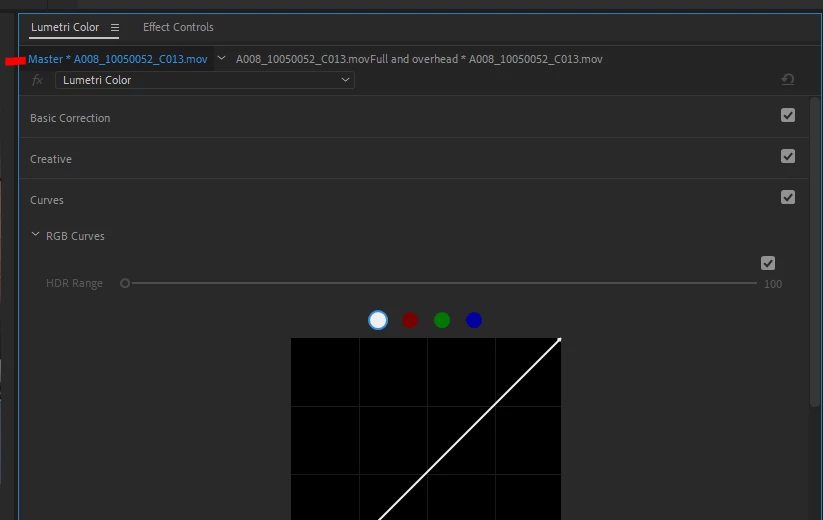
 

So ... "Master Clip" setting changes are applied to the clip and stored in the project panel metadata for that specific clip.


Using the "standard" corrections for clips, the tab that is not highligted in the above, means you are applylying the correction only to that instance of that cut of that clip on that sequence. And the corrections are stored in the metadata for that clip/cut on that sequence. Which is why if you delete the sequence, all the changes you have done to clips on that sequence "disappear".


You can apply Lumetri effect changes to either the Master Clip tab or the sequence clip tab. In the Master Clip tab, like your Canon controls, they will be applied to all uses of any part of that clip anywhere it is used in the project.


While Lumetri applied via the regular clip tab will again only be applied to that specific instance (cut) of that clip on that sequence.


Neil

2 replies

R Neil Haugen
R Neil HaugenCorrect answer
Legend
June 4, 2020

That's a good workflow, very nice!


The Canon controls are via what Adobe calls the "Master Clip" process, and any changes to a Master Clip tab will be applied to anything from that clip anywhere in the project. So if you have say C00142.XXX clip, and you make a change to the Canon settings in the Master clip tab on one sequence, those changes will apply to every use of any 'cut' from that clip on any sequence in that project.


The following image shows the Master Tab highlighted in blue ...  and you can access that tab in either the Effects Control Panel (ECP) or the Lumetri panel as below.


So ... "Master Clip" setting changes are applied to the clip and stored in the project panel metadata for that specific clip.


Using the "standard" corrections for clips, the tab that is not highligted in the above, means you are applylying the correction only to that instance of that cut of that clip on that sequence. And the corrections are stored in the metadata for that clip/cut on that sequence. Which is why if you delete the sequence, all the changes you have done to clips on that sequence "disappear".


You can apply Lumetri effect changes to either the Master Clip tab or the sequence clip tab. In the Master Clip tab, like your Canon controls, they will be applied to all uses of any part of that clip anywhere it is used in the project.


While Lumetri applied via the regular clip tab will again only be applied to that specific instance (cut) of that clip on that sequence.


Neil

Everyone's mileage always varies ...
Legend
June 4, 2020

Mr. Neil.

Thank you very much.

It always a pleasure to hear your professional advice.

R Neil Haugen
Legend
June 3, 2020

That ... depends. (You expected that, right?)


How many audio channels are you recording on those files? Sometimes, if there are multiple audio like say four channels, Premiere can have difficulty with linking proxy files that it creates. If they're typical duo mono or stereo, one 'channel', then using the Premiere proxy process is pretty slick.


If the proxy files created by the camera have exactly the same names and audio as the original files except for the extension, the ' .mp4 ' bit, then you could use them and do the old online/offline trick.


  • Ingest the original files to get all metadata into Premiere.
  • Then select the media, right-click "make offline", making sure to check "media files remain on disk" and that "relink others automatically" is checked.
  • Then right-click, "link media", making sure match names is checked but extension is not.
  • Click "Locate", click "search in next dialog to navigate to the folder of proxy media.
  • Select first file, click the blue "Ok" button. It should relink to the rest of the media also.


The above only takes a few seconds, really.


Then do your work, at the end, simply reverse the process. Make all the proxy files offline, replace with all the original media, and do your export.


Why does this work? Premiere stores ALL data for the effects you've done in sequence metadata, not clip metadata. So whatever clip you use to replace one with in this process is seen by Premiere to be the same clip.


Neil

Everyone's mileage always varies ...
Legend
June 3, 2020

Dear Mr. Neil.

I have only one audio straight from the XLR . Also, I noticed the C200 C-Fast Card and the SD-Card Files are the same names. This is what I did.

1- I created a folder on my Desktop, called It: My Proxy Project

2- I Imported Both the Raw file from the C-Fast Card and the Proxy card from the C-200 SD Card to My Proxy Project folder.

3- I Imported both files Raw, and the MP4, Into Premiere pro.

4- I Right-Clicked on the Raw File- Proxy- Attach Proxy.

5- Inside the Attach Proxies Pop-Op menu, I choose the  MP4 File.

6- Inside Premiere, I created a Sequence from the Raw File.

7- I noticed If I click on Toggle Proxy Icon I can switch from Raw to MP4, because the Raw file Looks Uncompressed and Flat, and the MP4 file looks more Saturated.

8- I did my basic editing and Cuts.


This Is what I noticed:  let say for example I had 8 Cuts, and I want a different Color Temperature and Exposures for my Clips. If I add my desire Exposure and Color Temperature from the Master-Canon Cinema Raw Light Source Settings, It will affect the whole project. But If I use Lumetric Color Basic, and Creative Tab, I can apply my Desire Looks to my Clips, anyway I like.

Mr. Neil, Are the above steps correct?

For final Export any recommendation?

Thank you very much again.