


Participating Frequently
January 21, 2018
Question

How to find layer break position

  • January 21, 2018
  • 2 replies
  • 5974 views

THE ISSUE

I want to replicate DVD9, and have read that Encore CS6 has issues setting the layer break. I do not know how to find out where Encore has set the layer break, in order to prevent replicating improperly authored DVDs.

WHAT I'VE TRIED

Read many posts in many forums. Yet was unable to find a solution.

I've tried IMGburn's "Display IFO layer break information" tool, however I do not know if what is shown is a the layer break set by Encore or rather IMGburn's suggestion(s) of possible layer break positions. I am not sure even if Encore sets a layer break when exporting to ISO (I have limited knowledge (have only authored DVD5 until now)).

I do not know how to use PgcEdit. I prefer rather to use Encore only for DVD authoring, and if needed use other software only to check if it did a right job.

THE ENCORE PROJECT OUTLINE

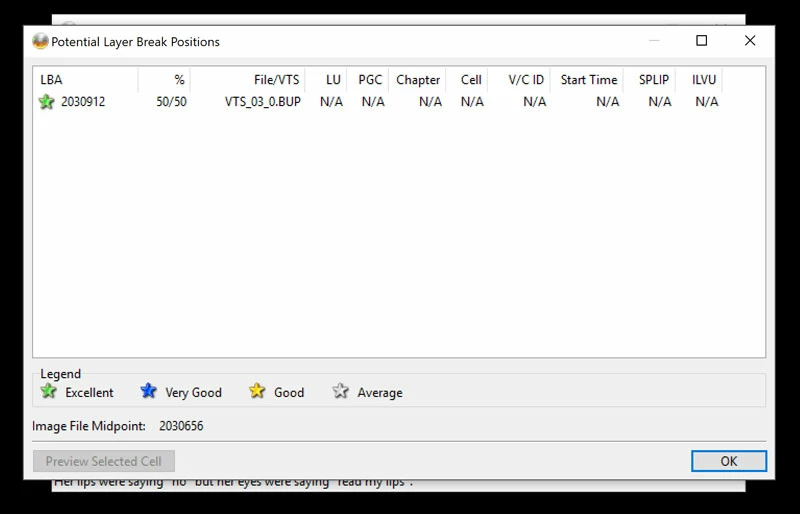
Video arrangement in Encore: [video 1: ~1.3 GB] [video 2: ~1.3 GB] [video 3: ~1.3 GB] [video 4: ~1.3 GB] [video 5: ~1.3 GB] [video 6: ~1.3 GB]. Each video is on a separate Encore timeline (if this matters), with chapter points every 5 minutes. When checking the ISO file with IMGburn, only one layer break point is displayed with a green star (see below). I wander if this is the actual layer break Encore has set, or is this a IMGburn suggestion?
THE QUESTIONS

1. How can I find out where Encore CS6 has set the layer break once I've authored a DVD9 (i.e. by checking the ISO, or DDL files, etc)?

2. How can I check visually (by playing the video) where the layer break is?

3. Is the LBA in the image above the actual layer break point Encore has set, or rather a layer break suggestion by IMGburn?

(I'm also confused by the fact that for another ISO file I've authored with Encore, multiple LBA are shown by IMGburn.)

4. If by some method (perhaps with IMGburn) the layer break position written by Encore in the ISO file can be determined by analyzing an ISO file, does this mean that the DDL file has the layer break in the same spot?

It is DDL I want to send for replication.

I'm using: Encore CS6, Windows 10. I also have Encore CS2.

I prefer to do the entire authoring with Encore only.

This project is for a charity.

Thank you very much.

This topic has been closed for replies.

2 replies

neil wilkes
Brainiac
January 21, 2018

Hi Ruben.

This is honestly not as difficult as you might think, and the good news is that this can be done using easy tools as well.

I do need to know what your replicator wants you to deliver though - this is very important. Are you replicating or duplicating? (Replicating is getting the disc glass mastered and silver factory pressed discs out of the other end, and Duplicating is making DVD+R DL written discs) This matters because with replication you might be asked to supply a DDP image set instead of an ISO image.

If using an ISO image is allowed, then you can use IMGBurn's layer break setting to do the job. To use this method:

1. Create your output from Encore as a Folder, not a replication master.

2. Open IMGBurn and choose "create DVD Image from |Files/Folders" option and in the settings make certain that the resulting ISO image will also contain a checksum as well as a .dvd file (this will include the layer break info)

You also need to be sure that it is set up as in the following screenshots as well - They are all important but one of the most critical is the IFO/BUP padding as this can result in a factory image fail if not done.

When burning a test disc also see the following settings are applied:

So to try & answer more of the questions:

2. - You cannot check this by playing the disc unless you have one of those old players that hiccups momentarily at the layer break transition. With modern players, especially Universal ones that also play Blu-ray, you will often find that the mandatory buffering required by Blu-ray specs is carried over to the DVD playback as well where in DVD specs this is just not required. You can check where the break is by simply opening your compiled Video_TS in a superb little tool called PGCEdit. This is a wonderful little utility that nobody authoring DVD should be without and it is donationware, so please please do this (I recommend $25-50 for what it is capable of).

To check location of layer break in this could not really be easier - simply open the tool, and open the compiled Video_TS when in the "Open DVD" dialogue.

To see what is in each title just open it's content either by double clicking or from the drop-down menus but if you know where it has to be (for example if there is one long feature & a couple of short extras then you know it will be in the longest title - see example below:

You can only see the one title, VTS1, TTN1, so double click that to open it and the following pops up:

You can see the layer break location standing out like a sore thumb - it's the yellow square showing that it is not set as seamless playback and is the layer break.

PGCEdit can do lots more besides this and is capable of reworking the commands & navigation of any button in the title as well as the button colours etc as well as being able to tidy up behind abstraction layer tools - it is extremely powerful but the good news is that when you open a disc the first thing it does is makes safety copies of the critical BUP and IFO files.

Now - if you are needing to send a DDP set then you can also make this from Encore. I do not know what a DDL set is though - do you mean DDP?

The easiest way to check is to first compile the project and then open the Video_TS in PGCedit as above & see what it says is set. If it says nothing then you need to reopen the project in Encore & prepare your Replication Master to DDP image.

Hope this helps - I will check in tomorrow

Participating Frequently
January 22, 2018

Hi Neil

Thank you very much for the information and for taking time to answer (and in detail). I highly appreciate it.

ANSWERING YOUR QUESTIONS

  • - I do not know for sure what format the replicating facility desires – will ask them soon (I wonder which one is ideal for replication – ISO or DDP – in case they accept both).
  • - I’m replicating (silver factory pressed discs)
  • - Yes, I meant DDP, not DDL (proof of my lack of knowledge):

COMMENTS AND NEW QUESTIONS

It seems to me from what you’ve written that IMGburn cannot tell where Encore has set the layer break, but PGCEdit can. I’ve tried PGCEdit, according to your instructions, for my test Encore project, and did not find any squares highlighted with yellow in any of the files. Thus I presume the layer break has been set by Encore to be between videos, which is great. Is this correct? If this is so, is there a way of finding between which videos the layer break has been set?

The Encore project I’ve tested is as follows: 6 x ~1.3 GB, 1 hour video files on 6 timelines with chapter points every 5 minutes. Below are screenshots of analysis of the Video_TS folder (PGCEdit) and ISO file (IMGburn):

MAIN QUESTIONS

  1. Do you think is safe to export as DDP the project above for replication? Can Encore be trusted in this instance, as it was given a good chance to place the layer break between videos (if this is what PGCEdit indicates by not displaying any “yellow box”)?
  2. How can I verify if Encore has authored properly (error free) a project? And that the DDP files are safe for replication?

I would very much prefer to author the DVDs with Encore only because I am afraid to use sophisticated tools like IMGburn and PGCEdit which increase the chance of me making a fatal mistake (due to my lack of knowledge). Encore is fairly easy to use (automated). However I'm not that concerned to use "sophisticated" tools to check if what Encore has done is good.

The questions are in bold (for ease of reference).

Thank you very much for your time and help. Looking forward to your reply.

neil wilkes
Brainiac
February 6, 2018

Hi Neil

Thank you very much for the info - very useful indeed.

I would be very delighted for you to check the DDP files with Eclipse Image Analysis. I've uploaded already the DDP files of 3 DVDs; the last one (its a 4 DVD set) will most probably be uploaded within 8 hours. Once I finish checking all projects with DVD players, I will send you the link. Is it possible to send it privately (i.e. not to disclose it on this forum)? If that's OK, you may contact me via cautberg (at) gmail.com that I may send you the link via email.

I was able to set a layer break manually with a single timeline; but not with multiple timelines (the setup for the projects).

By the way, what exactly is the issue of Encore not placing the LB in the right place? What is a right place, and what happens if it is not set right? Will the player freeze permanently or only for few seconds?

Hopefully within 8 or 10 hours all projects will be verified, and than I intend to send you the link (via email hopefully).

Thank you very much.

UPDATE: all DVDs have been verified with DVD players and work fine. The DDP files have been uploaded to Google Drive. Ready to send you the link for downloading and verifying the DDP files. Than you.


Sorry for delay - been in a major project the last couple of weeks.......

Can you drop me a PM here with email details please??

Stan Jones
Community Expert
January 21, 2018

Can't answer several of the questions.

There are many issues in replication, and it is my understanding that the replication facility checks your submission and reports errors.

One options is to export the Encore project as a folder (with no break set), and see what Imgburn says about that.

Participating Frequently
January 22, 2018

Thank you Stan for the useful information and for taking time to address my issue.

I did not know that the replication facility should check the files and report issues. I’m glad I do now.

Perhaps, since there are many issues in replication, I should rely on software that does most things automatically, like Encore, considering my lack of knowledge; and hope Encore will produce error free DDP or ISO files (given that the project will have 6 relatively equal videos in length and size, on 6 timelines with chapters every 5 minutes). And that the replication facility will identify errors, if any.

I intend to reply to Neil’s answer with more details.

Thank you once again and best wishes.