


softananda
Inspiring
April 15, 2014
Answered

How to import multiple DNG files into Premiere

  • April 15, 2014
  • 10 replies
  • 81424 views

I want to import multiple raw DNG files from a 2.5K blackmagic camera. Each clip is recorded in a separate folder:
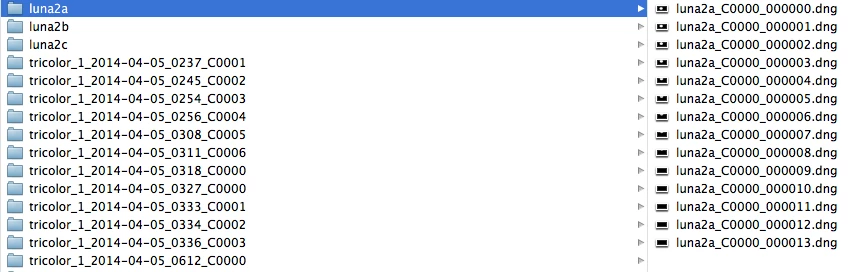
I can import each clip separately by selecting its folder and clicking on a DNG file, but -for obvious practical reasons- I would like to import ALL clips at once. However, when I try to do so, Premiere does not import the clips. Instead, it imports each folder, and within them there is not one single clip, but as many clips as DNG files compounded that particular clip. In other words, if the clip had ONE HUNDRED DNG files, Premiere imports that clip ONE HUNDRED times, not just once:
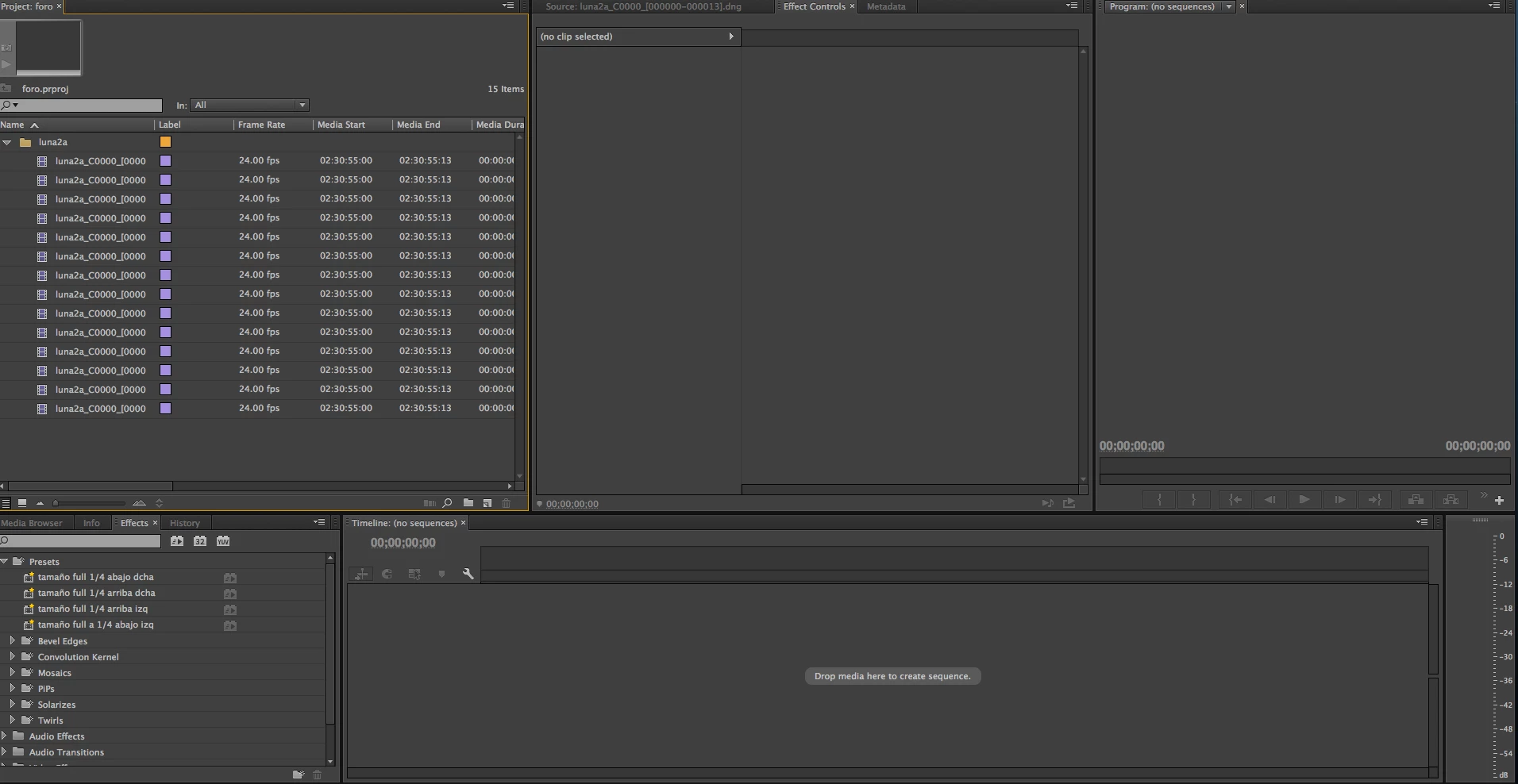
In this image, each file contains the ENTIRE clip, not just a DNG file. Is there a workaround for this? Otherwise, DNG files must be imported one by one, which of course makes the workflow much more difficult.

This topic has been closed for replies.
Correct answer Genetic

Hi @Softananda, I have the same problem as you do, but I managed to find a temporary lowtech solution that's maybe useful for you or for other users.

You can go to the folder where all your rushes are and just search for all the files in that subfolders ending by 00000.dng

This way you will have all the first dng files of every sequence and you can move them directly to your media pool in Premiere, where they will appear as unique sequences of all your dng files.

For me it works like a charm.


I hope this is useful for someone.

Bye!

10 replies

Participant
July 13, 2020

I click on the folder and expose all the little nasty files via the media browser. Then I press Ctrl + A, wait until it highlights all the files, then I click open, and go do a honey do list, mow the lawn, and play 3 hours of video games. I check it, then I go to bed. When I wake up in the morning, I click on adobe to wake it up. It takes a bit because it will say not responing. Just leave it for a bit. Every step with these files is a pain in the butt. I don'y do very many off my DNG cinnestick as its 480 gigs, and I have to use a 12 TB external drive to store the files in. All my video editing is drone footage, and this was my own workaround. There most likely a better way, but nobody has ever shown it. I use adobe premiere pro 2020.  My computer has 32GB Dual Channel HyperX(FM) FURY DDR4 XMP at 3200MHz 

High-Performance CPU Liquid Cooling and 1000W Power Supply

2TB M.2 PCIe SSD (Boot) + 2TB 7200RPM SATA 6Gb/s (Storage)

NVIDIA GeForce RTX 2080 Ti 11GB GDDR6 (OC Ready)

AMD Ryzen 9 3950X (16-Core, 64MB L3 Cache, Max Boost Clock of 4.7GHz)

It still takes a long time to process and edit these files. 😞

Adobe should have a class just on this!


Participant
October 25, 2016

It's funny to me to read this thread and see that Adobe engineers are clueless as to what the OP is talking about.........

And two years later, why isn't this fixed? It's not just Black Magic cameras shooting CinemaDNG. Why doesn't an engineer get a BMPCC and make this work smoothly?

Legend
October 25, 2016

Why doesn't an engineer get a BMPCC and make this work smoothly?

I second that, and add that such engineer needs to see how Resolve does it, and emulate that in PP.

dmitryc84863347
Participant
July 30, 2016

2 years ago... Resolve can do this! but i need to export files one by one everytime when I working in premiere.

Kevin-Monahan
Community Manager
Community Manager
August 2, 2016

Hi, have you filed a request yet?

Thanks,
Kevin

Kevin Monahan - Sr. Community & Engagement Strategist – Pro Video and Audio
Participating Frequently
December 23, 2015

I used the program SEARCH EVERYTHING to find 000000.dng then I selected all and dragged and dropped into the project and everything came up as full clips.

Why cant Premiere do this? Seems pretty basic!

Known Participant
January 11, 2016

Has this issue still not been addressed? This was filed almost a year ago. Is Adobe working to address this in the next update?

Legend
January 11, 2016

I don't recall reading anything about this in the latest version notes.

Participating Frequently
December 23, 2015

I tried to search for 000000 but the search posted no results, and there were definitely multiple files within the folder being searched that had 000000 in the filename.

Adobe needs to get on this.

Resolve handles DNG clips so super smooth, and imports DNG sequences and DNG folders just as easily as premiere handles h264.

Participating Frequently
October 13, 2014

I had used Davinci Resolve to do a rough edit of my DNG files and then I exported an XML to bring into Premiere expecting that I would be able to refine my edit there but Premiere failed to re-link any of my DNG media.  I didn't want to import all my media using the "search 000000.dng" technique because I'd already chosen only the clips I want in Resolve.  I also did not want to have to go into each individual folder of DNG files and select the 000000.dng file to get them into Premiere.  My goal was to stick with my RAW files throughout the process and not create extra proxy files.

My workaround was to edit the XML contents so instead of all the file names being

Clip_1_2014-07-11_0023_C0005_[000000-001129].dng

and the file paths being

/Clip_1_2014-07-11_0023_C0005_%5B000000-001129%5D.dng

they would both be

Clip_1_2014-07-11_0023_C0005_000000.dng

and therefore immediately recognized by Premiere.

I used TextWrangler search and replace with regular expressions (which I had never done and had to muddle through with this Using regular expressions – Part 1: Understanding the basic building blocks | Adobe Developer Connection which fortunately had the solution on the first page.

In TextWrangler go to Search>Find and check on both "Grep" and "Wrap around". 

First find \[\d\d\d\d\d\d-\d\d\d\d\d\d\] and replace it with 000000 and click "Replace All"

Then find %5B\d\d\d\d\d\d-\d\d\d\d\d\d%5D and replace with 000000 and click "Replace All". 

Save and import into Premiere.

Kevin-Monahan
Community Manager
Community Manager
October 13, 2014

Hi Michael,

Thanks for posting your workaround for relinking DNG media. I will pass this along, but please file a bug report so that your findings are captured into our bug system: http://adobe.ly/ReportBug

Best,

Kevin

Kevin Monahan - Sr. Community & Engagement Strategist – Pro Video and Audio
Participating Frequently
October 13, 2014

Hi Kevin,

I submitted a bug report, which was mostly just info from this posting, which has been around since April.  It looks like posters in this thread may have already submitted a feature request/bug report on the issue.  I just updated Premiere CC 2014 to the latest version and the issue persists.  With the growing popularity of the Blackmagic cameras, do you think this may be resolved soon?  Or perhaps Adobe will post an official workaround?  I understand that using proxies is a common workflow, but with RED footage you can stay in RAW throughout the process if your computer can handle it. 

Thank you.

-michael

Genetic
GeneticCorrect answer
Participant
June 16, 2014

Hi @Softananda, I have the same problem as you do, but I managed to find a temporary lowtech solution that's maybe useful for you or for other users.

You can go to the folder where all your rushes are and just search for all the files in that subfolders ending by 00000.dng

This way you will have all the first dng files of every sequence and you can move them directly to your media pool in Premiere, where they will appear as unique sequences of all your dng files.

For me it works like a charm.


I hope this is useful for someone.

Bye!

Participant
June 21, 2014

The "search" 000000.dng technique was successful for me. I was having the same trouble as the person who started the thread. Trying to import multiple clips from the Blackmagic Pocket Cinema Camera on the new cc2014 update was not working so well. This is a nice, simple work-around.

Kevin-Monahan
Community Manager
Community Manager
April 21, 2014

softananda wrote:

I want to import multiple raw DNG files from a 2.5K blackmagic camera. Each clip is recorded in a separate folder: I can import each clip separately by selecting its folder and clicking on a DNG file, but -for obvious practical reasons- I would like to import ALL clips at once.

Hi Softananda,

You will need to make a feature request for this. Sorry you can't do this by default now. Here's the link: http://adobe.ly/feature_request

Thanks.

Kevin

Kevin Monahan - Sr. Community & Engagement Strategist – Pro Video and Audio
softananda
Inspiring
April 21, 2014

Kevin, I just made the request. Any chances Adobe will treat image sequences in the future as it currently treats RED files, which are also contained in folders?

Kevin-Monahan
Community Manager
Community Manager
April 21, 2014

Hi Softananda,

It's possible, and I sure hope so. However, I just checked in the upcoming version and it works the same way. Thanks for making the request, I'll make sure the team knows about it.

BTW, source settings will be available, just not as advanced as Red's. It looks similar to the current ARRIRAW Source Settings.

Thanks,

Kevin

Kevin Monahan - Sr. Community & Engagement Strategist – Pro Video and Audio
Mark Mapes
Community Manager
Community Manager
April 15, 2014

How exactly are you importing the clips? Are you dragging from the OS file browser, using Premiere's File>Import command, or using Premiere's Media Browser?

Media Browser is the best way to go with file-based content. That said, I have little experience with DNG, so I can't say for sure whether it will work any better in this particular case.

softananda
Inspiring
April 15, 2014

As I said to pertergaraway, I experience the same issue whether using the media browser or the import command.

Participant
April 20, 2014

Got it.

Can you post a screen shot of the contents of that SSD?  I'd like to see the folder structure in use.


Adobe seems to have stopped accepting DNG files both in Premiere Pro and AE. In PP it shows the error "the file appears to have no media data". In AE the ACR accpets only one image at a time and repeats for every image sequence. What am I supposed to do here....I've tried everything but DaVinci. I might have to say goodbye to Adobe this way.


petergaraway
Adobe Employee
Adobe Employee
April 15, 2014

Use the Media Browser to import DNG files.

Peter Garaway

Adobe

Premiere Pro

softananda
Inspiring
April 15, 2014

Media Browser won't do it, because it only allows to open one DNG clip at a time. My problem is not that DNG files cannot be put into the project, but rather that I cannot open/import all of them at once, as I can do for instance with RED files. When it comes to blackmagic DNG files, I have to go folder by folder...