


Inspiring
June 3, 2019
Answered

How to remove folder/bin from inside main bin in Project Panel

  • June 3, 2019
  • 11 replies
  • 4680 views

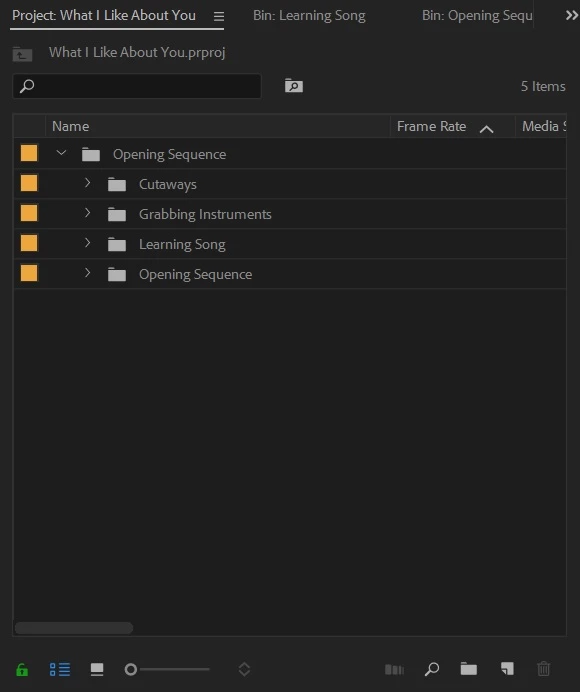
I'm still pretty new at learning the functionality of Premiere. I'm using PPcc 2018. I want to remove all the sub-bins from inside the main bin titled "Opening Sequence". I somehow managed to create a bin in the Project Panel and then include all my other bins/folders inside the main one. (see screenshot). I would then be left with separate bins titled "Opening Sequence", "Cutaways", etc without them being tucked inside the main bin.
    This topic has been closed for replies.
    Correct answer Meg The Dog

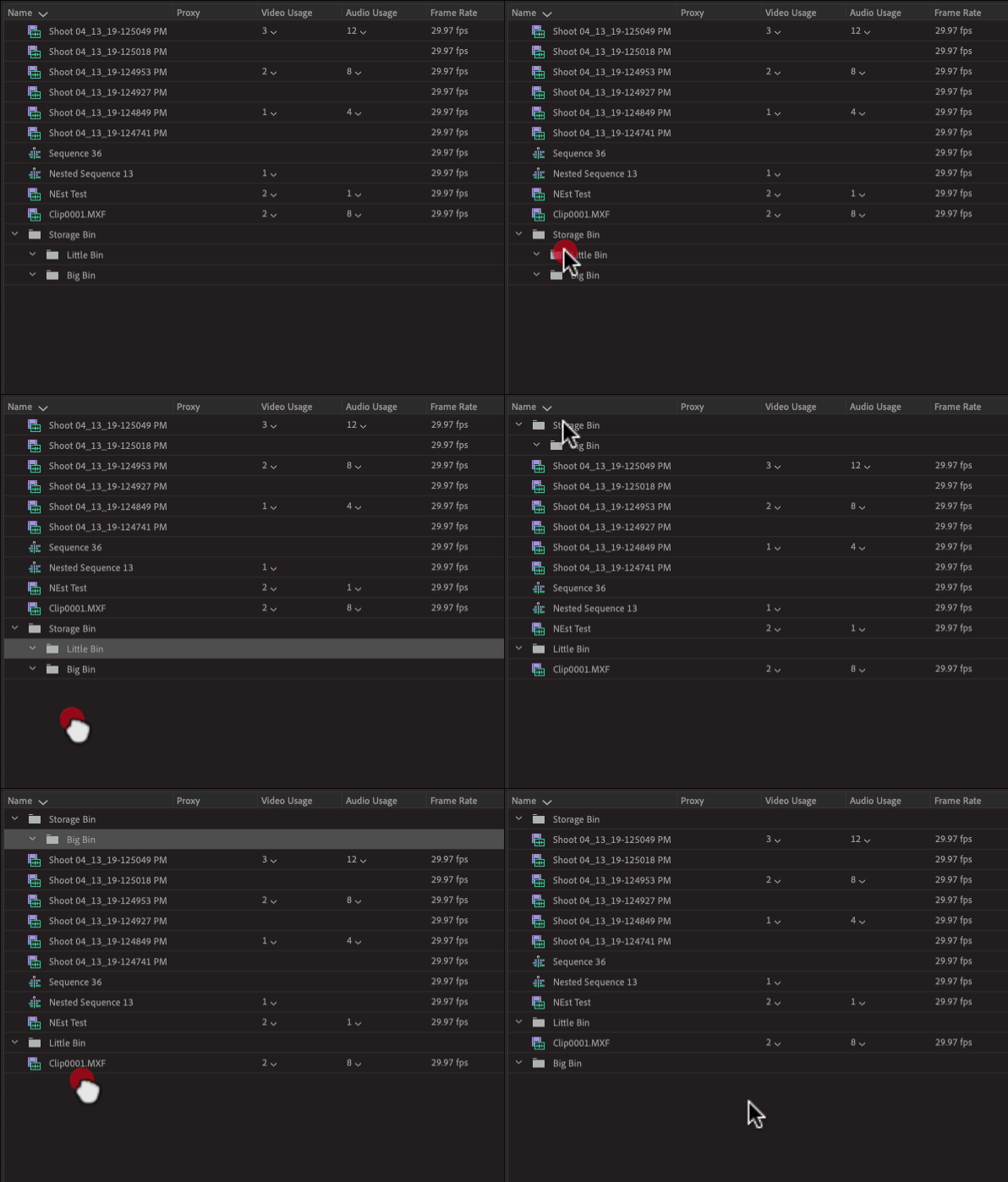
    Just click down on the bins that are inside the other bin and drag to a blank area of the Project Panel. This will elevate the bin to the top layer of the directory:

    MtD

    11 replies

    Brainiac
    June 4, 2019

    rename file to deal with ascending or descending order.. like maybe try M-Learning... which will put it below L(earning). Otherwise use bins to separate source stuff...

    ??

    Ann Bens
    Community Expert
    June 4, 2019

    Sorting on name is alphabetical.

    Have to rename the folder/clip or whatever asset to accommodate the order.

    JonnyD14Author
    Inspiring
    June 5, 2019

    Alphabetical. Got It.

    JonnyD14Author
    Inspiring
    June 4, 2019

    No, clicking on that arrow just reverses the order of the clips in the Project Panel. I want to relocate a specific clip between specific other clips.

    Brainiac
    June 4, 2019

    near the NAME column there's an arrow... click on it

    JonnyD14Author
    Inspiring
    June 4, 2019

    Ok, related but different:How do I rearrange clips in the Project Panel. I want to slide the "Sheet music" clip below the "Learning lyrics" clips in the Project Panel. (see screenshot) I tried clicking and dragging in a bunch of different places with no result.

    Brainiac
    June 4, 2019

    hehe..thanks !

    Brainiac
    June 3, 2019

    thank gawd I'm not alone !

    but at least it was successful , and not only THAT , it will probably work for other situations too... meg dog is a very smart person !

    Brainiac
    June 3, 2019

    OMG, you freaky gif was the correct answer !   I'm doomed !

    Ann Bens
    Community Expert
    June 3, 2019

    To be honest I dont like jumpy gifs either.

    Brainiac
    June 3, 2019

    P.S.

    please turn off that gif cause I hate it.

    Brainiac
    June 3, 2019

    speaking of that actor in groundhog day, bill murry ?, he was in a movie called 'get low' which was unfortunately not advertised much, but was a really good movie.

    A guy, boyd, was DP and did a great job shooting that with his friend ( the director).

    Boyd has been going from DP to director ( stuff like walking dead and queen of the south etc. ) and producer credits too.'

    He's nice person and very talented. Get low was wonderful ( sissy spacic, bill murry, Robert duvall, etc. ).

    So, anyway, when I think of groundhog day I also think about the other movies he was in...

    Brainiac
    June 3, 2019

    it reminds me of that movie "Groundhog Day" !!!!