


Inspiring
July 31, 2022
Answered

How to utilize a return key as a shortcut

  • July 31, 2022
  • 1 reply
  • 414 views

So...I went move the shortcut for rendering effects in-to-out  -- the RETURN key --- to the render in-to-out (everything) function. After I deleted it, I can't seem to add it as hitting RETURN (or ENTER) is the shortcut key to clicking OK in the keyboard settings window.


Help?
This topic has been closed for replies.
Correct answer Vishu_Aggarwal

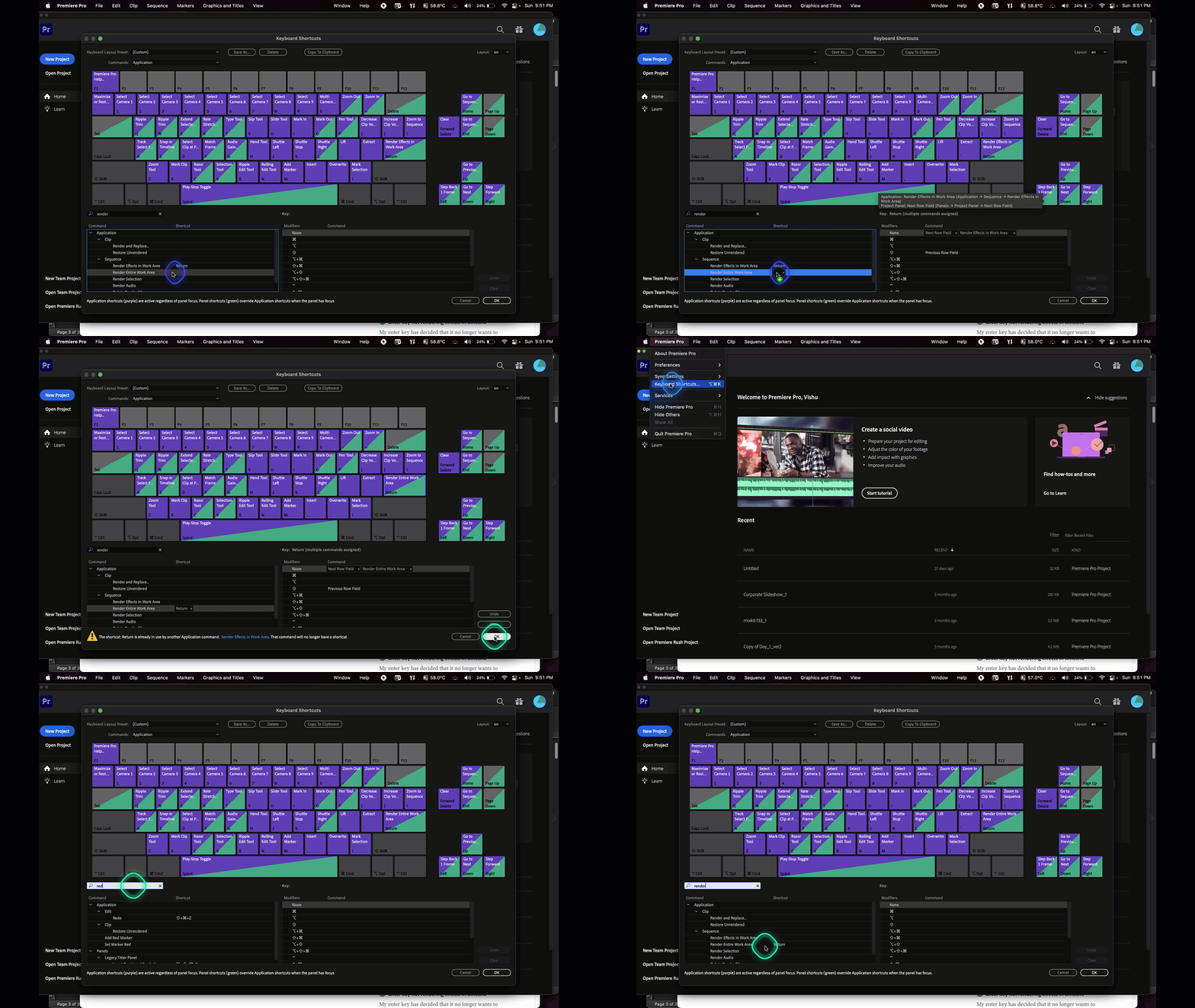
You can do so by dragging the enter/return key from the keyboard layout to the shortcut command.

For Reference check the below screen recording  - 


1 reply

Vishu_Aggarwal
Vishu_AggarwalCorrect answer
Participating Frequently
July 31, 2022

You can do so by dragging the enter/return key from the keyboard layout to the shortcut command.

For Reference check the below screen recording  - 


Vishu AggarwalAdobe Certified Instructor, Professional and Expert
FPS_FishAuthor
Inspiring
July 31, 2022

Super swesome. Solved a different issue I was having with the space bar. Thnak you!