October 25, 2022
Answered

How to XDCAM IMX, IMX 30

  • October 25, 2022
  • 1 reply
  • 3134 views

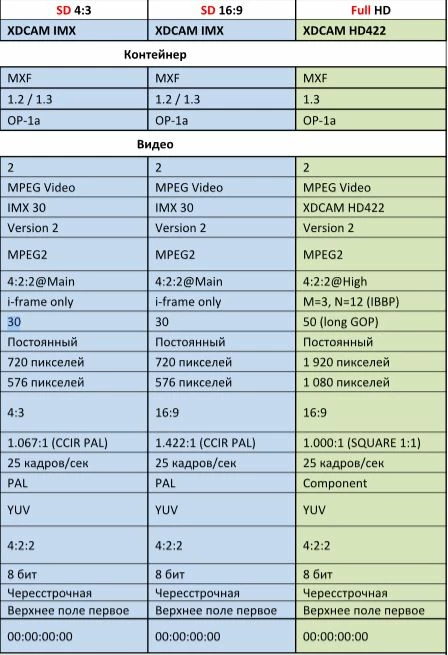
Good day, community! I have a question that may seem silly, but I'm not sure, that I correctly understand the video instructions for the TV format, for the following requirements:

  1. Format - XDCAM IMX
  2. Container - MXF
  3. Codec - MPEG Video
  4. Codec name - IMX 30
  5. Bitrate - 30
  6. Frame rate - 30 fps
  7. Aspect ratio - 4:3 (720-576)
  8. Bitrate type - constant
  9. Format Profile - 4:2:2


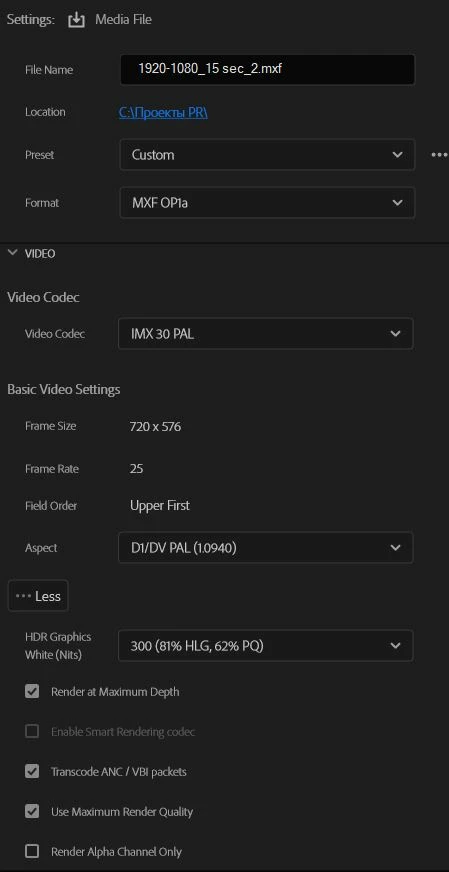
Here is the preset, that I chose directly in Premiere Pro:

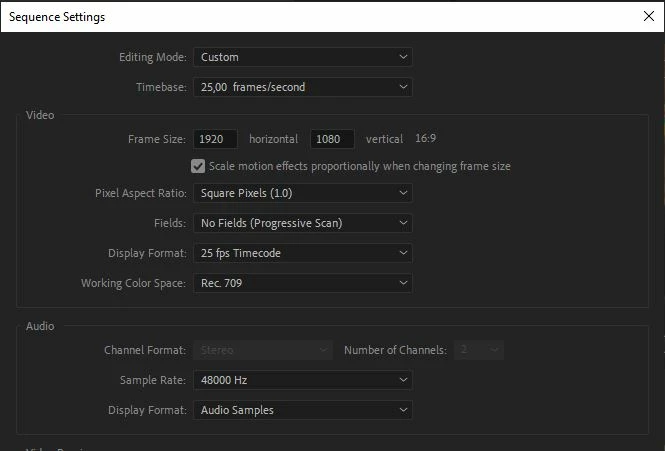
And sequence settings in the project:
BUT! And this is the main problem, the output video quality is terrible. 
I have attached some examples from the video. A static image with text in the final looks 
especially awful.
 
Could you, please, suggest me what I am doing wrong?


This topic has been closed for replies.
Correct answer Richard M Knight
Here are the parameters of the source material:
Type: MXF
File Size: 2,14 GB
Image Size: 4096 x 2160
Frame Rate: 25,00
Source Audio Format: 48000 Hz - 24-bit - 4 Channels
Project Audio Format: 48000 Hz - 32 bit floating point - 4 Channels
Total Duration: 00:00:18:04
Pixel Aspect Ratio: 1,0
Alpha: None

You're down sizing progressive 4k footage to interlaced sd, that's never going to look the best. Try and get the tv station to accept progressive HD.

1 reply

Community Expert
October 25, 2022

Your sequence settings are for HD 25fps progressive and you are exporting at SD quality at 25fps interlaced, both 'PAL' settings. You list 30fps as the required framerate, do you mean 25?

October 25, 2022

Yes. I mean 25. My fault. So, if I understand correctly,

I need to rebuild the entire sequence under 4-3 PAL?

Community Expert
October 25, 2022

What is the size and framerate settings of your source material? Is it HD 25P. I would duplicate your HD sequence and then change the settings of the copy to: