puguhlanggeng
Participating Frequently
November 12, 2020
Answered

I cant import audio / audio source is greyed out

  • November 12, 2020
  • 1 reply
  • 4617 views

hi, i really need your help,

i cant import any audio to premiere pro,

when i dragged the clip, it is only the video were dragged, but not the audio.

my prepro were working fine the day before, i believe its my fault (accidentally clicked something i dont know)

hope i can find solutions

This topic has been closed for replies.
Correct answer Ann Bens

here it is


Rename file and try and import via Media Browser.

Dont do anything until fully conformed.

1 reply

Community Expert
November 12, 2020

If you select on a piece of audio media in your Project Panel, or a video clip with Audio, it'll activate the Source Patching buttons.

If you have the media opened in the Source Monitor and there's no option to pull audio, check to make sure that it imported with audio at all.

puguhlanggeng
Participating Frequently
November 12, 2020

I think I only imported the video. I do various ways such as importing from ''file'' and also ''drag and drop'' the media but still no audio. if there is any other suggest i would really appreciate it

Ann Bens
Community Expert
Community Expert
November 12, 2020

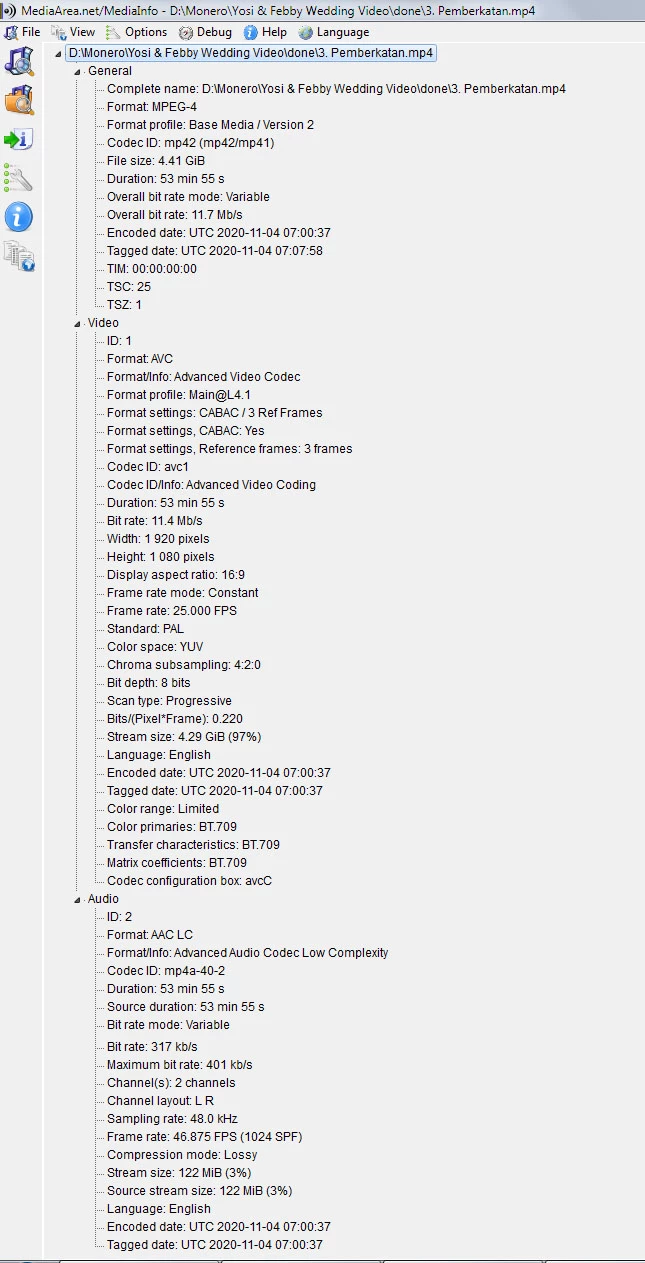
Post screenshot of clip in Mediainfo in treeview.