


New Participant
July 13, 2020
Question

Imported graphic does not load as a layer in Essential Graphics panel

  • July 13, 2020
  • 3 replies
  • 1344 views

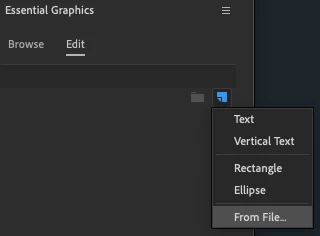
When I load a .png file in the Essential Graphics panel, it always loads into my project panel. I've read that having graphics in the Essential Graphics panel is the only way to align it to the workspace, but how can I do that if it doesn't load there?


This topic has been closed for replies.

3 replies

R Neil Haugen
Brainiac
July 14, 2020

The only way I can get the behavior you're getting is if I add a png file to a timeline from the Project panel bin. That totally matches what you're showing, no Graphics section appears up in the Effect Control Panel nor line in the EGP panel's layer stack.


If I use the EGP New Item option to add an item From File, navigate to and select the PNG from that dialog, the EGP creates a new graphics clip for that png file on my sequence. (Yes, it also appears in the Project panel but ignore it.)


When I then simply click that graphics clip in the timeline, created by the EGP, then the EGP layer stack becomes active, and the ECP now shows at top a Graphics section with that graphics clip.


This is the default, expected behavior. This is a puzzlement.


Neil


Everyone's mileage always varies ...
New Participant
July 15, 2020

I'll try this again with different image formats to see if that's the issue. 


UPDATE (7/23/20): Still no success after importing a JPG in the EGP. 😞 

R Neil Haugen
Brainiac
July 13, 2020

Huh.


Earlier I was on my laptop. I'm at the studio, and tried two different versions of Premiere, current & 2019. In both, as below, I use the 'add/from file' option in the EGP, and it adds the png file I locate in the drop-down dialog to the Project panel and the Program monitor as well as of course makes a graphic layer clip in the timeline.


When I click on that new graphic layer in the timeline, the Edit panel of the EGP shows as below. I'm really puzzled as to what's going on in your system.


Neil


Everyone's mileage always varies ...
New Participant
July 14, 2020

I did those exact steps, but nothing ever appears in the EGP. I even tossed in a random graphic and still nothing. I'm on the latest version also. Guess I'll have to eyeball everything for now. Thanks for your help, Neil.

R Neil Haugen
Brainiac
July 13, 2020

PNG files are added (as an asset) to the Project file, yes.


Now after adding the graphic, click on the created EGP graphics layer on your timeline, and it also appears in the EGP layer stack. And you can align using either the EGP controls or the ECP controls as always.


Neil


Everyone's mileage always varies ...
New Participant
July 13, 2020

Thanks for the reply, Neil. 


I did just as you described, but the layer never shows up in the EGP.