Exit
  • Global community
    • Language:
      • Deutsch
      • English
      • Español
      • Français
      • Português
  • 日本語コミュニティ
  • 한국 커뮤니티
0

Input Contract Violation Occurred Error - HELP!

Participant ,
Aug 06, 2019 Aug 06, 2019

Hi,

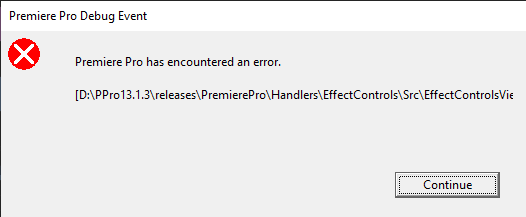
I am editing a project and have suddenly received the following error:

The error message extends past the frames of the box and i cant copy the text so thats the best i can do.

Once i click continue, it then has another error message saying "input Contract Violation Occurred".

Premiere then shuts down, but does attempt to save the project.

The next issue is that when i open the project up, the play-head is in the same spot that the error occurred as it has been saved when it was crashing, and so the error pops up again and i cant access the project.


Luckily i have auto-saved project files that i can refer back to, however each time i get near some specific files this error pops up.

These files are used in various other sequences that have the same properties and this error does not occur. So it wouldn't make sense for it to be the file itself, or it would happen in those other instances.

Any idea why this error occurs?

Specs:

Processor Intel(R) Core(TM) i9-9940X CPU @ 3.30GHz

RAM: 64gb

NVIDIA Quadro RTX 5000

Windows 10

Prem 13.1.3

1.6K
Translate
Report
Community guidelines
Be kind and respectful, give credit to the original source of content, and search for duplicates before posting. Learn more
community guidelines
Guest
Aug 07, 2019 Aug 07, 2019

Go into your Event Viewer (a Windows built in application), look in the Hardware Events and Application logs, and see if you find anything interesting. Please also post the mediainfo of the file in question.

Translate
Report
Community guidelines
Be kind and respectful, give credit to the original source of content, and search for duplicates before posting. Learn more
community guidelines
Participant ,
Aug 12, 2019 Aug 12, 2019

So i wouldn't say i know exactly what im looking for.

However, i went back and made the error occur, then check the Event Viewer.

In the Administrative Events tab it had the following:

The program Adobe Premiere Pro.exe version 13.1.3.44 stopped interacting with Windows and was closed. To see if more information about the problem is available, check the problem history in the Security and Maintenance control panel.

Process ID: 66c

Start Time: 01d5509a6d1e81e6

Termination Time: 61

Application Path: C:\Program Files\Adobe\Adobe Premiere Pro CC 2019\Adobe Premiere Pro.exe

Report Id: a68d173f-298d-45a3-8de1-f8ef5da41a34

Faulting package full name:

Faulting package-relative application ID:

Hang type: Cross-thread

Event ID: 1002

Task Category: 101

And in the Security Section was this:

A user's local group membership was enumerated.

Which is different to everything else.

Translate
Report
Community guidelines
Be kind and respectful, give credit to the original source of content, and search for duplicates before posting. Learn more
community guidelines
Guest
Aug 12, 2019 Aug 12, 2019
LATEST

Great start. Was that in the General tab? There might be more in the Details of that event.

I usually look through Application for Premiere stuff, and System for Nvidia / OS stuff.

Just noticed that you're on 13.1.3, does this happen on 13.1.4? What about the media that you're working on, what codec and such?

Also check in %AppData%\Roaming\Adobe\Premiere Pro\13.0\logs and see if there's anything there.

Translate
Report
Community guidelines
Be kind and respectful, give credit to the original source of content, and search for duplicates before posting. Learn more
community guidelines