


New Participant
November 24, 2017
Answered

Insert button of the source window doen`t work windows 10

  • November 24, 2017
  • 2 replies
  • 2402 views

I opened a Clip inside the source window and want to add it to the timeline. Drag and drop works fine. But if I want to do the same thing using either the insert button nor the overwrite button work. I can press them but nothing happens. Normal behaviour? Sorry for my english I`m german. Any advice is welcome. I have the latest version of premiere pro cc2018.

I searched this Forum but couldn`t find anything. Did I oversee somethig?
    This topic has been closed for replies.
    Correct answer R Neil Haugen

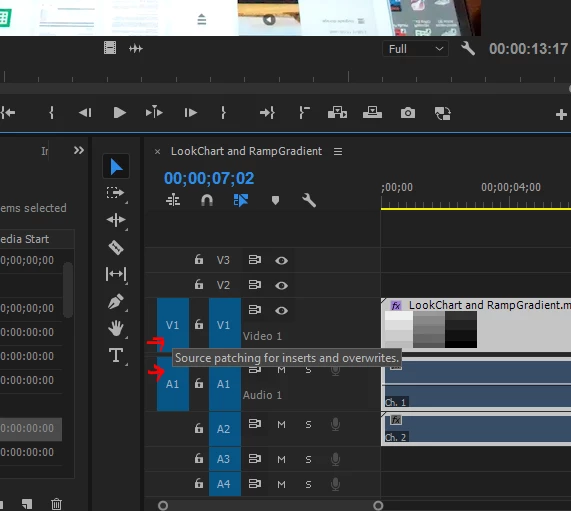
    It's the targeting blocks you don't have set correctly. The line of rectangles of the far left of the timeline header block are Source targets, for moving clip or audio from the Source monitor to the timeline via insert or overwrite operations. You need to have one of the far left blocks toggled to blue for video and one for audio to get both to land on the sequence.

    Those two far left blue blocks need to be blue. Click on them if they're charcoal.

    The right set of blocks are for targeting track movements within a sequence.

    Neil

    2 replies

    R Neil Haugen
    R Neil HaugenCorrect answer
    Brainiac
    November 24, 2017

    It's the targeting blocks you don't have set correctly. The line of rectangles of the far left of the timeline header block are Source targets, for moving clip or audio from the Source monitor to the timeline via insert or overwrite operations. You need to have one of the far left blocks toggled to blue for video and one for audio to get both to land on the sequence.

    Those two far left blue blocks need to be blue. Click on them if they're charcoal.

    The right set of blocks are for targeting track movements within a sequence.

    Neil

    Everyone's mileage always varies ...
    TeleboticAuthor
    New Participant
    November 25, 2017

    Yes that was it. Thanks a lot it solved my problem. Much appreciated

    R Neil Haugen
    Brainiac
    November 25, 2017

    Happy to help. You wouldn't believe how many times I've had to wonder that the heck ... then went, oh, duh ...

    Neil

    Everyone's mileage always varies ...
    New Participant
    November 24, 2017

    Sometimes the transport controls on the viewer and program monitors just seem to stop working. Try using the "+" sign like you want to add another button to the window, close it, and see if the buttons start working. If not, drag something to the bar (like safe areas/zones), close it, and then try again.

    Hope this helps.