

Participant
May 2, 2022
해결됨

inserting footage from the source monitor to the timeline is being magnified ,why?

  • May 2, 2022
  • 4 답변들
  • 590 조회

inserting footage from the source monitor to the timeline is being magnified ,why?

이 주제는 답변이 닫혔습니다.
최고의 답변: MyerPj

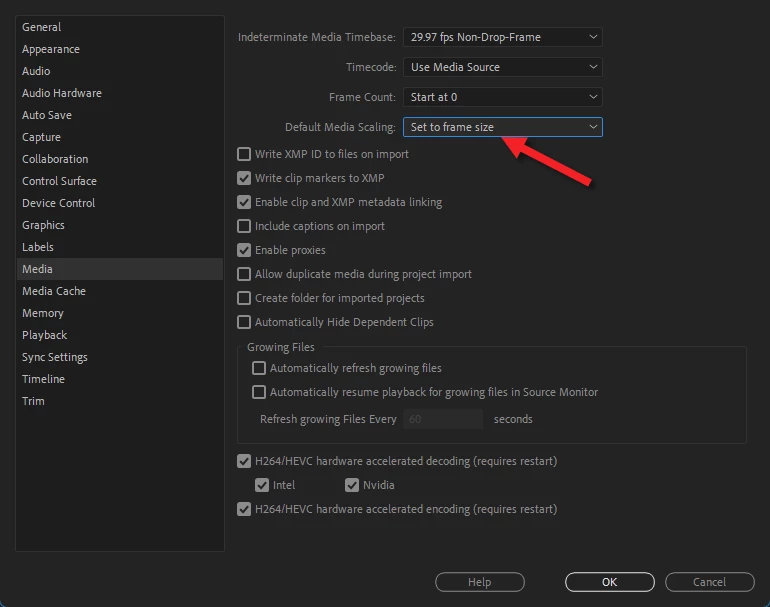
Likely you have a different sequence size vs video file. Like if you have a 4K clip (UHD) and a 1920x1080p timeline/sequence, by defualt it will come in 'magnified.


There's an option I leave set, which works well for that situation, be sure to use "SET" and not 'scale" to frame size.


4 답변

Participant
December 1, 2023

I'm having the same problem, but I can't access the Sequence Settings. Like the option is greyed out. If it helps, I am on a mac mini school computer. 

MyerPj
Community Expert
Community Expert
December 1, 2023

Same reply as above. If you have 4k footage and are working in a 1080p sequence, it comes in 'magnified' unless in the prefs (as above) you have default scaling as 'Set to Frame Size'. In the timeline, you can right-click the clip and select 'Set to Frame Size', same thing, it just happens by default if you have the pref set.


Harold Silva
Community Expert
Community Expert
September 20, 2023

Si la opción que te dieron como solución no esta activa solo das cllick derecho y seleccionas set to frame size en los clips.

Harold Silva B.
MyerPj
Community Expert
MyerPjCommunity Expert답변
Community Expert
May 2, 2022

Likely you have a different sequence size vs video file. Like if you have a 4K clip (UHD) and a 1920x1080p timeline/sequence, by defualt it will come in 'magnified.


There's an option I leave set, which works well for that situation, be sure to use "SET" and not 'scale" to frame size.


Legend
May 2, 2022

Is the frame size of the clip in the source monitor the same as the frame size of the sequence in the timeline?