

TristanNYC
Known Participant
November 1, 2019
Answered

iPhone 11 Pro (X, Xs) 4k 60FPS HEVC will not work in Adobe Premiere CC 2019/2020

  • November 1, 2019
  • 20 replies
  • 27791 views

iPhone 11 Pro 4k 60FPS HEVC will not work in Adobe Premiere CC 2019/2020


Here is the issue:


The issue is that Adobe Premiere will never play the full clip if you try to move around the timeline. It will always revert back to the beginning of the clip and glitch out. It imports no issus, but playing on the timeline is wrong and glitched, even saving a project with the file in it crashes Adobe quite often. The codec is Apple's H265 which is the ONLY codec you can use to shoot 4K 60FPS. This means I have to run all footage through handbrake to even begin to use it in Premiere, this has been an issue for years. I just wish this response from their twitter was more than damage control and them actually having a solution.


This is where Adobe says this is not working as intended: https://twitter.com/tristanpope/status/1187219976249368576?s=20


This is the example video of it messing up: https://twitter.com/tristanpope/status/1187408078741868545?s=20


And this is the reply I got back from customer support saying it doesn't happen for them, which I find highly unlikely:
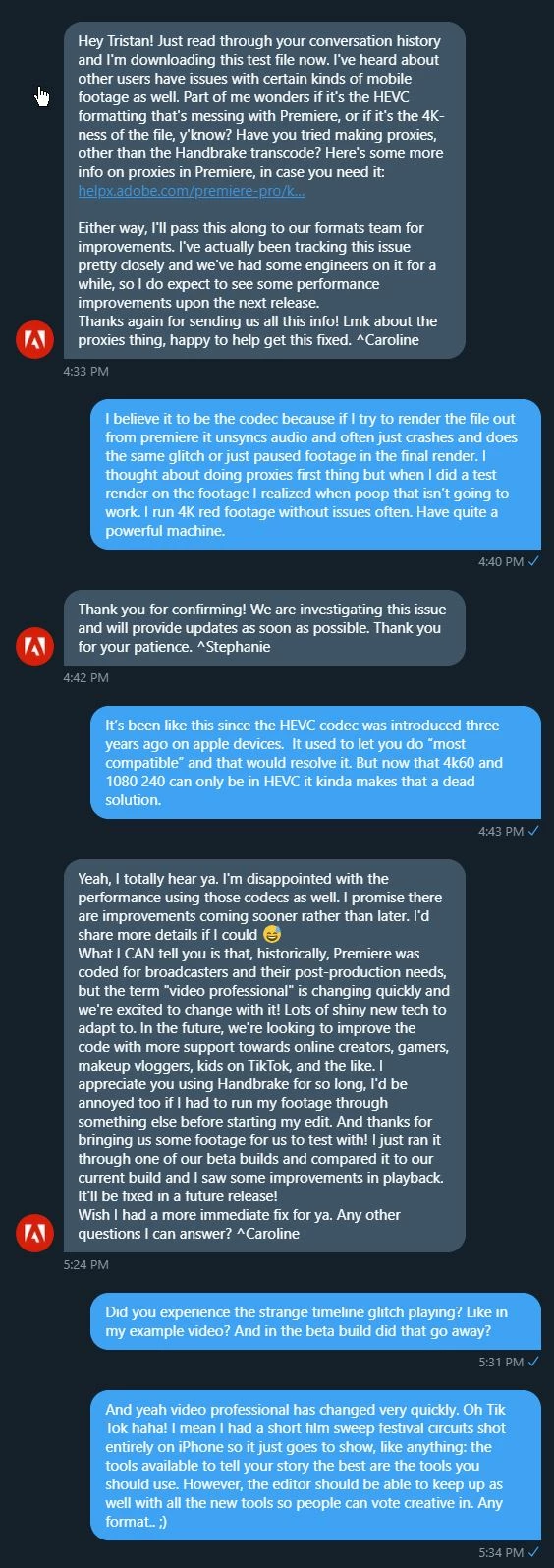
 

Thanks for sharing the file! I have downloaded it and I'm going to share it with the engineering team for testing. I'll update you as soon as I hear from them. ^Shivangi
Oct 24, 2019, 5:34 PM
Thank you.
Oct 24, 2019, 5:35 PM
 
Thank you for remaining so positive and calm while our experts is working on it. ^Shailesh
Oct 24, 2019, 5:40 PM
 
Hi Tristan. sorry for the delay in response. We're unable to reproduce the issue at our end even with the sample file you shared. Would you mind contacting our phone/chat support team? We'll need to troubleshoot the issue further by hopping on to a remote session. Here's the link: https://helpx.adobe.com/contact.html Let us know. ^Shivangi
 
--------
So yeah... any fixes in the pipeline?
 
 
-----UPDATE from Twitter Support-----
 
-----------------UPDATE with Adobe 2020------------

a rep on Twitter who tried it on Mac and Mac it seems to be fine, because it is Apple's codec afterall wrapping the H.265. 
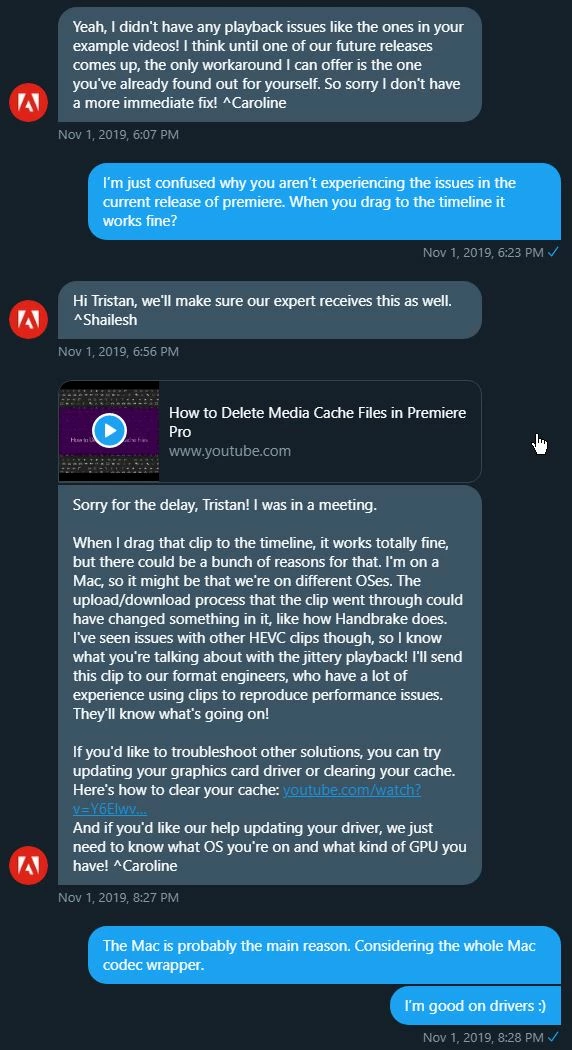
 

However on the PC side of things, you cannot play nor edit HEVC from an iPhone on a PC in Premiere without the issue shown above. Nor can you export or render without the issue above or a crash. Nor can you save a file without a crash 9/10 times. 


Adobe 2020 on a PC:

Example 1: https://twitter.com/tristanpope/status/1193680897087885312

Example 2: https://twitter.com/tristanpope/status/1193684072171741189


UPDATE 11/18/2019:
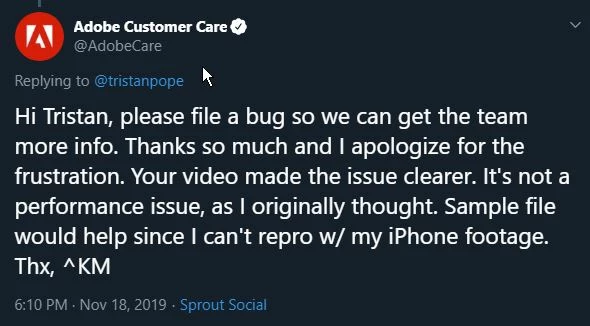
Support on twitter confirmed this as a bug not just a performance issue. I have sent them a file to work with via their twitter chat for testing.


I have gone ahead and filed a bug and pointed it to this thread as rewritting all of this would be impossible in the new format as requested as well: https://adobe-video.uservoice.com/forums/911233-premiere-pro/suggestions/39063853-bug-report-iphone-11-pro-4k-60fps-hevc-will-not-w\


UPDATE 12/13/2019:

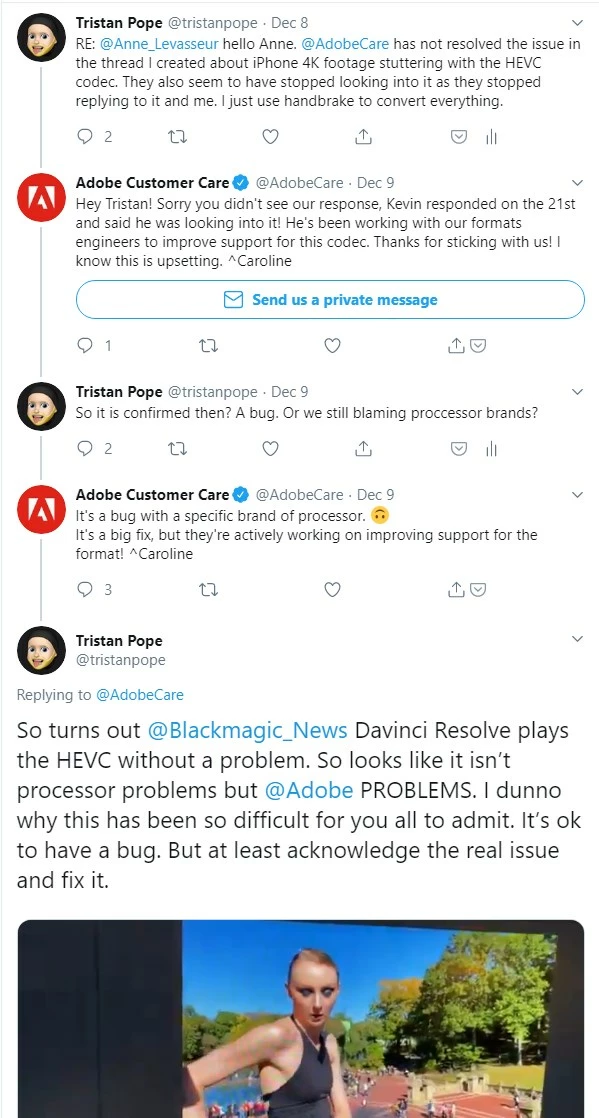
I went on a bit of a rant on twitter. Cause twitter and this not being at least acknowledges as a bug and how it has been dealt with is so unprofessional.
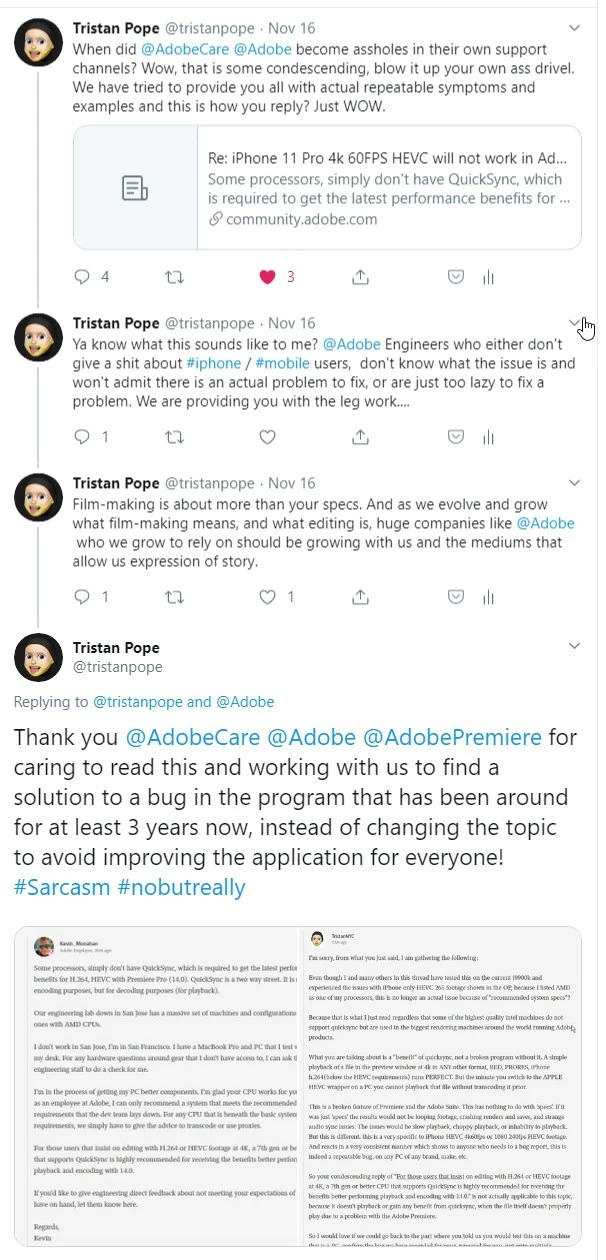
 

^KM is useless. And seems to not actually understand how computers work.
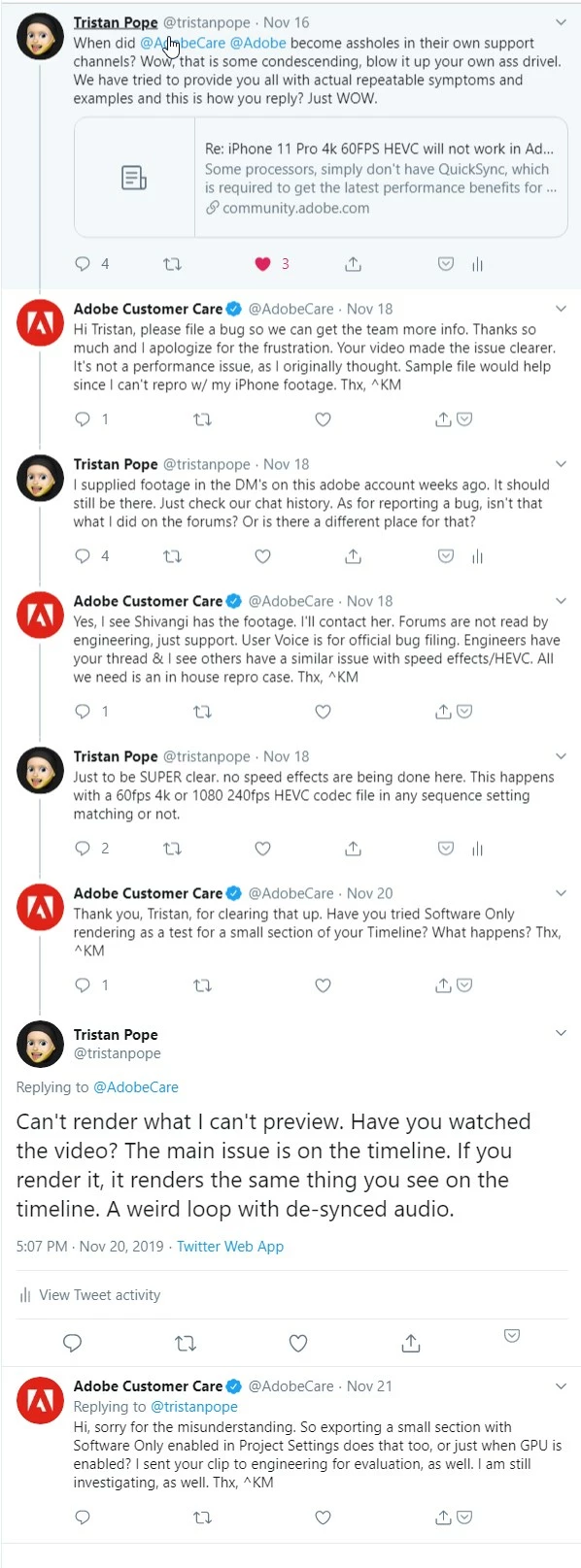
 

Caroline is nicer but has now gone with the "it is processor based" approach.


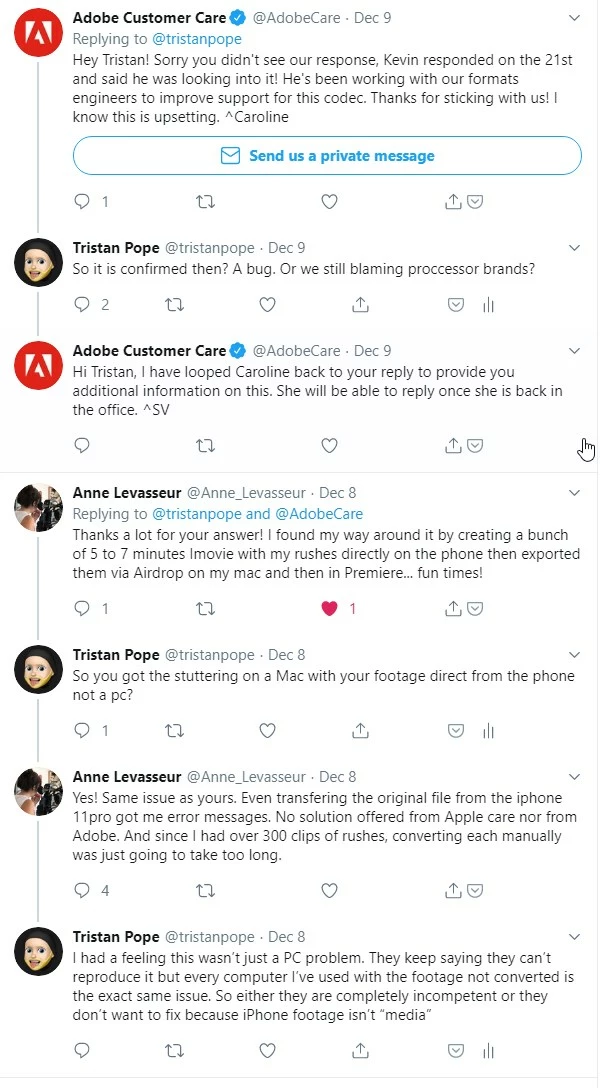
A mac user contacted me about having the same issue.
 

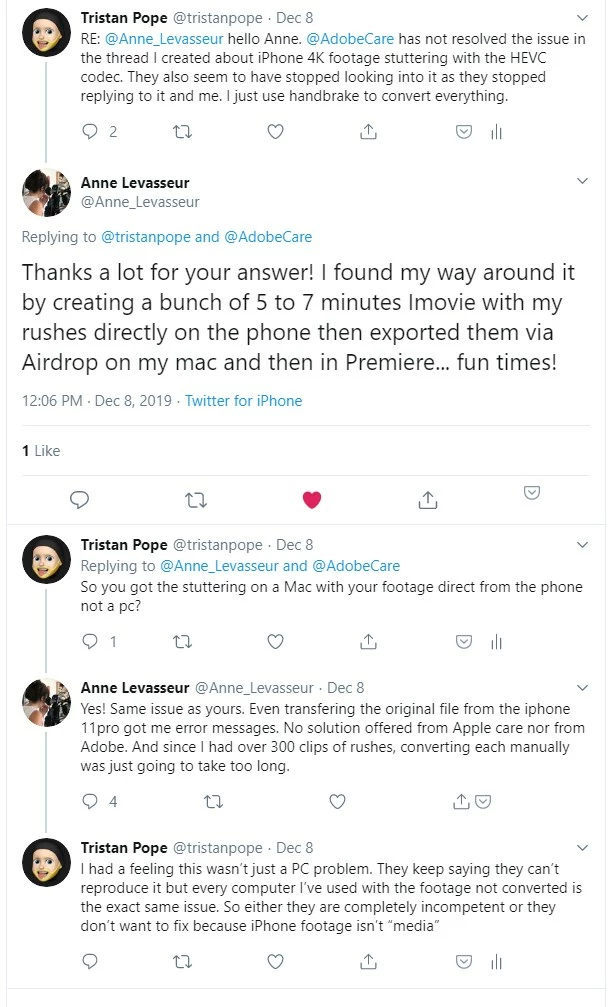
Seems like someone on a MAC is also having the same issues. So with this and my multiple processor tests seems that debunks the AMD is the devil because we are in bed with Intel theory.
 

Adobe seems to forget that filmmaking is also journalist and majority of journalists use mobile these days.


I cannot replicate that issue on an old Macbook running a VERY slow Intel processor from 2013, which according to Kevin should be my issue on the faster intel processor listed below in my spec list...
but as you can see on the macbook with a much slower processor from intel... no issues just a little laggy: https://twitter.com/tristanpope/status/1204218684341997578


What I would like to see is someone who has a mac with both Windows and MacOS on it and can bootcamp into windows to test a premiere timeline then ON the SAME machine do it on the MacOS side of things. I bet you on the Bootcamp side you will get the stutter and on the Mac side you will not. But I am not going to do all the work for Adobe here. Stupid I had to do this much research when they have an example file that doesn't work already sent by me.


UPDATED VIDEO on how to work with this footage until ADOBE decides to care about it's paying SERVICE, Davinci Resolve on the same computer loaded at the same time, running the footage without a hitch:


https://twitter.com/tristanpope/status/1204999383378477056


Best part is this is free software for most, and a one time purcahse if you need the extra features. But our payed for every month software giant can't seem to handle it and the excuses are just piling on rather than just admitting to the bug and giving us an ETA on when it will be fixed.


So that's it folks, this is where we are at. Davinci Resolve or Handbrake until Adobe get's a clue.


STATUS UPDATE JAN 8 2020:

Still not working or fixed.

Tested on multiple computers. These are some of their specs:


First rig:

**Chassis:** MAINGEAR RUSH Chassis with Tempered Glass Sides, Brushed Black Aluminum

**Motherboard:** ASUS Rampage V Extreme X99

**Processor:** Intel® CoreT i7 6900X 8-core 3.0GHz/3.5GHz Turbo 20MB L3 Cache w/ HyperThreading (16 Threads) OC to 4.2GHz

**Processor Cooling:** [Closed Loop Liquid Cooling] MAINGEAR EPIC 240 Supercooler

**Memory:** 32GB HyperX® FURYT DDR4- 2666 (4x8GB) [QUAD Channel]

**Graphics Card:** Nvidia 1080 GTX Founders Edition

**Power Supply:** 860 Watt Corsair® Professional Digital Series AX860 80+ Platinum

**Operating System Drive:** [M.2 NVME SSD] 512GB Samsung® 950 Pro [2,500MB/s Sequential Reads]
**Hard Drive Bay Two:** 1 gig samsung ssd


Second Rig:

**Chassis:** MAINGEAR VYBE Mk. V - Matte White

**Motherboard:** ASUS ROG Crosshair VIII Hero w/ WIFI - ATX

**Processor:** AMD RYZEN 9 3900X 12-Core 4.6 GHz

**Processor Cooling:** [Closed Loop Liquid Cooling] MAINGEAR EPIC 240 Supercooler

**Memory:** 64GB HyperX Predator RGB DDR4 3200MHz (4x16GB)

**Graphics Card:** NVIDIA GeForce RTX 2080 Ti 11GB GDDR6

**Power Supply:** EVGA 850W SuperNOVA P2 80+ PLATINUM

**Operating System Drive:** 2TB Corsair MP600 Gen4 M.2 NVMe

**Hard Drive Bay Two:** 2TB Corsair MP600 Gen4 M.2 NVMe

**Hard Drive Bay Three:** 1TB Samsung SSD

**Hard Drive Bay Four:** 2TB HHD WD Scratch Disk for Cloud Services

**Operating System:** Microsoft Windows 10 Pro - 64-bit, OEM

Third Rig:
**Chassis: MAINGEAR VYBE Mk. V - Matte Black 

**Motherboard: MSI Pro Carbon AC ATX

**Processor: Intel Core i9-9900K 8-Core 3.6 GHz (5.0 GHz Turbo)

**Processor Cooling: [Closed Loop Liquid Cooling] MAINGEAR Epic 240 

**Memory: 64GB HyperX Predator RGB DDR4 3200MHz (4x16GB) 

**Graphics Card: NVIDIA GeForce RTX 2080 Ti 11GB GDDR6

**Power Supply: BeQuiet 850W Gold

**Operating System Drive: 2TB Western Digital Black SN750 M.2 NVMe SSD [up to 3,400 MB/s] (SSD-WD-SN750-2TB-M.2-NVMe (WDS200T3X0C))

**M.2 NVMe SSD: 2TB Western Digital Black SN750 M.2 NVMe SSD [up to 3,400 MB/s] (SSD-WD-SN750-2TB-M.2-NVMe (WDS200T3X0C))

**Operating System: Microsoft Windows 10 Home - 64-bit, OEM 


This topic has been closed for replies.
Correct answer Nate McFadden

14.3 latest build


Were you using a new project from scratch or existing ones? The fix (shipped in 14.2) requires deleting the media cache if using previously existing projects. I'm guessing you might have already tried this, but wanted to make sure. (Filing a new bug now and trying to isolate as much as possible.)


Thanks for your help. 


20 replies

TristanNYC
Known Participant
January 9, 2020

Update: January 8th 2020

Still not resolved or fixed. No word from any of the support team.

meaganm36063337
Inspiring
January 9, 2020

I have heard since that Mac operators are not having the problem, not sure what software they're using. I have also heard from PC users who can't even get the footage off their phones to view let alone import into the software. 

TristanNYC
Known Participant
January 9, 2020

Yes this issue doesn't exist on a mac using adobe. I have an example I posted of it running just fine on a 2013 macbook pro. This is PC only. And to get the footage to your PC from iPhone the best way is dropbox or google drive. The windows import is broken and doesn't play well nor does it maintain the frame rates. 


TristanNYC
Known Participant
December 13, 2019

I have gone ahead and updated the main thread with all updates.

Things I have found:

Davinci Resolve on the same computer works fine with the format: https://twitter.com/tristanpope/status/1204999383378477056


Adobe is throwing this whole "It is the processor" bull at us just to make an excuse.

We would be happy with "This is a bug, we will fix it" but we get excuses and blamed instead. Like the great Steve Jobs, "You're not holding it right".


A mac user has also reported an issue: 

Adobe seems to forget that filmmaking is also journalist and majority of journalists use mobile these days.


I cannot replicate that issue on an old Macbook running a VERY slow Intel processor from 2013, which according to Kevin should be my issue on the faster intel processor listed above, but as you can see on the macbook no issues just a little laggy: https://twitter.com/tristanpope/status/1204218684341997578


What I would like to see is someone who has a mac with both Windows and MacOS on it and can bootcamp into windows to test a premiere timeline then ON the SAME machine do it on the MacOS side of things. I bet you on the Bootcamp side you will get the stutter and on the Mac side you will not. But I am not going to do all the work for Adobe here. Stupid I had to do this much research when they have an example file that doesn't work already sent by me.


So that's it folks, this is where we are at. Davinci Resolve or Handbrake until Adobe get's a clue.

meaganm36063337
Inspiring
December 14, 2019

Thanks for the update guys, I got around it by dropping the footage on the timeline, not touching it, not even sneezing while it was on there and rendering the raw footage out. As soon as I trim or replay the errors start and those errors come out in the render. By dropping them on (I did about 10 at a time) I was able to use them in my project no worries. But what an absolute joke.

I also tried in Corel Video Editor (a cheap alternative) on a laptop and didn't have the glitch problem.

I saw the responses you were getting earlier Tristan, and I feel your frustration. Adobe are not free products, they're supposed to be high end. Instead of looking for problems at the user end, they need to consider that everyone having the issue has no other problems, so while iPhone is not their product, I think it's their job to stay up to date with latest technology. I am a videographer and frequently work with 4K footage and my specs handle it no problem, despite being an older system (5 years). I wondering if the problem is existing for Samsung and other phones?


Kevin-Monahan
Community Manager
Community Manager
November 13, 2019

Hey Tristan,
I reported your issue. Thanks and sorry for the frustration.


I have a feeling that you are running computers that might not handle this footage as other computers may do. Rig 1 is a 6th gen processor that is underpowered for the format. We recommend a 7th gen processor or better for 4K and above. See system requirements. Rig 2 has AMD processors. Here is where I may need to do more digging. However, I suspect your issue for this rig is that AMD CPUs may not support hardware decoding of this specific format. I am investigating if a) AMD does or does not support hardware decoding and b) Determining if hardware decoding very crucial for this format to perform well. I imagine it is crucial. I know that Intel Xeon CPUs do not support it. I noticed at least one other customer on this thread that falls under one or both of these constraints. 


I will continue investigating and will report back on what I find. We definitely want to get to the bottom of this issue to help you out and to prevent others from having problems. 

Thanks so much for your patience and feedback.


Regards,
Kevin

Kevin Monahan - Sr. Community and Engagement Strategist – Adobe Pro Video and Audio
TristanNYC
Known Participant
November 13, 2019

I have gone ahead and tested this for you. I have a family member with an i9900k Intel Rig. Same stutter / replay issues reported. 


I am quite taken back that you all don't have one PC over there with the latest AMD and INTEL processors and are blaming them for this issue. My 3900x machine renders out footage faster than any intel based machine on the market currently in the public sector of processors. As well it has playback of 4k with ease. 


Quick Sync, which I am assuming you are referring to, is mostly for rendering purposes not for timeline playback at the basic level, which your GPU will take control of if you enable CUDA anyway.

Also the i6900x not being powerful enough, not sure where you get that from. I can timeline play pur 4k footage from any input and be fine. Sure you may get a little lag here and there, but not the glitches reported in this thread.


So while I appreciate what you are saying, I must disagree with your reasoning, this has been happening for 3 or 4 generations of iPhone which owuld put the i6900x in higher than average specs for adobe 2019 2018 etc where it was still an issue with the HEVC codec. 


I am glad you will continue to investigate, might I suggest starting with putting the file on a PC with premiere, then when you see the issue for yourself, regardless of system specs, you take it from there instead of speculation? Shoot even the guy above seems to be having issues on an i9900k system. Which is WAY above and beyond what ya need for this. 

Ann Bens
Community Expert
Community Expert
November 13, 2019

-simple phone camera video-


Actually it is not: heavily compressed footage especially H.265 is a pita to edit.

ztodd
Known Participant
November 13, 2019

I believe Marcin_Wisniewski's point (If I can make assumptinos) is 'this why we pay for adobe products'.  Yes these programs are professional tools and yes 'professional equipment is better'.  But not all of us have the luxury of that type of equipment.  


I appreciate the comments and help from community and support staff, but this is a problem that the adobe product and development teams should not be overlooking.  I'm sure they have data on the type of devices their users use, so saying 'standard iOS settings isn't accepteable'... isn't acceptable.

Participant
November 13, 2019

I am having exacly the same problem with video from iPhone Xs.

Video recorded on iPhone Xs (iOS 13.2) using DJI Mimo App at 4K 30fps (mostly), some using the camera's native app at 24fps and 30fps

Moved video files to Win 10 using iCloud Files. I am working on Win 10 Pro (current version) + Premiere Pro (latest version)
As for hardware the i work on Intel i9 9900K, 32GB RAM, RTX 2080 Super . I worked on an NVMe disk and NVMe + SSD.

Other programs playback footage no problem. Encoding it to different format with Handbrake also is no problem.
This is unacceptable for me. To see such big and professional company have problem with simple phone camera video is blows my mind.


I found out that after changing video settings in Camera App Properties (iOS -> Settings->Format) from High Efficient to Most compatible allows me to work on those new recorded vides no problem at all.

Base on that I assume that HEVC is problem here.

TristanNYC
Known Participant
November 13, 2019

You are correct it is the HEVC that is causing the issue. But you cannot record 4k 60fps or 240fps 1080 in anything but HEVC. This started with the iPhone X. And still has not been resolved.

Kevin-Monahan
Community Manager
Community Manager
November 10, 2019

Tristan,

I'm not sure what's going on there, but I advise you to try a brand new CC2020 project. My underpowered Mac can import and playback this format (albeit with dropped frames - my system is outdated). You can also try transcoding it to an editing codec for best results. HEVC is not the best format to edit with. In fact, it's the absolute worst performing codec there is. So, no, you do not need to introduce Handbrake to your workflow. After you try the new version, do let us know if it solved your issue or not.


Thanks,
Kevin

Kevin Monahan - Sr. Community and Engagement Strategist – Adobe Pro Video and Audio
TristanNYC
Known Participant
November 11, 2019

I highly recommend you try this on a PC. I already spoke with a rep on Twitter who tried it on Mac and Mac it seems to be fine, because it is Apple's codec afterall wrapping the H.265. 


"HEVC is not the best format to edit with. In fact, it's the absolute worst performing codec there is. So, no, you do not need to introduce Handbrake to your workflow."


What? If it is the worst codec to work with ever, then yes you do need to encode it with handbrake on every platform even if it did work then...


But this is not the issue at hand, the issue at hand is that you cannot play nor edit HEVC from an iPhone on a PC in Premiere without the issue shown above. Nor can you export or render without the issue above or a crash. Nor can you save a file without a crash 9/10 times. 


Adobe 2020 on a PC:

Example 1: https://twitter.com/tristanpope/status/1193680897087885312

Example 2: https://twitter.com/tristanpope/status/1193684072171741189

Still not working.


Kevin-Monahan
Community Manager
Community Manager
November 11, 2019

Sure, I'll give trying a PC when I get back into the shop tomorrow. I'm on my day off today. That said, I thought Shivangi tried this and she's definitely on PC.


Sorry, that sentence is not exactly clear. What I meant to say was to transcode using Media Encoder and furthermore use an intermediate codec like ProRes or Cineform. Not H.264 with Handbrake.

After I try your issue out on PC, I'll let you know the results. OK?

In the meantime, try Media Encoder, please.

Thanks,
Kevin

Kevin Monahan - Sr. Community and Engagement Strategist – Adobe Pro Video and Audio
ztodd
Known Participant
November 10, 2019

TristanNYC I have the same issue.  Been trying to capture it via Screenspresso but whenever I attempt to it renders fine in Adobe.  Was trying to write up my own post on this (https://community.adobe.com/t5/Premiere-Pro/Premiere-Pro-2020-Stutter-and-Incorrect-Clipping-Render-Maybe/td-p/10728730) but yours is much more comprehensive. 


https://twitter.com/ZTodd/status/1193666579298443266?s=20 <-- thats the best I could do for side by side, top shot is the file playing through, bottom shot is the file in premiere resetting about 2/3 of the way through


Kevin-Monahan
Community Manager
Community Manager
November 10, 2019

Try the new version ztodd.


Kevin

Kevin Monahan - Sr. Community and Engagement Strategist – Adobe Pro Video and Audio
TristanNYC
Known Participant
November 11, 2019

He is using the new version...

Ann Bens
Community Expert
Community Expert
November 1, 2019

Can you upload a short clip to test.

TristanNYC
Known Participant
November 1, 2019

I uploaded a clip to Adobe's team already, but they said there was no issue..... I would prefer to keep that for them only as these are unedited files I don't want out in the public for a film and the candid nature of the directing in the sound. I can send it privately however.

Kevin-Monahan
Community Manager
Community Manager
November 10, 2019

Tristan,

If Shivangi over at Adobe had no issue, it might be some issue with your hardware. The only thing unusual is your AMD processor. I wonder if that could possibly be at the heart of the issue since it's the only thing significantly different since we've tested both on PC and Mac from our side. Possible to try this media in a CC2020 project. If that doesn't work, perhaps you can try the files on another machine and report back.


Thanks,
Kevin

Kevin Monahan - Sr. Community and Engagement Strategist – Adobe Pro Video and Audio
Community Expert
November 1, 2019

Are you working with footage you ran through Handbrake, or is that the raw HEVC footage in the timeline?


JVK

-------------------------------------------------------------------------JVK | Editor/Designer/Software Instructor. Pr, Ae, Ch, Ps, Ai, Id
TristanNYC
Known Participant
November 1, 2019

When I convert it through Handbrake to be H.264 it works fine.

If I use the raw out of iPhone .mov H265 it will not work.

Video referenced above.


According to Adobe's twitter, this is not what should be happening:

Ann Bens
Community Expert
Community Expert
November 1, 2019

You need a beefy machine to edit H.265 realtime. And I mean beefy...........

TristanNYC
Known Participant
November 1, 2019

This is my rig. 

Motherboard: ASUS ROG Crosshair VIII Hero w/ WIFI - ATX
Processor: AMD RYZEN 9 3900X 12-Core 4.6 GHz
Processor Cooling: [Closed Loop Liquid Cooling] 240mm Corsair H100i
Memory: 64GB HyperX Predator RGB DDR4 3200MHz (4x16GB)
Graphics Card: NVIDIA GeForce RTX 2080 Ti 11GB GDDR6
Power Supply: EVGA 850W SuperNOVA P2 80+ PLATINUM
Operating System Drive: 2TB Corsair MP600 Gen4 M.2 NVMe
seocond drive M.2 NVMe SSD: 2TB Corsair MP600 Gen4 M.2 NVMe
Operating System: Microsoft Windows 10 Pro - 64-bit, OEM

Think this consitutes as beefy. Also the issues shown in that video is obviously a software not a hardware issue.