


Participant
January 8, 2025
Answered

iPhone footage ends up with black border

  • January 8, 2025
  • 2 replies
  • 458 views

Hi,

I'm editing iPhone footage to use on Instagram and I can't figure out how to NOT end up with a vertical black border on either side, once it's on Intsa. I've uploaded clips dircetly from the same phone and there have been no borders - the video filled the whole screen.


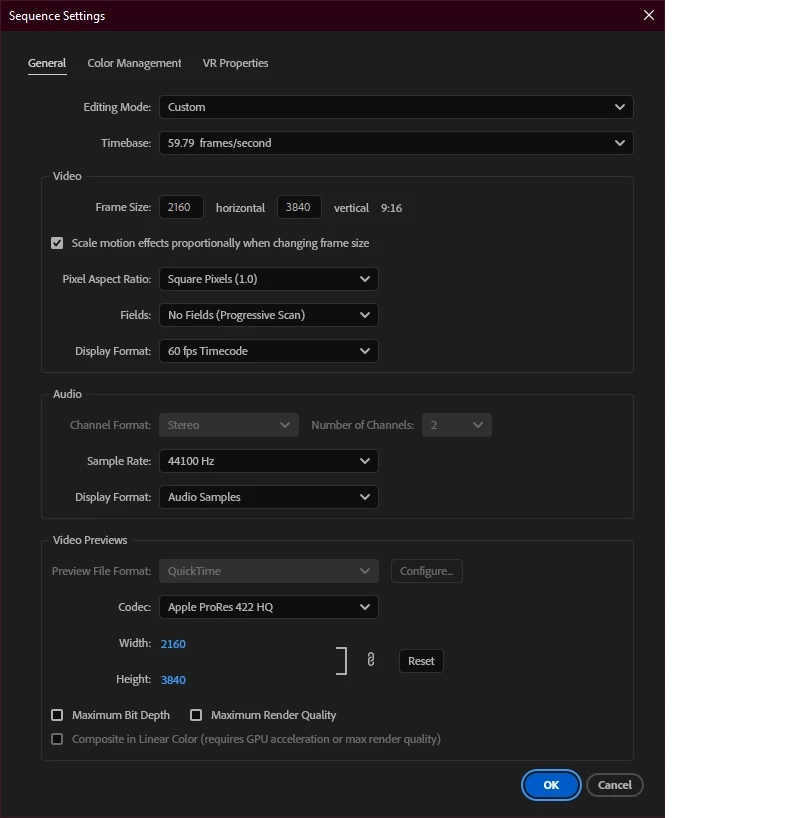
I imported the iPhone footage and dragged it to the sequence timeline and Premiere automatically created these settings for it:
 

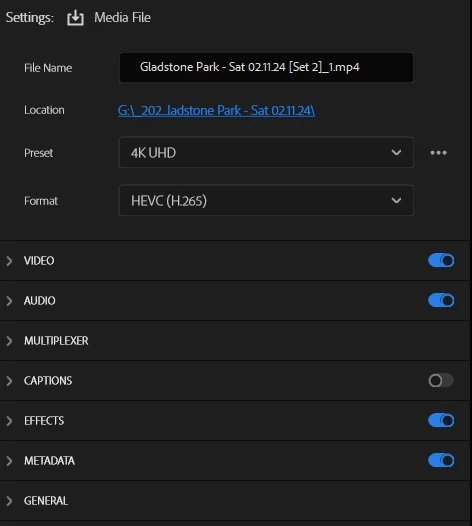
And I used these output settings:
 

I also tried 'Scale to frame size' which usually fixes this problem for me but this time it made no difference.


I'm using an iPhone 14 and the latest version of Premiere Pro (as of this post).

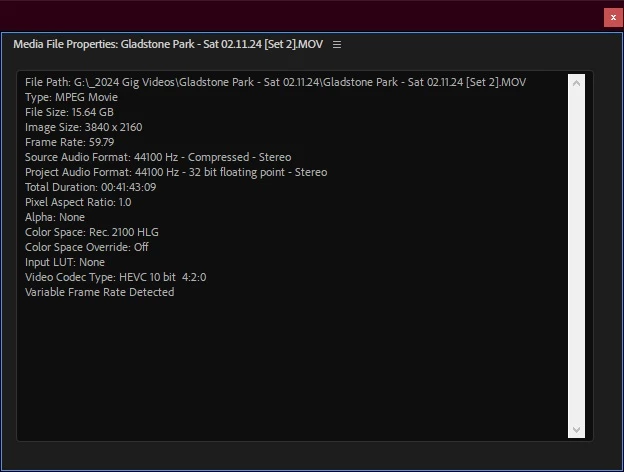
My iPhone footage has the following properties:
 

Any help would be greatly appreciated!


Thanks in advance,

Mark

Correct answer Sumeet Kumar Choubey

Hi Mark, 

As suggested by Averdahl, to solve this issue, you would need to match the frame size of both the sequence and the export. You can change the Frame size under Sequence Settings to match the Frame size of your media. Hope it helps. Let us know if you have any questions.


Thanks,

Sumeet

2 replies

Sumeet Kumar ChoubeyCommunity ManagerCorrect answer
Community Manager
January 8, 2025

Hi Mark, 

As suggested by Averdahl, to solve this issue, you would need to match the frame size of both the sequence and the export. You can change the Frame size under Sequence Settings to match the Frame size of your media. Hope it helps. Let us know if you have any questions.


Thanks,

Sumeet

Participant
January 8, 2025

Thank you too - much appreciated!

Averdahl
Community Expert
Community Expert
January 8, 2025

Your footage is 3840x2160 but you are using a sequence that is 2160x3840 and export using the 4K UHD Preset that is 3840x2160.


Thumb of rule is to use a sequence that matches your source footage, iow sequence set to 3840x2160 and export to 3840x2160 as well. Any deviation from this will give you black borders. 

Participant
January 8, 2025

That really helped! Thanks so much 🙂