


Cobra
Inspiring
January 26, 2022
Answered

Is there an option to enable different LABELS for each clip I am adding to the timeline?

  • January 26, 2022
  • 2 replies
  • 818 views

I was wandering why all labels have the SAME color when you import them to the timeline? Same color for video, same color for audio. And left clicking selecting a color for EACH individual clip is a waste of time. Isn't there any option to automate and give a different color in any clip I import into the timeline?
This topic has been closed for replies.
Correct answer Ann Bens

The default colors have a meaning.

All blue means video and audio are linked.

purple for video only

green for audio only

etc.

You can give the clips a color in the Project window

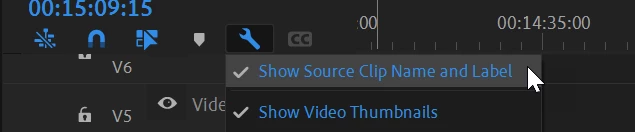
This feature turned on will make the colors reflect in the timelines

2 replies

Ann Bens
Community Expert
Ann BensCommunity ExpertCorrect answer
Community Expert
January 26, 2022

The default colors have a meaning.

All blue means video and audio are linked.

purple for video only

green for audio only

etc.

You can give the clips a color in the Project window

This feature turned on will make the colors reflect in the timelines

Vishu_Aggarwal
Participating Frequently
January 26, 2022

Premiere pro by default assign different colors to different type of media's for example video with audio will be in "Iris color". Only Audio will be in "Caribbean" etc. 

Please check the following premiere pro preference -  Edit > Preferences > Label Colors (Windows) or Premiere Pro > Preferences > Label Colors (Mac OS) command.


Vishu AggarwalAdobe Certified Instructor, Professional and Expert