
Participant
June 13, 2017
Question

Jagged edges for new Essential Graphics Titler

  • June 13, 2017
  • 24 replies
  • 18159 views

Hi guys,

I'm running Premiere Pro 11.1.0 (222 Build).

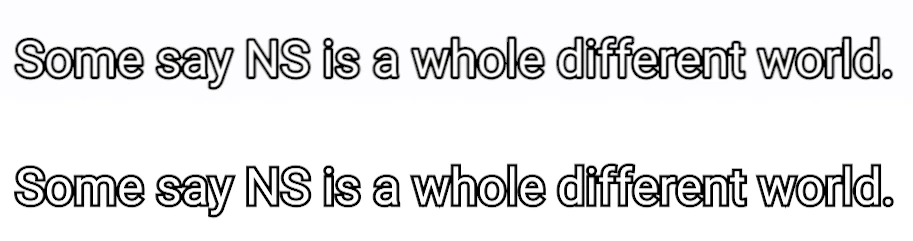
I find that the Essential Graphics Titler is producing titles with more jagged edges as compared to the Legacy Titler. Same issue over a few machines. Is there a fix for this? See the screengrab attached.

(Above text is legacy, below is the new essential graphics.)
This topic has been closed for replies.

24 replies

Kevin-Monahan
Community Manager
Community Manager
June 16, 2017

Hi kiraelyw,

Sorry, you're having trouble with the quality of text graphics using the Essential Graphics panel.

I find that the Essential Graphics Titler is producing titles with more jagged edges as compared to the Legacy Titler. Same issue over a few machines. Is there a fix for this?

I am not seeing any issue with text quality and the Essential Graphics panel. I think your issue might be related to certain fonts. Do you experience this issue with all fonts or just some of them? Give us more details and we'll try to assist you through this problem.

Thanks,
Kevin

Kevin Monahan - Sr. Community and Engagement Strategist – Adobe Pro Video and Audio
jstrawn
Legend
June 16, 2017

In order to improve performance, Pr does not anti-alias Graphic layers during scrubbing and playback at Full Resolution. To see your text or other layers at High Quality (which is not the same as Full Resolution), expand the Program Monitor's settings menu (looks like a wrench) and check on High Quality.

You can run this way to all the time if you wish, but you will lose some performance benefits as a result. So it may be best to leave HQ off, especially if you are working with long blocks of text or using many text, shape and clip layers together. It will not affect the render quality of your final export, but it will affect render previews for your sequence.

Participating Frequently
June 16, 2017

In my experience it happens no matter what font you're using and inconsistently with the same font.  It also happens in the final render. There's no issue in scrubbing or playback in the interface really.

Participating Frequently
June 15, 2017

I'm experiencing this same issue.  Zooming in to the program window at 200% reveals the hidden problem that you will find during render.  You can tell that they are not all the same quality and were made exactly the same and not modified.

June 14, 2017

Same for me here !

With the new essential graphics I have jagged edges but only on some titles in the same timeline. I used the exact same steps to create them but one is jagged and the other not... Even tried to duplicate the good one but when I place it gets jagged again.

Version of Premiere: 2017.1.1

kulpreet singh
Inspiring
June 13, 2017

Hi KiraelyW,

Thanks for reporting this issue, I will surely look into this.

Which font are you testing with, have you tried with different fonts?

I also need information about your system specs & your OS details.

-Kulpreet Singh

Participant
June 13, 2017

Hi Kulpreet,

Thanks for the quick reply.

I don't have access to my Mac Pro at work, but it should be a 2016 model. My Macbook Pro as follows:

Was using Roboto font, however tried a few others and seems to have the same aliasing issue.

kulpreet singh
Inspiring
June 13, 2017

Thanks for the additional information, KiraelyW.

I will research on this and will reply back.

-Kulpreet Singh