
Participant
June 13, 2017
Question

Jagged edges for new Essential Graphics Titler

  • June 13, 2017
  • 24 replies
  • 18151 views

Hi guys,

I'm running Premiere Pro 11.1.0 (222 Build).

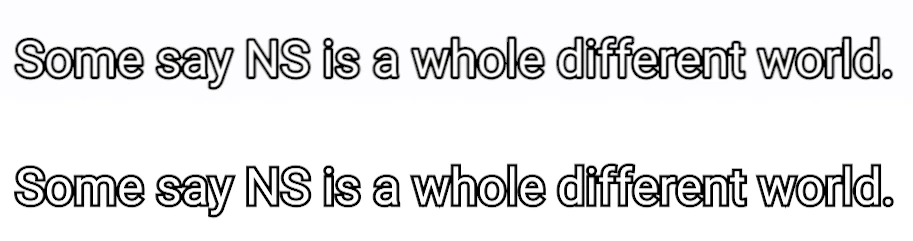
I find that the Essential Graphics Titler is producing titles with more jagged edges as compared to the Legacy Titler. Same issue over a few machines. Is there a fix for this? See the screengrab attached.

(Above text is legacy, below is the new essential graphics.)
This topic has been closed for replies.

24 replies

Participant
February 25, 2019

This problem is incredibly frustrating! I decided to go around the Essential Graphics shadow by adding an Effects drop shadow, and because it was a bit too subtle I doubled it up. This literally resulted in my text drifting diagonally across the screen as if I'd put a set of position key frames, but only on export. The preview looks fine and animates in place as it was intended to.

It also seemed to connect and respond to a clip cut on the layer below (when the clip changes on V1, the title on V2 jumps - Why would this even happen? I guess the drop shadow is responsive to what's beneath it in a sense, but this sort of behaviour is so random.

The only other effect on it is a Gaussian Blur which I used to improve the animation.

I then tried to add the Channel Blur potential fix which resulted in random diagonal animation again.

Clearly the algorithms and coding behind the Essential Graphics functionality is not entirely stable, it's really disappointing as someone who used to use AE to do all titles - I've now invested all my time into Premiere based titles on this project and the quality is a let down.

I'm now going to work without any shadow (despite visibility issues) and will possibly place my titles into another sequence to be subbed in once the rest of the video is set, then I will add a drop shadow to that entire sequence so it isn't directly connected to my Essential Graphics, and hopefully this will provide a better result.

Very frustrating to need to deal with problems that simply shouldn't exist.

xy-maps
Participant
September 10, 2018

I had exactly the same bug under the current Premiere version at work (12.1.1) and was able to fix it because "Composite in linear color" was not selected in the sequence settings.

Afterwards the problem was completely gone. I hope I can help you with that.

Participating Frequently
August 24, 2018

Same here, happens only on render, jagged text, I tried the solutions and didn't work for me, I'm using just the text tool. Premiere v12

supercommerce
Participant
July 12, 2018

Same problem here.

The jagged edges occur in the preview AND when I export.

I created texts from the tools panels. Most of them were right but four of them (but each one was an edited copy from the other) got jagged.

- No shadows.

- Tried preview with high quality.

- Sequence settings matched what some people suggested above (ARRI Cinema with progressive field).

What I did to solve the problem was recreate the problematic titles from the top menu. But it seems very annoying .. too much bugs on Premiere.

Participating Frequently
April 30, 2018

I was having the same issue randomly when using drop shadow...but then everything got fixed simply by checking "toggle animation for scale" in the essential graphics panel. See screenshot. Hopefully this will help some of you.

CoryTV
Participating Frequently
May 8, 2018

This Voodoo fix absolutely worked for me. I'm glad you got out there in front of this one for me.

jstrawn
Legend
March 27, 2018

Ideally A thing (like one text layer inside one graphic) for the sake of reliability. Thanks in advance.

Inspiring
March 23, 2018

I continue to get notifications in this thread,so I thought I’d post although I’m sure it will not solve everyone’s issue. All my problems with essential graphics text looking jagged went away when I changed my sequence settings to progressive rather than upper field first. I don’t know why assets Created in premiere like text would work better with some sequence settings than others, but I have tried many combinations of sequence settings a and it seems that the titles agree more with progressive scan.  Hope that helps someone somewhere

-A

Participating Frequently
March 14, 2018

Still waiting for Adobe to give us any additional info...

I simply hope that one of the future updates does NOT take away the Legacy Titler before correcting this issue.

*knocks on wood*

Participant
March 23, 2018

This is outrageous. I had not run into this problem until today. I've lost hours of my day and will need to delay a delivery to a client. Extremely bad experience and absolute crickets from Adobe.

Participant
February 26, 2018

Hello everyone! I made it work on my PC!!! Had the same issue, but somehow I fixed it, I did two things:

1. Updated all my drivers( I used Driver Booster) - it's a free software.

2. Updated Premiere Pro from  Adobe Premiere Pro CC 2017 (v11.1.1) Multilingual Update 3 to Adobe Premiere Pro CC 2017 (v11.1.2) Multilingual Update 4

One of these two things definitely helped, not sure which one, though! Good luck!

Participant
January 17, 2018

I have this problem too. I notice it randomly occurs with shadow applied and ONLY when softness is applied. I've tried different strengths of softness right down to '1' but the 'jaggys' still happen. If I deselect softness the text is sharp, if I remove shadow the text is sharp. So definitely a bug. Any news on getting it sorted Adobe? This thread has been going since November 2017.