


June 14, 2017
Answered

Label Color timeline same that project window

  • June 14, 2017
  • 6 replies
  • 15104 views

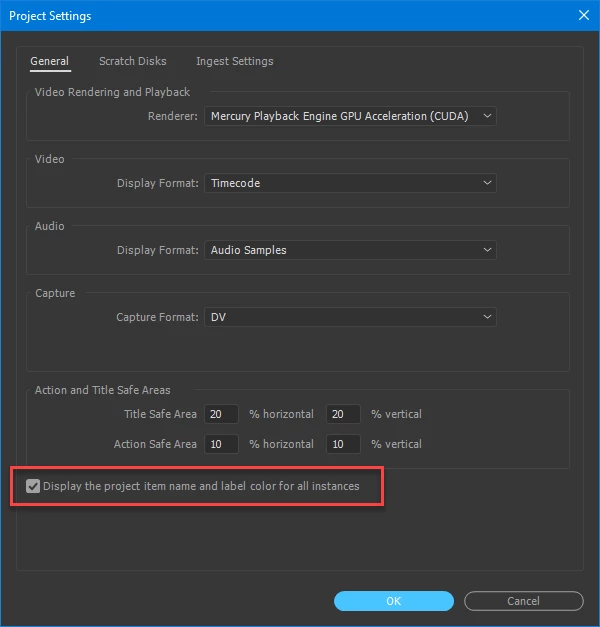
Hi guys, does anyone know if there is a preference or option that enables to change a label color for a clip in the project window and sync the change in label for the timelines?

I got a lot of timelines with preselect footage coming from different cameras, I'm editing in 2K and some footage is in 4K I would love to have a different color label for all 4K so when editing I know I can resize those clips in my 2k edit.

So the easiest way I found to do it is in project window add the metadata of frame size, and change label color for all 4K files. Problem is that it doesn't change to the timelines I already work on the edits. It just keep the color for new timelines when dropping the clips on the timeline.

Thanks

Adobe Premiere CC 2017.1.1

!
Correct answer Ann Bens

6 replies

mooncatcher_
New Participant
December 30, 2021

It has been changed in 2022. Now it is in the sequence options

mooncatcher_
New Participant
December 30, 2021

Peter A Lund
Inspiring
May 4, 2023

Man, 


this is such a mess! 

for a very important tool to get a massive project structured. 

I am stuned by the way this is handled. 

rejoice in the way things are.When you realize there is nothing lacking,the whole world belongs to you.>Be content with what you have;rejoice in the way things are.When you realize there is nothing lacking,the whole world belongs to you.
R Neil Haugen
Brainiac
December 2, 2020

onionbacon,


As soon as you set that to "all instances" ... you would then change the labels for every other editor working in that Production at that time. You're only thinking about editors working sequentially ... one at at time. But for many Production workers, there are multiple people working in that production at the same time.


So you're working away, with things as you want them, and suddenly while working the color labels change! I'm not seeing that as building good relations between editors.


And even for one-at-a-time work, it would be annoying if every time you went back to the production, you had to reset the color labels ... and had lost all the organizational  work you'd done through them.


It's quite a nut to crack.


Neil

Everyone's mileage always varies ...
Known Participant
October 9, 2020

Hi, was using this a lot, now am in a Production, and I can't see this tick box anymore? Does this trick not work in a Production? Please how do I get label colours to follow from bin to timeline in a Production? Thank you

R Neil Haugen
Brainiac
October 9, 2020

This was by design removed from the Productions setup. As they figured that this could cause immense data mangling in projects, every editor messing up what other editors want to have for their lable markers.


It would be nice to have an over-ride and that has been requested. You could certainly go to the UserVoice system and search and up-vote any of the requests there for this, I think there are some. Or of course create a new request.


Neil

Everyone's mileage always varies ...
Known Participant
October 9, 2020

Thanks Neil, I can see the complications but would be great if a way could be found

naderf61746027
New Participant
March 8, 2018

That's F@ tick box! I was looking for it for a loooong time.

Thank you,

Peter A Lund
Inspiring
November 30, 2019

Hey, 


does anybody disagree with me: It should be default that those colors change and if I don´t want them to update this is:


Tickbox with Text: If Name and Display Colors for all Insances can be different (click here) . 


I had to google why my color lable that I change does not display in the timline like I would expect it. 

Ask any Cutter worldwide and I promise you that this is the way this should work. 

And I am curious, why thius was changed or why someone would like to have it the other way around. 

And thanxs to the community that I could find it. 🙂

thanxs 


Peter 

munic 

cold and rainy 

rejoice in the way things are.When you realize there is nothing lacking,the whole world belongs to you.>Be content with what you have;rejoice in the way things are.When you realize there is nothing lacking,the whole world belongs to you.
Participating Frequently
October 10, 2017

The Project Setting Window has changed.. where do I find this on the latest version of Premiere CC2017?

Inspiring
October 10, 2017

File > Project Settings > General

MtD

Ann Bens
Ann BensCorrect answer
Community Expert
June 14, 2017

June 14, 2017

That is it!!! thanks a lot !!!!!!!

you just save me lot of time with one click!