


- Home
- Premiere Pro
- Discussions
- Re: Layer disappears and re-appears randomly!>?!?
- Re: Layer disappears and re-appears randomly!>?!?
Layer disappears and re-appears randomly!>?!?

Copy link to clipboard
Copied
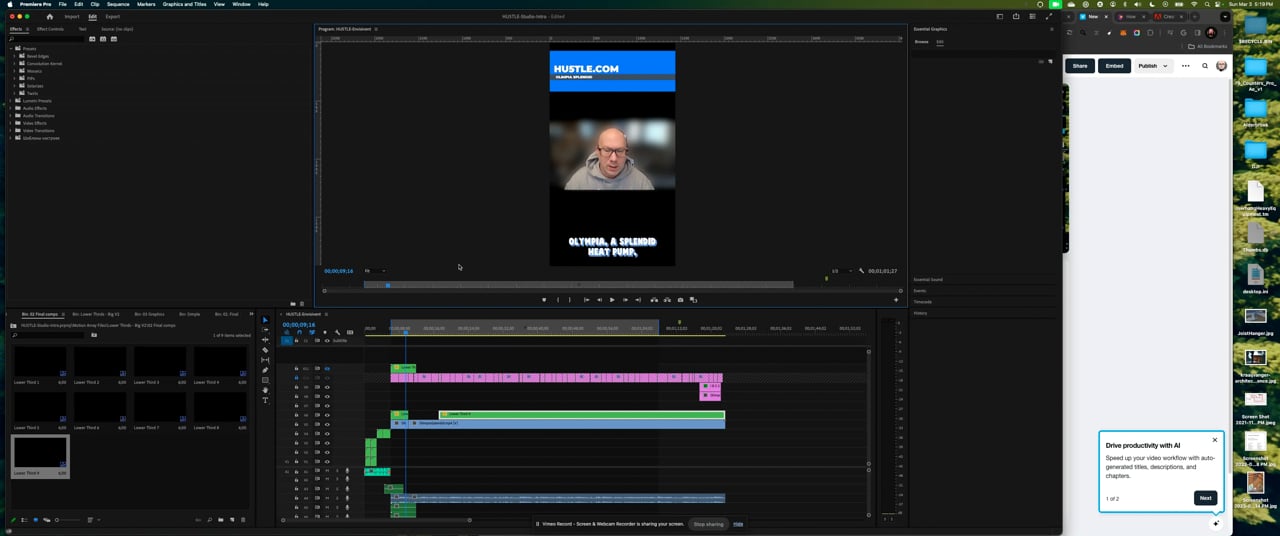
Please take a look at the video of the issue. When I try and create a "hold" frame the layer randomly disappears and re-appears and I have no idea as to why. Please watch video repro!


 28
Replies
28
28
Replies
28


Copy link to clipboard
Copied
Hi @jvalal,
Thanks for the screen movie. You're trying to add a frame hold to a nested sequence and getting unexpected behavior. Is that right? Can you show us a screenshot of the contents of the nest? At the end of the Timeline, are those adjustment layers?
I apologize, but seeing what's going on without the project file to inspect makes it difficult to assist. Feel free to PM me a link to your project file (no media necessary), and I can have the product team take a closer look.
Thanks,
Kevin
Copy link to clipboard
Copied
Hi @Kevin-Monahan This is not a nested sequence. Not sure where you see that. There are no adjustment layers. I'll PM you the project. Thanks!
Copy link to clipboard
Copied
Hello @jvalal,
The item that you were doing a frame hold on is a nest. All the green clips in your sequence are nests. I'll message you via PM now that you have sent me the project file. Thank you for that!
Kevin
Copy link to clipboard
Copied
understand more how that's happened?
Copy link to clipboard
Copied
OK. Perhaps this is workflow-related. Yes, these are all nests. You don't need to create nested sequences unless you want to group more than one element. For single graphics, place the raw graphic in the track above the video. No frame hold needed, just extend the graphic by trimming it. I hope the advice helps.
Copy link to clipboard
Copied
All I'm doing is dragging the effect into my timeline. I don't select nest at all. In fact when I right click the effect "nest" is still an option, which gives the impression that it isn't nested, unless the user can double nest.
Copy link to clipboard
Copied
Hi,
@jvalal wrote:
How is that so? I never selected "nest" for those clips? Can you help me
understand more how that's happened? .
Do you mean you are dragging the nested sequence (containing graphics) to the timeline? A Photoshop file can be imported as a multi-layered graphic, and it appears as a nest; so that's definitely possible.
Try just dragging a raw .jpg or .png version of the file in (or flatten the PSD file in Photoshop). You can probably get things working better after that.
Cheers,
Kevin
Copy link to clipboard
Copied
when I right click the effect "nest" is still an option, which gives the impression that it isn't nested, unless the user can double nest.

You can definitely nest a nest. You may need to do that when creating specific effects or composites. Cropping a speed-effected clip with warp stabilizer effect applied might come under that category.
Thanks,
Kevin
Copy link to clipboard
Copied
@Kevin-Monahan
No, I mean I'm simply dragging the graphic on to the timeline "over" the video to achieve the lower thirds. Then I do the hold frame, because I can't drag the graphic out to the end of the timeline as that option isn't available. Because I can only drag the clip so far. the total graphic length is X seconds, which includes an into and outtro. I want to hold the graphic "open" so that it's visible throughout the whole video then the outro at the end of the video at the time I choose. Linked below is a video showing my workflow and the issue.
note
1. I don't actively nest anything. I simply drag the lower thirds onto my timeline, add captions, convert captions to graphics and that's when the issue materializes
2. I don't have the ability to drag the clip to the end
3. The Closed captioning seems to be causing the issue, but it's not consistent, as noted in my video.
Please take a few minutes to see the issue, because we still don't have a solution or reason as to why CC is obscuring the layers in some places and not others.
https://www.youtube.com/watch?v=xTjpl4ZI8Ro
Thanks
Jason

Copy link to clipboard
Copied
Hey Jason,
Thanks for the movie. I hope I can help you. In the timeline, select the "lower third" - and then show us a screenshot of the Effect Controls panel. Are there any animated properties there?
Then, in the timeline, double-click the lower third "nest." A new sequence should open. Show us a screenshot of what you see in the timeline there. Is the main blue graphic inside the nest?
Is that "lower third" a third-party graphic? It does not appear to be a .mogrt. It's the thing that's not quite right with your workflow. Is it from Envato Elements? You may have to customize that graphic to make it lock into your existing workflow.
If you can't trim a nested sequence and extend it in the main sequence, the content inside the nest has not been extended, either. You've got to step inside the nest and trim it out there; then, you can drag it out in the main sequence.
To extend a simple graphic, you should not have to do a frame hold; only if it's inside a nest, as you have shown. Check it out; the feature is disabled for standard graphics files.
Hope to assist you ASAP.
Thanks,
Kevin
Copy link to clipboard
Copied
Morning Kevin -
Yes, they are "nested". In After Effects these are referred to as compistions and pre-comps, so when you say nested it's foreign to me. It sure would help some if Adobe standardized some of the taxonomy across your products. I'm sure there are pros and cons to this approach.
Back to business
Yes, not envato, but Motion Array. See video showing the "nesting" in Premiere. It sounds like I need to make one of those layers longer? But not sure how that effects the Closed Captions blocking the layer.
Copy link to clipboard
Copied
Hi Jason,
Good morning. Thanks for the screen movie. I tried to reproduce the situation and came up with the following.
- After splicing the nest into two and placing the second half at the end of your sequence for the fly-out, move back to the first nest at the beginning of the sequence. Don't make a frame hold; you'll extend instead in step 3.
- Access Position keyframes by selecting the nest and clicking the Effect Controls tab. Delete the third and fourth keyframes representing the fly-out.
- Double-click on the nest to access the source graphic. Extend the source graphic for as long as you need it to for covering the duration of the lower third until the fly-out occurs with the second nest.
- Extend the first nest to the second nest by trimming it. You now have the handle so that you can do that.
That should get you back in the swing of things, I hope. If this doesn't make sense to you, I'll try to make a screen movie when I have a spare moment later in the day. Let me know what happens in the meantime.
Thanks,
Kevin
Copy link to clipboard
Copied
Hi Kevin - not following step 2. In the effects control tab, I don't see any key frames for the first spliced clip.

Copy link to clipboard
Copied
Hello, Jason,
OK. One other possibility: double-click the nest to see the graphic inside. Select the graphic. Check the Effect Controls tab once more and remove those last two keyframes. I hope the advice helps.
Thanks!
Kevin
Copy link to clipboard
Copied
Hi Kevin - there's more than one graphic in the nest. Not sure if you have access in my project files, but you shuold be able to see how many nests exist at least 3+ layers to help troubleshoot this.
Next nest down doesn't have anything in the keyframes that I can determine.
Copy link to clipboard
Copied
And maybe a better question for the Adobe team is why do the caption layers mask that layer. I stil don't understand they why this is occurring.
Copy link to clipboard
Copied
Hey there,
And maybe a better question for the Adobe team is why do the caption layers mask that layer. I still don't understand they why this is occurring.

I could not inspect the content of these nests in the project you sent me (they were all empty), so I could not see what was in there.
Which nest or graphic is carrying the position keyframes? I hope you can find it. Sorry that I don't see them in the project you sent me.
Take care,
Kevin
Copy link to clipboard
Copied
Copy link to clipboard
Copied
Hi @jvalal,
Sure. You may want to use the project manager to make sure all the assets are inside those nests, etc. The same method you used previously should work. I hope I can help you.
Thanks,
Kevin
Copy link to clipboard
Copied
Copy link to clipboard
Copied
Hi Jason, @jvalal,
Thank you for the files. I made you a movie and PM'd you the link. Did the technique I showed you work for you? Let me know. I hope the advice helped you. Sorry this case was so frustrating.
Take Care,
Kevin
Copy link to clipboard
Copied
Hey @Kevin-Monahan - I didn't get notified of your PM, but just checked it. Yes, that may work, let me try that workflow. Yes, there's a ton of nesting, which I did allude to earlier.
Isn't this inherently whatinsert frame hold segment does? Or should do? I'm assuming it's not working because all of the nesting.?
Is there a better way to handle this as I know I have more of these objects from Motion Array or is this probably the easiest?
Thanks
Copy link to clipboard
Copied
Hey there,
You're right. It should work and does work with ordinary nested sequences (and normal footage, of course). There might be a bug, but I have not yet nailed down a reproducible case with my sample media.
I think it may have to do with these specific preset graphics packs. They are several layers deep with these nests, so I could not get them to operate as expected using ordinary techniques.
An idea: render these graphics as video files with an alpha channel and save them for future use in all your projects. It would be less hassle that way. I hope I helped you.
Thanks,
Kevin
Copy link to clipboard
Copied

-
- 1
- 2

Find more inspiration, events, and resources on the new Adobe Community
Explore Now
 AdChoices