


Participant
August 21, 2023
해결됨

Legenda premiere pro não aparece a opção "preferencias de transcrição"

  • August 21, 2023
  • 1 답변
  • 4804 조회

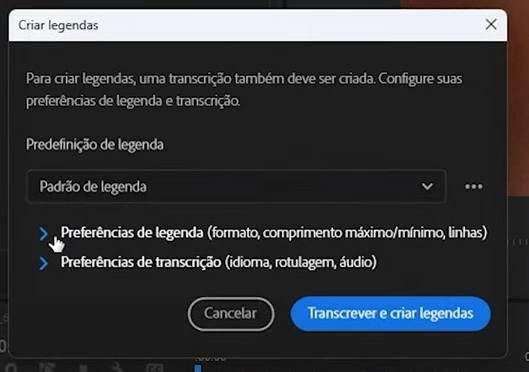
Legenda premiere pro não aparece a opção preferencias de transcrição, com isso utilizo o premiere pro em inglês a legenda sai em inglês não sendo possível alterar o idioma para portugues brasil. Algumas versões atrás era possível , mas na atual 23.6 não é
이 주제는 답변이 닫혔습니다.
최고의 답변: Stan Jones

Your first screenshot is the Create Transcript dialogue. It has the language option.


Your second screenshot is Create Captions dialogue. It does not have a language option. It uses the transcript, in the language used to transcribe.


In the newer versions of PR (23.4 and newer), the auto-transcription does not show the transcribe dialogue. You must set the language ahead of time in the Transcription preferences.


To re-transcribe, right-click the source media in the Project Panel and pick "re-transcribe."


Stan


1 답변

Stan Jones
Community Expert
Community Expert
August 22, 2023

Your first screenshot is the Create Transcript dialogue. It has the language option.


Your second screenshot is Create Captions dialogue. It does not have a language option. It uses the transcript, in the language used to transcribe.


In the newer versions of PR (23.4 and newer), the auto-transcription does not show the transcribe dialogue. You must set the language ahead of time in the Transcription preferences.


To re-transcribe, right-click the source media in the Project Panel and pick "re-transcribe."


Stan


Participant
February 21, 2024

Isso não funciona. mesmo selecionando o idioma nas preferências a transcrição continua com problemas!! inclusive a opção retranscrever não fica ativa.

Stan Jones
Community Expert
Community Expert
March 3, 2024

Hey guys, thanks for the help.

The preference panel is set to portuguese.


I opened a new project and imported the same video and was able to generate the subtitles in portuguese without change any settings.


@Kevin-Monahan I appreciate your attention.


If you are still having any issues with transcription language, I would uncheck "autodetect."


If you have an incorrect transcription in your current project, right click that clip (or Ctrl + click to pick multiples), right-click, and pick Re-transcribe. It will give you the option for language selection.


Stan