


Inspiring
January 28, 2022
해결됨

Lower contrast on external monitor in UHD sequences, but not in HD sequences.

  • January 28, 2022
  • 2 답변들
  • 1557 조회

Hi there, 

This is the problem: 
On my external Eizo CG247X monitor the images are of much lower contrast in an UHD sequence, then they are in an HD sequence with the same footage.

I have my Eizo connected with both displayport and HDMI.
The displayport is connected to a RTX3070 and displays windows 10 and the premiere GUI.
The HDMI port is connected to a Blackmagic mini Monitor 4K. 

When I view the program monitor on my Eizo and then switch the input signal to HDMI there is a clear difference in contrast. On the HDMI input the blacks are raised and the whites are less bright.

When I do this with an HD timeline with the same fooage, the image is displayed correctly on both DP and HDMI. (I also compared an HD timeline to a rendered video on Vimeo and it all matches perfect).


In Davinci Resolve this problem does not occur. Both HD and UHD timelines show a correct image. 

I don't think it's the footage, because different types of footage show the same problem, jpeg, BRAW, Prores... normal contrast in an HD timeline, low contrast in an UHD timeline.

I suspect that it has something to do with the scaling of video and data levels. But I have no clue why this only happens in an UHD sequence in Premiere. 

This is my computer hardware:

Processor Intel(R) Core(TM) i9-10900K CPU @ 3.70GHz 3.70 GHz
RAM 64,0 GB
RTX 3070
Blackmagic mini monitor 4K

PremierePro V22.1.2 Build 1
Windows 10


I have calibrated the Eizo with Colornavigator and created a Rec709 3D LUT with DisplayCal as instructed on the Eizo youtube channel. And loaded this LUT in to the Eizo.
I have calibrated three modes: Gamma 2.4 100 nits / 2.4 120 nits / 2.2 120 nits for various situations.
The problem persists in all mode/signal combinations.

I tried isolating the problem by changing the Input Range on the Eizo from full to limited levels. 
But there still remains a difference between HD and UHD sequences. 

I hope someone can help me, thanks. 


이 주제는 답변이 닫혔습니다.
최고의 답변: JorritHuisman

If you don't see the option for REC 2020 then the Mini Monitor does not support HDR. 


So, it looks like I finally solved it. 

I did not mention earlier that I have an SDI to HDMI 6G converter. But bypassing the converter by directly connecting the Eizo to the mini Monitor 4K resulted in the same issue. Even when I went through all the various settings in the mini Monitor and in premiere. So I didn't think it would cause or solve the issue.

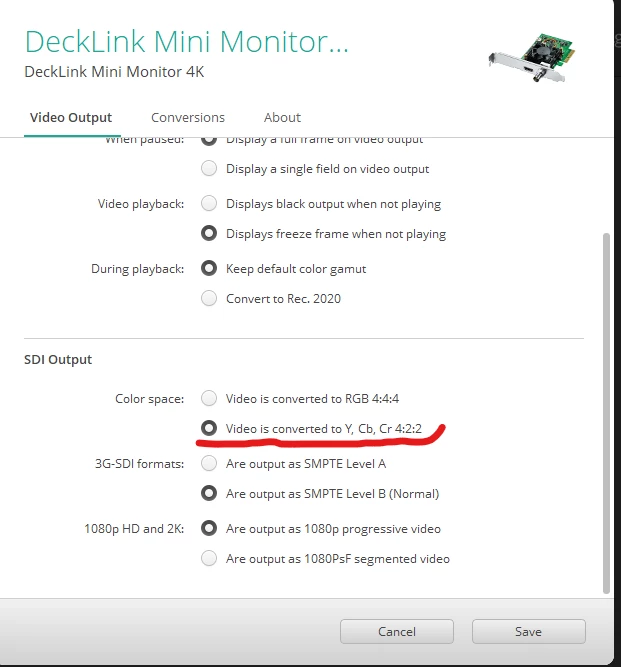
But with the SDI to HDMI 6G converter in the pipeline, I had to set the SDI output on the Mini Monitor 4K to Y, Cb, Cr4:2:2. 


And set the Eizo to limited range. This gives me the same image between HD and UHD timelines. 


I checked the signal by connecting  the video feed from the mini Monitor/converter combo and the video feed straight from the camera to an Atem mini to check if the signals would match. And they did.


In premiere I had to leave the sequence setting at REC709 both in HD and UHD. 
And even though the miniMonitor 4K gives me the option of REC 2020 HLG and PQ, I had to leave that at REC709 ass well. I went through all possible combinations of settings, but only changing the settings in the converter was eventually the solution. 


It makes sense to have the pipeline in video levels now, but sometimes it is easy to overlook something obvious when dealing with many settings. I went through the whole HD videopipeline and calibration setup before and I think I tried every possible combination of settings between the NLE's, video I/O hardware and monitor. Only to run in this HD/UHD contrast issue. I think I need to revisit the pipeline again to make sure I really understand it, but for now this works. Thanks for your advice!


2 답변

Inspiring
January 28, 2022

There might be a problem but how does the camera's HDMI out look when connect to a TV compared to using Premiere Pro and the Mini Monitor when connected to the same TV? Are they identical?

That being said Premiere Pro and Resolve should look identical when using the Mini Monitor. You should be able to use Edius on the PC and Resolve on the Mac and they should both match when using broadcast compliant hardware. I know the UltraStudio Monitor 3G has the option for REC 601, REC 709 and REC 2020 but I don't think the Mini Monitor supports Rec 2020. Not selecting Rec 2020 could cause some problems if it is not enabled when using Premiere Pro but it is enabled when using Resolve.  

R Neil Haugen
Legend
January 28, 2022

And then there's the question of what the settings in Resolve are for full/legal ... hopefully, this user left those on Auto, which is what all the colorists I know suggest for everything unles you 1) have enough knowledge to be able to delineate the different scenarios where one is needed and 2) have something that needs a changed setting.


Which, as one colorist put it, he hasn't needed to do in 15 years of working six hours or more a day in Resolve doing nothing but color. So he's highly doubtful any normal user has ever needed other than "auto" or the full/legal settings for Resolve.


Neil

Everyone's mileage always varies ...
Inspiring
January 29, 2022

I just checked, the mini monitor 4k actually does support rec 2020. I believe I can change it in the playback settings in Premiere. 


You stated the following below. 

I just checked, the mini monitor 4k actually does support rec 2020. I believe I can change it in the playback settings in Premiere. 

How would you know it supports REC 2020 if you haven't checked your playback settings yet? The Intensity Shuttle was released before HDR was introduced. That is one reason I just recently bought the UltraStudio Monitor 3G. I was under the impression the Mini Monitor lacked REC 2020 that is why I waited for the UltraStudio Monitor 3G. I admit I could be wrong.

Most options available in the GUI of Edius, Resolve, Avid and Premiere Pro only affect the image on the computer screen and not 3rd party hardware. That being said the sequence in Premiere Pro has to be changed from REC 709 to REC 2020. I have posted some screen shots that should be helpful. 

R Neil Haugen
Legend
January 28, 2022

I do know Premiere is built around using the standard 'legal' range all the way through the pipeline for SDR/Rec.709 workflows. So that needs to be what the monitor is expecting in a 'normal' GPU-out to monitor setup.


I think this does sound like a full/legal mismatch. So make sure the monitor is set for legal in the GPU and monitor settings. If you're sending a full range from the GPU, or the monitor is taking the GPU to full range, this would cause what you're seeing.


Neil

Everyone's mileage always varies ...