



ohanafilms
Inspiring
March 21, 2017
Answered

Lumetri changes my color on its own

  • March 21, 2017
  • 10 replies
  • 14697 views

I have had this problem on every computer in our office, every version of Premiere since they added Lumetri, on both Mac and Windows. It has been happening for years and Adobe offers no answers or help, so hopefully someone else has had this problem and can help.

As I'm doing my color, nothing crazy just basic grading, I go back and several of my clips will have changed on their own. It is ALWAYS the same thing. One or two of the color wheels will have moved itself, usually in the direction of green or blue. This will happen even if I have not made any color wheel changes on that clip.

I then fix the color but surprise surprise later it decides to change itself back to yet a different color. The amount of time I have wasted on this over the last couple years makes me sick.

Anyone? Adobe?
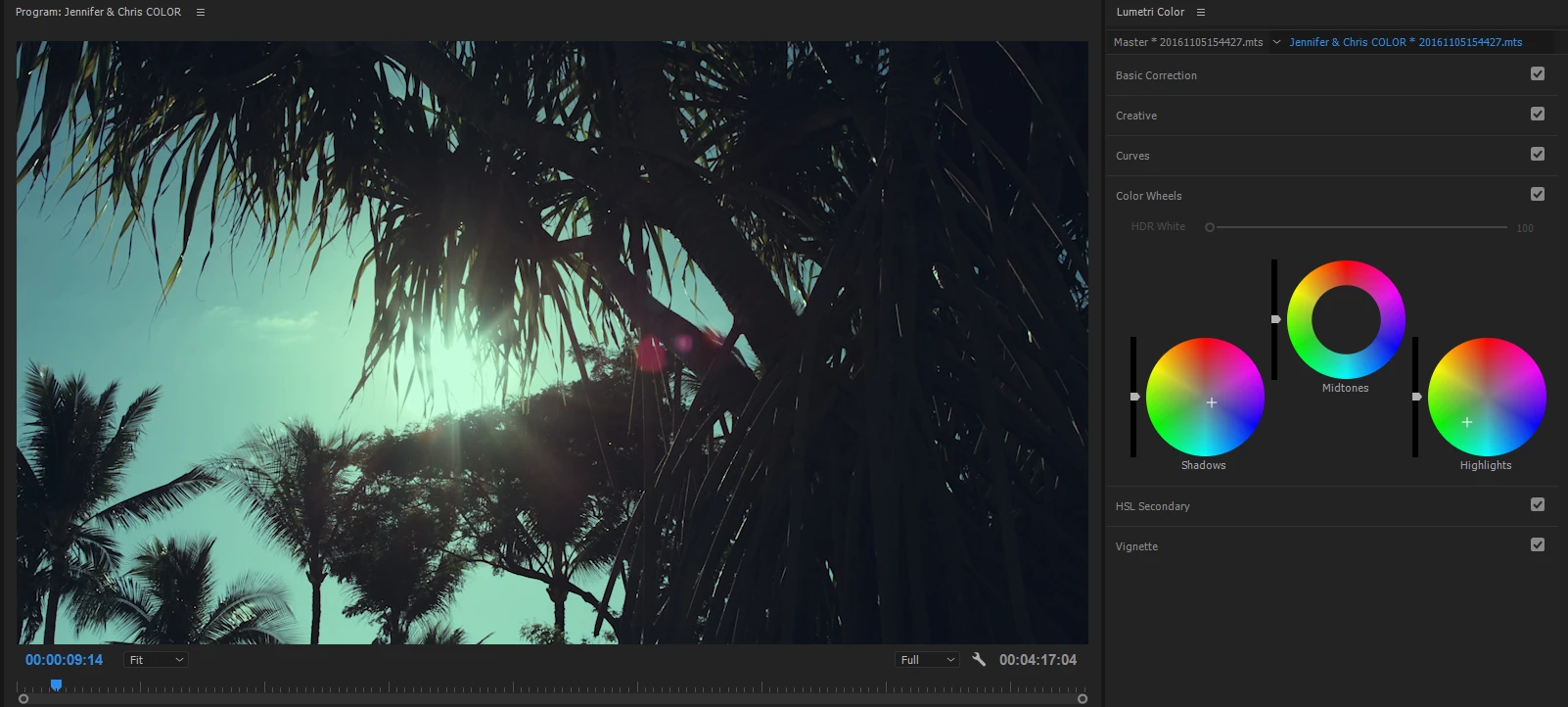
This topic has been closed for replies.
Correct answer ohanafilms

Can you please try if this issue happens when:

- Using mouse double-click operation to reset color wheels/wheels-sliders in Lumetri panel ?

- Working with ECP instead of Lumetri panel ?


Dennis, I will have to try that in a week when we return from a shoot. Also, I have to admit I don't know what you mean by ECP.

I have been able to prevent this problem from happening by only doing Lumetri adjustments on adjustment layers. I no longer adjust the clip itself and the bug went away.

Thanks

10 replies

davidb73008326
Inspiring
November 1, 2023

I've been dealing with this issue for many many months.  I've read this entire thread and none of the "fixes" work for me.  What I do is I keep the History window open and when it happens I see "auto color" pop up on the list.  Then it's a matter of un-doing to restore the settings I had prior to the bug ocurring.  Sometimes that means I have to also redo something I may have done after the bug happened but I've learned to keep a pretty close eye on the History window so I'm never too far down the road before noticing the issue.  It's a pain indeed but the least painful "solution" I've found so far.  I've wondered if there is a keyboard shortcut for this that may be inadvertently triggered but if there is I have not found it.  I put it under the category of voodoo.  

dwbisme
R Neil Haugen
Legend
November 1, 2023

"Autocolor" appears on your History panel? Would love to get a screen-grab of that on here ...

Everyone's mileage always varies ...
davidb73008326
Inspiring
November 1, 2023

Sure.  I'll do so next time it crops up.  The wait shouldn't be too long.

dwbisme
Grace Duarte
Participant
July 11, 2018

Something similar is happening to us, except with basic color correction.

It goes more or less like this: Edit clip, move on, check back and it has completely reset (not changed, as in "by mistake", no, completely reset). Sometimes just "sweeping over" on the timeline is enough to make the changes disappear. It's insane, I'm having to edit some clips 3, 4, sometimes even 5 times before I can finally get the corrections to stick. I have tried everything, saving after each edit but sometimes I come to check, the changes are there, I edit a few other clips and come back to find that they have reset at some point.


Sometimes, if I'm lucky, only half the changes will be lost, but most of the time is a full-on reset.

It's been happening since we first started using Premiere Pro CC last year, at first I thought it was because I was inexperienced with the software. But now, on 3 different computers (Windows 10 64-bit) each with different hardware specs and peripherals. Having reinstalled and updated... I don't know.

We're wasting so much time I'm seriously considering other software.

Inspiring
July 11, 2018

Have you got a color panel connected. Or something else( shuttlePro? PaletteGear? etc.)

That will still work on the selected clip even if Color panel not open.

Could you still have a clip selected?

If you don't color will effect the clip you are looking at, but if you do it will effect the selected clip... maybe?

(I would like to be able to turn off scroll wheel changing values, as I am always changing values rather than scroll a UI window)

I bet it is a mouse wheel, wacom dial or touch pad...

Inspiring
May 3, 2018

Some thoughts.

Scroll wheel, mouse, wacom touch or sliders or rings.

Mouse scroll wheel effects if it is hovering over not even selected

so when you scroll away, down from the lumetri effect it could shift again.

happens to me all the time.

Magic mouse slips all the time and randomly slips stuff.

Wacom preferences coud be turning on for the app seperately to other apps. check what all the pointless buttons and wheels are set to

Mind you wacom with Premiere, jeesh, just scrub, stop selecting!

Someone else could be logged into your workstation, or the project could be being shared.

get a wave.

now

really

it is just so much easier with dials or balls.

not really enough on the ripple.

Inspiring
May 3, 2018

also remember that dynamic link converts everything to rec709 which might be fuddling stuff somewhere if there is any linking

and it uses the AME version of projects not the one you have open...

maybe

Known Participant
April 24, 2017

I have this problem too on Windows 10 based machine. Really annoying, you play with color wheels on Lumetri panel and the color shift while playing with other clips. Usually happens when you undo a couple of times.  Thought I was going crazy, but then I put a reference monitor to a suspect clip, then play with another clip in the program monitor and the clip in the reference Lumetri just undo or just change to a random color pick, then you go back to that clip to correct and it the clip you were working before that the wheel just reset back to it last move. Also happens with other elements in the Lumetri panel like curves but not as often as the wheels.  

I found that if I cut and paste back the Lumetri setting in the effect panel makes this behavior stop for a short while.

Swisscolors
Participant
April 24, 2017

Hi Jonzy,

the way you describe the issue sounds fairly logical to me, but still I didn't see any correlation with undoing a couple of times, since I utmost rarely do that. I keep working ahead instead of backwards, so that's why. On the other hand you might be well right, I don't doubt your experiences.

According to my experiences, it does not matter if you are on Win 7, 8.1 or 10 or Mac OSX, Adobe CC2015 or CC2017 in all different versions, even hardware like MacBook Pro, MacPro 2011, iMac2012, MacPro 2013, HP Z640, HP Z820, HP Z840 or PC-Clone doesn't matter, the bug always shows up at the very moment (deadline calling!) you cannot use it at all.

Jonzy  schrieb

I found that if I cut and paste back the Lumetri setting in the effect panel makes this behavior stop for a short while.

Sorry, here I completely must disagree with you. "Stopping this behaviour for a short while" is just not good enough for professional people like us, you and me. I tried that method dozens of times and it never worked for me. Only cutting the whole segment out and pasting it into a fresh sequence, Lumetri-ing it there. Then cut and paste that very same segment back again into the master sequence worked for me. Annoying, highly irritating, but survivable.

Bye.

Known Participant
April 25, 2017

That method work all the time for me, sorry if it doesn't for you.  I guess I'm lucky because I don't have to redo the whole sequence.

Swisscolors
Participant
April 22, 2017

Hi fellow victims,

my workaround for this very annoying bug is:

- Render your whole sequence to get the green horizontal line in your timeline.

   If a clip gets affected by this bug, the line will partially turn yellow or red.

- Cut and paste those affected clips into a different fresh sequence,

   to break the unwanted link.

- Explain your customer why you are yelling at your reference monitor for good reason.

- Correct the colours of those clips in the other fresh sequence.

- Drag those clips back and insert them into your master sequence.

- Keep ranting at the lazy Adobe Staff to get this bug fixed.

Bye.

Dennis Weinmann
Adobe Employee
Adobe Employee
April 24, 2017

swisscolors

Please send me a PM with your systems specs and downloadlinks to a sample project (including source media)

R Neil Haugen
Legend
April 24, 2017

Thanks for popping in, Dennis!

swisscolors​ and ohanafilms​ ... Dennis is THE person on the team to talk with on these things ... give him your info, and he's the engineer that really knows this part of the program!

Neil

Everyone's mileage always varies ...
ohanafilms
Inspiring
March 31, 2017

I fear that once again this will just be a bug that never gets fixed or even addressed in any serious way by Adobe. You see it over and over on this and other forums, many people with the same problem but no real answers. The answer is always "We can't recreate it. send us a bug report" then silence forever.

I've sent countless reports but my issues are rarely fixed. Some of the bugs posted on this forum go back years without a resolution.

I know I will simply be seen as a complainer but I don't think Adobe realizes the time, money and sanity bugs like this cause small companies.

R Neil Haugen
Legend
March 31, 2017

I can't replicate this on my Win10 system, didn't have this on my Win7 rig. It's not something that many people have posted, but clearly there are some having it. No clue what the percentage is but I'm guessing it's fairly low.

I do hope this gets attention. And, with Dennis Weinmann having posted on this thread, it has at least the attention of a key engineer who works with the Lumetri section. He's a great guy, also. Met him at NAB a couple years back.

Neil

Everyone's mileage always varies ...
ohanafilms
Inspiring
March 31, 2017

Neil, I know I probably come off as kind of an angry jerk but I am just a paying customer who works 7 days a week, busting my — for my clients. I honestly do not doubt Dennis and everyone at Adobe are great people. I have been working professionally since 1991 and have been a loyal Adobe customer for most of those years. In the last 3 or 4 years I have seen a disturbing trend in certain companies that are relied upon by the creative industry. I feel like many big software companies are satisfied with getting their product mostly right but not as motivated to make things work fully. There is a lack of response and urgency that comes off looking like a lack of pride. As a customer I often feel like a nuisance if I have an issue with buggy software. I feel like it's a bigger priority to have cool offices with ping pong tables than it is to make stable software. Maybe working on beige computers under florescent lights somehow was more efficient. Who knows?

As an example, a couple years ago Adobe released a disastrous version of Premiere that put a massive halt on seemingly everyone's productivity who upgraded. It literally barely worked but once you started a project in it you could not go back. It was a HUGE issue for a lot of people like me who can't lose a week to troubleshooting. On this very forum an Adobe employee's answer to everyone's plea for help was to literally tell us we are all beta testers and finding these bugs was just part of the process. Keep in mind this was not a small bug, this was unusable software that should have never been released. Plus, beta testers? I am a customer not a beta tester.

I realize there are only a few people on this forum with the same Lumetri issue but clearly it's a real problem that exists. It's just hard to see any evidence that anyone is actually doing anything to fix it. I 100% hope I am wrong. I'm happy to be proven wrong if it means my software will work better. So much of my life depends on this software!

Mod notes:

  • Warning 1: Kindly refrain from using bad language or profanity no matter how angry you get.
  • These forums have minors viewing content.
  • Keep topics focused and on topic.
  • Kindly review community guidelines.
ajaxfilms
Inspiring
March 26, 2017

We are having very similar problems.

We updated our OS and re-downloaded Premiere Pro but the problem is NOT resolved....changing the color on one clip seems to randomly affect others...... unfortunately this makes it impossible to proceed on our project. Adobe, do you have any ideas? Thanks.

Kevin-Monahan
Community Manager
Community Manager
March 23, 2017

Hi ohanafilms,

Sorry for your issue. I cannot reproduce your issue on my Mac. First of all, I need a lot more info about your system including make/model of your Mac, version of OS X, your media, the hard drives you're using, etc.

Please also include any special setups you are running regarding hardware, workflow, media type, etc. that might be out of the ordinary. I see weird anomalies from time to time on unsupported equipment.

I will try to reproduce the issue on my PC as well.

Thanks,
Kevin

Kevin Monahan - Sr. Community & Engagement Strategist – Pro Video and Audio
ohanafilms
Inspiring
March 23, 2017

This problem has occurred on every version of PP we have used since the introduction of Lumetri. It happened on every iMac (OS 10.9.5 through Sierra) we have owned on every project. On the Macs we use external CalDigit (RAID 5) drives for media.

The example above came from a computer running Windows 10, PP 2017. Media is stored on an internal RAID 5.

Our footage comes mostly from C100 MKII, MTS format.

There is nothing special, unusual or complicated about these timelines. We very rarely use any plugins other than Lumetri on our footage. It has occurred with and without LUTs on the clip.

It has been happening for so long that I have had many opportunities to look for clues and some sort of common thread but it appears to be totally random.

Kevin-Monahan
Community Manager
Community Manager
March 23, 2017

Sorry to hear about that. My one troubleshooting ask would be to try transcoding camera originals to a mezzanine codec, then see if you get the same results. I'd be curious to see the results.

My opinion of Canon camera originals are that they are gorgeous but sometimes have difficulty decoding. This can result in unexpected behavior that I can't otherwise explain. I will see if I can find some of the footage you mentioned and will test with that.

Thanks,
Kevin

Kevin Monahan - Sr. Community & Engagement Strategist – Pro Video and Audio
ajaxfilms
Inspiring
March 21, 2017

We are having a very similar problem and really need Adobe to help us with this. ...here is a link to our issue:Re: Lumetri - adjusting one clip affects another

Dennis Weinmann
Adobe Employee
Adobe Employee
March 31, 2017

ajaxfilms

We had related issue with PR CC2015, which was only affecting Tangent Hardware. This has been fixed with CC2017.0

Which PR Pro version have you installed ?

ohanafilms

Would be great if you can share a sample project file, can you upload and share via PM ?

Thanks.

Dennis

ohanafilms
Inspiring
April 1, 2017

Hi Dennis. Thanks for the help. I will be pretty busy with shoots this week but I will try to get you copy of a project ASAP.

I have another piece of the puzzle that might help. Today I did color on a 7 min project. As an experiment I only put Lumetri on adjustment layers and nothing on the actual clip. I did not have the issue of color wheels changing themselves.

Legend
March 21, 2017

I've never seen this happen myself.  I don't recall anyone else reporting it.  Unfortunately, I can't think of anything that would cause this except maybe operator/observer error.

ohanafilms
Inspiring
March 21, 2017

Jim, I 100000000% promise you it is not operator error. I absolutely know it is not something I am doing.

ohanafilms
Inspiring
March 21, 2017

Well, that is certainly bizarre. Does it only happen with clips that have a speed adjustment?

I have never seen that behavior occur and do almost all my color correction in Lumetri.

The fact you say it is cross platform and cross versions is particularly puzzling.

Are you working on network or local storage?

I'm also wondering if there is any third party plug ins that are common to all your installations that might be causing the problem.

MtD


There is no common thread I can find. It happens with or without speed changes, with or without LUTs, etc. There are no 3rd party plugins involved. In general we keep our color grading pretty simple and don't like to play around with too many gimmicks. Not working over a network. It literally seems to be random.

It happens with every edit we have done over the last couple years, so we are talking about around 90 edits. Usually 3 or 4 clips will be affected on a typical 7-10 minute timeline. As soon as you click off those clips and start working on the next clip the color wheels (usually highlights or shadows, never mids) will become drastically pushed in the blue/green direction on the affected clip. The clips affected are not from the same master clip. There is nothing technically connecting them that I can find.

Our edits are almost always simple cuts-only with very few bells-and-whistles. We can't be the only people experiencing this! It has happened on all of our computers, Mac or Windows.

When we switched form Mac to Windows last month I thought for sure this problem would go away because ALL of the other huge bugs we were dealing with are now gone.