


GotGame
New Participant
October 26, 2017
Question

Media Encoder not recognizing synced fonts

  • October 26, 2017
  • 14 replies
  • 13919 views

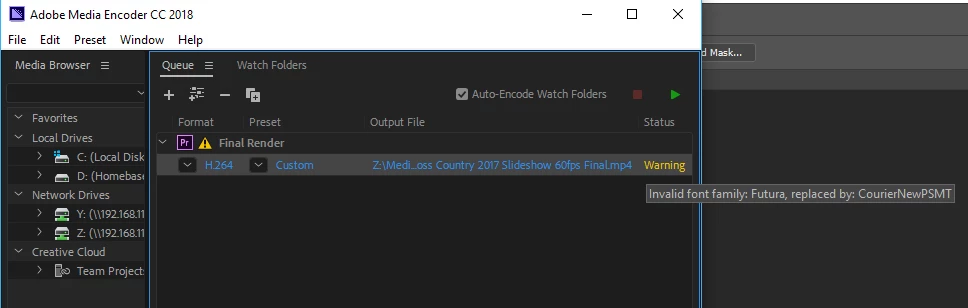
Updated to Premiere Pro CC and Media Encoder CC 2018. Trying to export a project that had worked fine with previous version. The project uses a synced font, Futura. I tried unsyncing the font and resyncing it. Warning is "Invalid font family: Future, replaced by: CourierNewPSMT". Obviously, I don't want to use courier new.

Any help on this would be greatly appreciated.
14 replies

JoshuaMcMahon
New Participant
August 19, 2019

I've been having this issue too, based on the fact that I have a font in my project. I found that if I switched to Mercury Playback Engine Software Only in Media Encoder, the render would go through. Not sure what's getting CUDA hung up here...

Shinaj Abdul Gafoor
New Participant
October 6, 2021

this worked for me, thanks


GotGame
GotGameAuthor
New Participant
October 28, 2017

Odd behavior from Media Encoder continues.. The warning about the missing font is back after Media Encoder crashed during rendering of the project. Logging in and syncing settings is not a permanent fix to the problem after all. It has crashed on me a few times. I thought it had run out of memory the first time, but am fairly sure it did not on the subsequent exports. Deleting the job, exiting ME and re-queuing the export works sometimes. Still looking for an answer to this and the crashing.

Brainiac
October 28, 2017

Let's get some details about your system and project.

How To Ask For Help

GotGame
GotGameAuthor
New Participant
October 27, 2017

After signing into Adobe to sync settings in both Media Encoder CC 2018 and Premiere Pro CC 2018, I was able to queue the project to Media Encoder without the font warning. I don't believe I ever logged in to Adobe in Media Encoder in the past.

Thanks

Participating Frequently
April 22, 2021

I can confirm in Adobe Media Encoder:


File -> Sync Settings (or your email) -> Sync Settings Now


Worked for me


I didn't have to sync settings in Premiere Pro or After Effects - though other may have to depending on their setup.

Participating Frequently
April 28, 2021

... One week later


I had an issue with Illustrator fonts, so I updated all the apps (Including Creative Cloud), then restarted my PC - Everything working properly now.

Brainiac
October 26, 2017

Which one of the Futura fonts are you using?

GotGame
GotGameAuthor
New Participant
October 27, 2017

Using Futura PT Bold in this project.