


New Participant
December 10, 2024
Answered

Media manage error message

  • December 10, 2024
  • 9 replies
  • 3730 views

Hi hi, 


Just left my macbook pro 2023 M2PRO 16GB try to media manage a big project on premiere pro for a few hours. Nearing the end, I got the following error message : 

"An unknown error (-1609629681) occurred during the Project Manager operation. Please save your project and retry the operation."

I am just now updating Premiere to the latest version, but this error came on Premiere Pro 25.0.

Did anyone ever have something similar ?

Would really like to be able to media manage this soon and not have to do it by hand. Feel like media managing in 2024 is still such a lottery- it hardly ever runs smoothly for me !

Thank you in advance, 
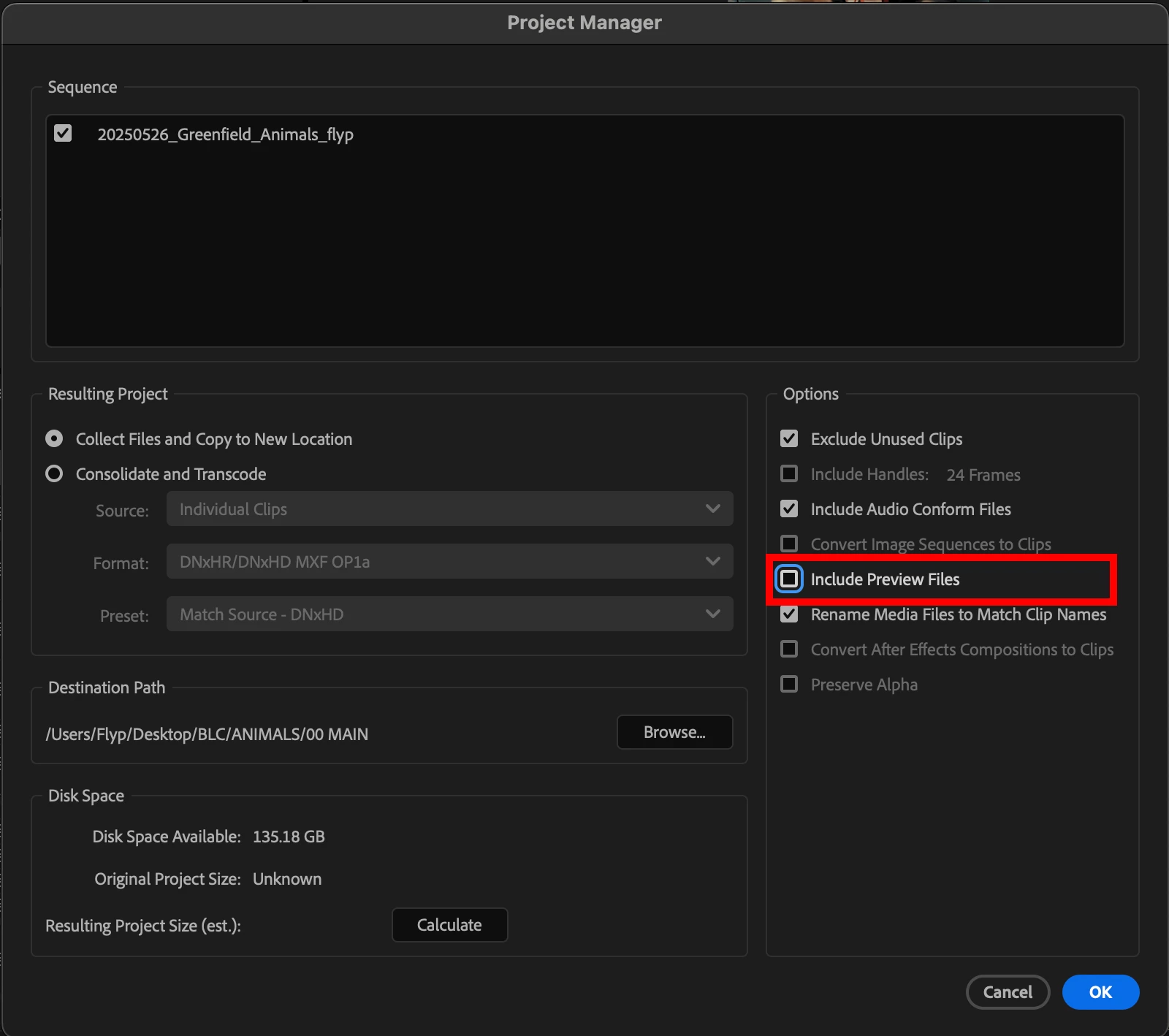
 

Correct answer FLYP

Hello there,

I've found that deactivating the "Include Preview Files" from the Project Manager before collecting fixes this issue.


Hope it works for y'all!

Have fun designing!

Flyp

9 replies

New Participant
September 3, 2025

I'm also having this issue when attempting to media-manage a not-so-big project. Have tried setting both local HD and external drive, unchecked include previews as well. I am on the latest version of Premiere 25.4.1. 


This is a very serious issue as this is one of the core operations in project management; it is literally costing our company money for storage not to be able to effectively media manage off of our cloud-based servers. Parsing through manually is simply not an option timewise and I'm honestly astonished these kinds of bugs exist at the same time as the gen-AI-slop is being pushed as a feature set. 

FLYP
FLYPCorrect answer
Inspiring
May 26, 2025

Hello there,

I've found that deactivating the "Include Preview Files" from the Project Manager before collecting fixes this issue.


Hope it works for y'all!

Have fun designing!

Flyp

New Participant
July 28, 2025

Works for me. Thank you!

FLYP
Inspiring
July 28, 2025

You're welcome mate!

Community Manager
April 23, 2025

Hi @Abraham_MotionGraphics,
I'm sorry to hear you're still having problems with this.  Many folks have found that updating the Mac OS resolved the issue.  Can you try that and let us know if it's still happening?
Best,
Rach

Abraham_MotionGraphics
Participating Frequently
April 23, 2025

Same issue here. Really bad for Adobe to be so buggy.

New Participant
March 23, 2025

Hello All,


The unknown error during project manager export with media is still an issue on Premiere v.25.1 on Mac OS current. Have attempted various workarounds with deselecting options, including exclude previews and unused clips. Any progress in bug patch update?

Participating Frequently
February 10, 2025

same problem, 

Seuchenvogel
New Participant
January 31, 2025

I also encountered this error today and I am working on an M1 Ultra. The project manager is very helpful for me, as I always work directly from the SD cards to save time and only archive what is necessary. I hope there will be a solution if it is a bug.

Apple M1 Ultra, Ventura 13.0.1, PP 23.1.0 (86)Who is General Failure, and why is he reading my disk?
Ch0usseAuthor
New Participant
December 10, 2024

Hey Kevin, thanks for the swift reply. Unfortunately I won't have enough space on my desktop to media manage everything on there. I will try tonight to re-create a new project file with the sequences i want to media manage as a test unless I find another faster solution by then!

Kevin-Monahan
Community Manager
Community Manager
December 10, 2024

Hello @Ch0usse,
Thanks for the reply. Please keep the community and me in the loop about the results of your tests. I hope we can help you solve this issue shortly. The Project Manager has a good number of caveats, so overcoming them can be a challenge. Sorry about that.


Thanks,
Kevin


Kevin Monahan - Sr. Community & Engagement Strategist – Pro Video and Audio
Kevin-Monahan
Community Manager
Community Manager
December 10, 2024

Hello @Ch0usse,

Thanks for filing this bug report. Looks like you are having trouble with the Project Manager. Are you using the copy and collect function? I do see a previous bug written for that, but the error code is different.

As a workaround, you might try creating a folder on the Desktop to see if that works. Let me know!


Thanks,
Kevin

Kevin Monahan - Sr. Community & Engagement Strategist – Pro Video and Audio