


- Home
- Premiere Pro
- Discussions
- Re: Media offline after cc 2017 update plus audio ...
- Re: Media offline after cc 2017 update plus audio ...

Copy link to clipboard
Copied
After the premiere pro cc 2017 update I have some issues with clip sequences and audio.
When starting a premiere pro file of the previous version the system says:
"This project has been created with a previous version of Premiere Pro and has to be converted..."
After clicking "OK", all the video sequences are missing. By trying to insert them manually, the audio files of the clips are missing.
I tried to start a new project with different video-clips and the same problems occur again. No audio files are in the project just the video file.
I tried to sign out and sign in to premiere pro following a troubleshooting instruction but it didnt work.
Anyone can help me? Thank you very much in advance.


 1 Correct answer


Hi,
Apologies for the Inconvenience.
As stated by Howardj, Please clear the Media Cache & check the audio in the timeline.
Instructions are in the following link. FAQ: How to clean media cache files
If you want to install the Previous version of Premiere Pro, please check the instructions in this link
FAQ: How do I reinstall Premiere Pro CC 2015.2 (9.2)?
Thanks,
Vidya Sagar.

 89
Replies
89
89
Replies
89


Copy link to clipboard
Copied
paulk78477015 wrote:
I can't believe this!
I've got a deadline for tomorrow and NOTHING works with CC 2017!
I cannot believe you upgrade just before a deadline.........
Its and upgrade, separate install
If I was you finish in 2015.
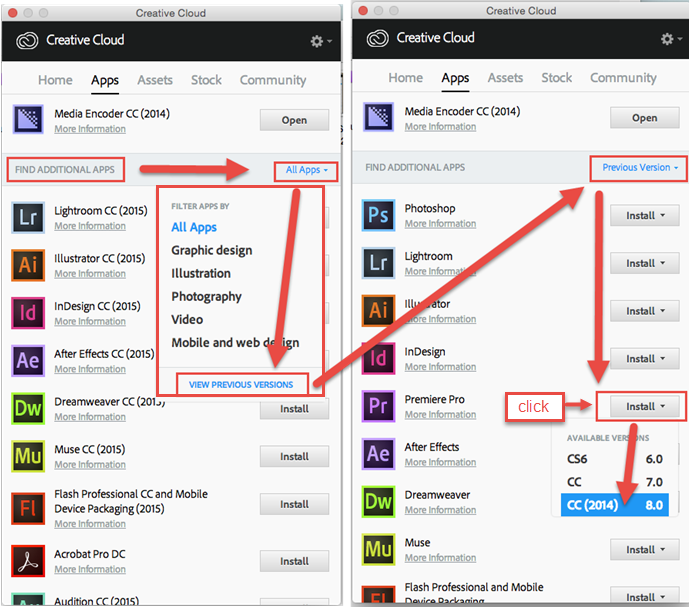
How to find previous version (old screendump, look for 2015.3)

Copy link to clipboard
Copied
Thank you Ann.
I couldn't edit my post, there was an error every time.
After about an hour of searching, restarting the App etc. there was finally the "Find Previous Versions" button, which wasn't there initially. Bug? (Windows 10)
So I've finally got 2015.3 installed again. Jippie.
Next week is another deadline and the week after another. But you're right, the day before truly wasn't the best choice.
I'll keep my hands off of CC 2017 for a while now 
Copy link to clipboard
Copied
The mp3 suggestions didnt work for me either. Is anyone able to tell me how to downgrade CC 2017 back to the previous version?
Thx alot!

Copy link to clipboard
Copied
I also have the same issue with audio not working. Tried rolling back to previous version. Opened up my project. And the audio isn't working on the older version either? No audio tracks at all. But it's apparently only for old files because when I import a file created after I did the update. I get audio tracks, but then I can't see audio waves..
Copy link to clipboard
Copied
For those who can't downgrade to the previous version, cause there is no "Find Previous Versions" button in the App:
Click the settings tap in the top right corner and click on "search for updates". (Even if it is up-to-date)
The App will restart and the "Find Previous Versions" button will appear and you can downgrade as Ann described.

Copy link to clipboard
Copied
So of my 70 or so clips, some rather large in an hour and a half documentary, almost all of them were either unlinked or the Proxie files offline. Worse than that, it does not recognize some of my proxies which worked fine before (Audio must be the same for the proxy as it is for the full Resolution). It is. But PrPro does not know that.
I was hoping my 4k would at least scrub in 1/4 to 1/2 resolution with the new release. How stupid am I!
So I can either wait until tomorrow and chill out tonight while my proxies are recreated overnight and then keep my fingers crossed to see if they will work, or rollback to a less than stellar version.
Thank you Adobe. Please do not charge my CC for last month, this month,and probably next month at this rate. I should be billing Adobe for the hours and hours I have wasted to try to stick with and support their product.
Cheers
Copy link to clipboard
Copied
Go back to 2015.4, finish project and start fresh in 2017.
Copy link to clipboard
Copied
Already started blowing this thing away. Good thing I back up every day:
The message below was received with perfectly good video clips that were working fine. And 2017 definately does not like sub-clips.
As much as I could not contain myself and so looking forward to the issues in 2015.4 fixed, I find it harder to believe they released this. Doesn't anyone test anymore?
Copy link to clipboard
Copied
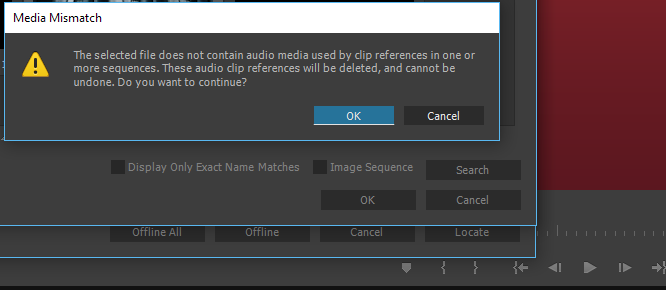
I'm getting the SAME error message in 2015.3 and 2015.4 now, too!
Before switching to CC 2017 and back to 2015.3 / .4 there was no problem with those files.
I'm going to bed now and will contact the Adobe support tomorrow.
Copy link to clipboard
Copied
Hi,
Apologies for the Inconvenience.
As stated by Howardj, Please clear the Media Cache & check the audio in the timeline.
Instructions are in the following link. FAQ: How to clean media cache files
If you want to install the Previous version of Premiere Pro, please check the instructions in this link
FAQ: How do I reinstall Premiere Pro CC 2015.2 (9.2)?
Thanks,
Vidya Sagar.
Copy link to clipboard
Copied
I didn't see Howardjs comment before, my bad.
This acually fixed the issue! No Media Mismatch anymore.
So do NOT continue, when the Media Mismatch pops up. Close PP, delete all files in the Cache folder and start PP again.
Thanks Howardj and Vidya Sagar!
Have a good night everyone!

Copy link to clipboard
Copied
Please fix this audio on the time line issue immediately for 2017.
This was not an issue before so why change what worked. Get your developers on it ASAP!!! I have to go back to the older 2015 version unbelievable!

Copy link to clipboard
Copied
I also found this to work but after deleting the media cache I had to copy the original files to a new location (keeping the file names the same) then relink the offline clips in PP 2017 to that new folder location which holds the exact same media. This made premiere start to re-conform the aac audio in the clip (which it didn't do correctly for the aac audio after deleting the media cache and rebooting).

Copy link to clipboard
Copied
Thank you, dave the editor, that worked for me! Never thought of renaming my folder... Thanks again!!

Copy link to clipboard
Copied
Hi Vidya Sagar - thanks for your response. I was having similar issues as oceanet40021756 (After converting a cc 2015 project to cc 2017 some files started appearing as "offline". And when I tried to re-link them Premiere seemed to think that the clips I was pointing to didn't contain audio) and following those instructions you posted to delete the Media Cache files seems to have fixed the problem.
One thing I'd like to point out though is that from reading the instructions I wasn't sure whether you needed to delete ALL the files under \Users\<username>\AppData\Roaming\Adobe\Common, or just the cache files (in the Media Cache Files folder) and the media cache database files (in the Media Cache folder). To stay on the safe side I only deleted the "Media Cash Files" folder, and that seems to have fixed things.
Anyhow, just wanted to flag this in case other people are having the same confusion.
Thanks again,
- R

Copy link to clipboard
Copied
I just got mine to start working, i restarted my computer a couple of times and loaded a mp3 in the source panel, it played just fine. I then clicked and dragged my video (.mts file)wasnt previously working to the sequence time line from the source panel and there was no audio to be expected. I deleted the clip and clickeda nd dragged from the import panel and the audio came with it. I dont know why it work that way but it works so now i can meet my deadline aswell. Ohh and i had the start a new project, the converted project left me with broken links and no audio.

Copy link to clipboard
Copied
Didn't this happen when you first upgraded to CC 2015 also? mine did this exact same thing the last 2 times they have published a new version. just saying that this is a common issue now when upgrading. I for one am not touching it until my projects are all caught up but there has always been an option to keep the previous version also so I always do that so I have the stable version and can mess with the new version for awhile until I can trust it.
Copy link to clipboard
Copied
I think i just solved it, i restarted media encoder and all the audio reattached itself to the files

Copy link to clipboard
Copied
Hi All,
Sorry about this trouble & I request all to click on this option (if experiencing the same issue).

Thanks,
Kulpreet Singh
Copy link to clipboard
Copied
I tried all suggestions and work arounds. Wasted an entire night. Had to reinstall 2015.3 (which already had a slew of issues) and restore my assets from a backup.

Copy link to clipboard
Copied
Basta, apagar o cache que funciona normalmente !!! tive este problema ao instalar a nova versão !!!

Copy link to clipboard
Copied
Aqui não funcionou!! Perdi 5 dias de trabalho!!!
Copy link to clipboard
Copied
Incrível ADOBE!! Estou fazendo downgrade por conta da falta de atenção ao entregar um produto INCOMPLETO!
Como pode uma empresa deste porte ser tão amadora assim?
Perdi horas de trabalho por conta disso!

Copy link to clipboard
Copied
Same here, all media required relinking. Audio completely disappeared even after linking the media again, media just stops playing when cutting to another video layer. In one area i have the same clip playing 3 times back to back, the first two just wont play but the third will. Did the delete cache thing, and its working better but not perfect, and render times have increased. Instead of realtime or faster it is now taking 50% longer. Ie 2min video took 3 min to render. WTF!!!

Copy link to clipboard
Copied
The thing I've learned following the previous update fiasco, is to NEVER use the new version on an already existing project.
Stay with me now as I insult the clowns doing the testing at Adobe: You guys are incompetent. get some "real" editors NOT employed by Adobe to test you products.
After upgrading to CC2017 (making sure not to remove the previous version), I opened a not so complex project I'm working on. Half the media were shown as "offline", most of them .mov or .mp4. After forced linking them, no audio tracks were present.
Other clips, with 2 audio tracks, were not imported because "originals contained 2 audio tracks and these contain 8".
I won't get into missing plugins. My plugins are NOT missing.
There's no way a REAL COMPETENT tester at Adobe could have missed that.
Well done, Adobe. I love your products, but you have a serious problem when it comes to "seamless upgrades".
Get your shit together !


Find more inspiration, events, and resources on the new Adobe Community
Explore Now
 AdChoices