


Answered
Migrating /Syncing settings to Premiere 12.1 - not working at all
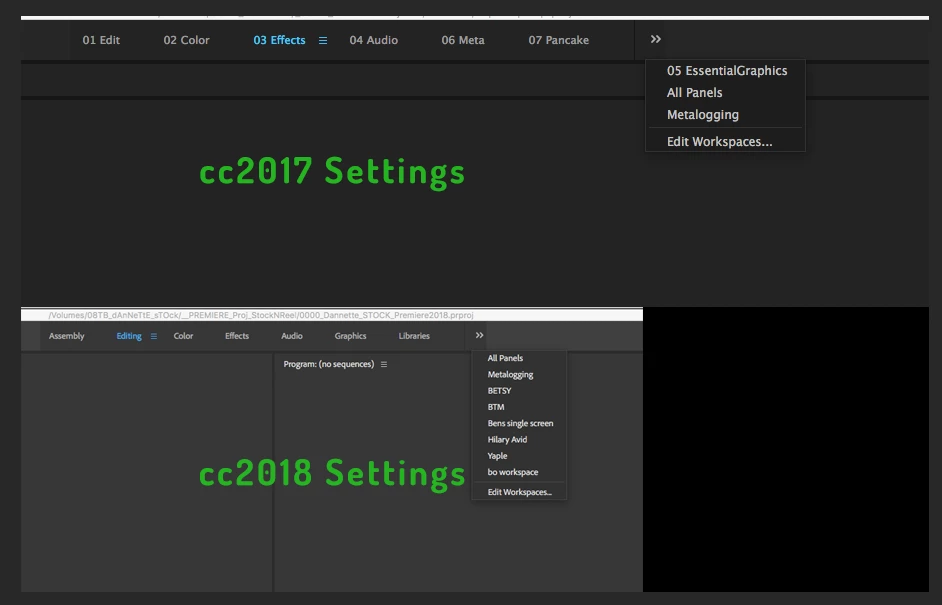
Am I doing something wrong or is this just an issue with the new software? I just downloaded Premiere CC 2018 12.1 and tried to download my settings from the cloud. None of my workspaces are there and my keyboard shortcuts don't work. So I went back into CC2017 and uploaded my settings again, just to make sure. Then went back to 2018. No good. It's as if I'm seeing other peoples' settings and keyboard layouts. I've got "Hillary Avid" and "BETSY". Who are these people and where are my settings!? I also tried copying my settings from the 11 folder into the 12 folder. No good. I'm on a Mac Book Pro running12.10.6 Sierra for what it's worth. Anyone else having similar issues?
 AdChoices