


Participant
November 27, 2017
Answered

Missing buttons on Program monitor & source monitor.

  • November 27, 2017
  • 2 replies
  • 8058 views

Working in Premiere 2017 on a machine which is not my own.

There are no buttons visible on Program monitor or Source monitor, so functions such as toggling proxies is not possible!

I can only see safe margins by clicking onto overlay settings. Very annoying.

2 other editors have taken a look and can't find a solution. Please help!

Thanks

Tom
This topic has been closed for replies.
Correct answer Meg The Dog

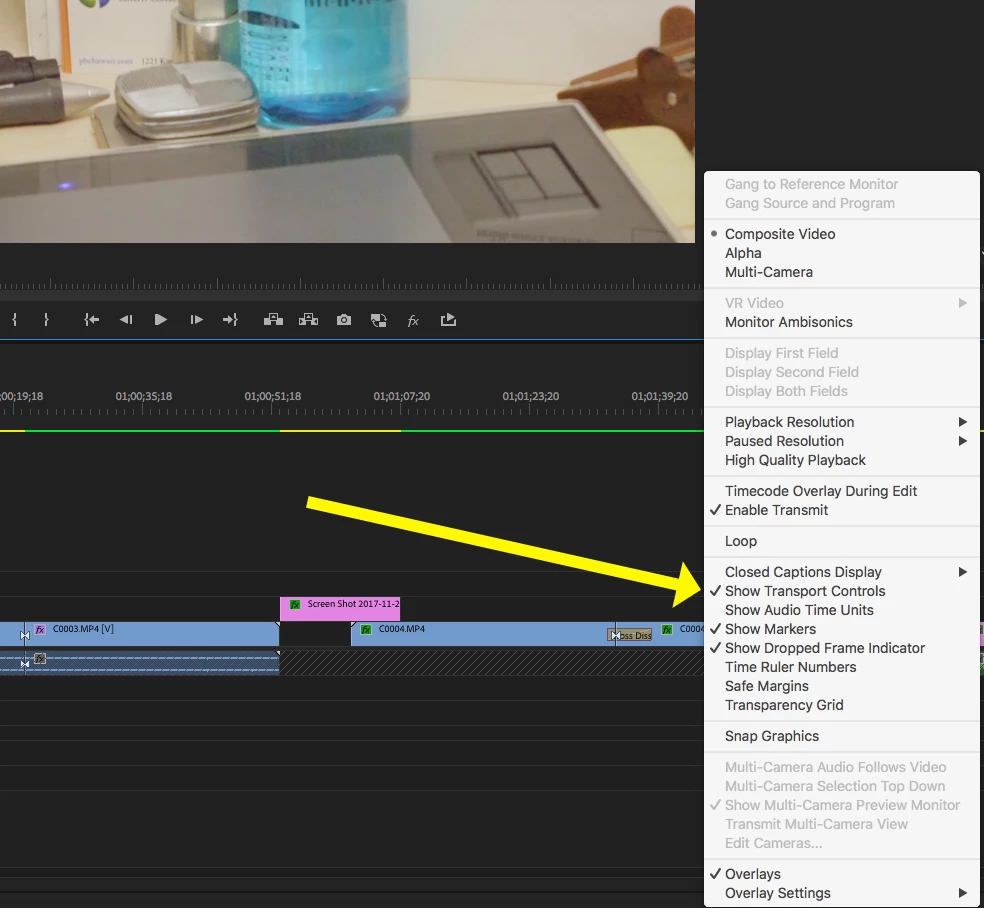
Make sure Show Transport Controls are toggle on, under the monitor wrench menu:

MtD

2 replies

Meg The DogCorrect answer
Inspiring
November 27, 2017

Make sure Show Transport Controls are toggle on, under the monitor wrench menu:

MtD

Participant
November 27, 2017

Hi MtD

Your suggestion definitely works when I toggle the Transport Controls on and off on my home set-up, but I thought I tried that in the edit suite today too!

I will try that first thing in the morning, but certainly looks like that should work.

Thanks very much for your help.

Participant
March 5, 2020

Thank you this worked for me

Legend
November 27, 2017

You can add buttons with the +.

Also, make sure you're using a 1080p 24" monitor at a minimum.

Participant
November 27, 2017

Thanks for replying Jim.

The problem is the + symbol isn't even visible! There are no buttons at all and no space for them either.

The monitor is identical to the one in the suite next to me, but the other editor can see and access all the buttons.

Seems like it must be a bug, but I can't find anyone else having this problem so far.