


New Participant
January 2, 2020
Question

Motion Tracking in Premiere Pro

  • January 2, 2020
  • 1 reply
  • 8214 views

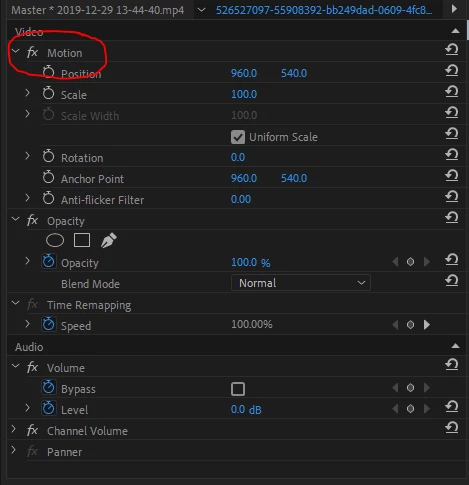
I was trying to figure out how to do motion tracking in premiere pro 2020, and the tutorials I was using all had a button i don't. Where do I get the button? Am I missing a package I need to download/buy?

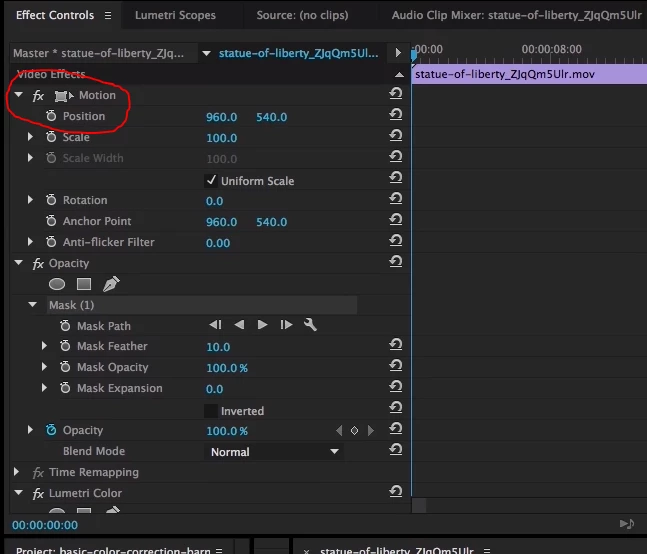
Below is two images attached. One is of my screen where the button is not there, and the other is from a tutorial where the button is not missing. I want to make the camera follow a point, and also make an image follow a point later on. I've done this in other editing softwares, but Premiere pro is being a little tricky


This topic has been closed for replies.

1 reply

Ann Bens
Community Expert
January 2, 2020

The second image is an old image.

Its the transform icon. It is not realy a button. Clicking on it produces the wireframe in the Program window.

In newer versions of Pr just highlight the word Motion.


Premiere does not have motion tracking.

Either have to do it manually or use Ae.

TheNuizAuthor
New Participant
January 2, 2020

What is the button I'm missing though? Everyone else I watch seem to have it

Ann Bens
Community Expert
January 2, 2020

There is no button missing.