
Mouse tracking in premiere is sloppy. Mouse over audio keyframes doesn't register 100% of the time.
Premiere v23.1.0
Window 10 (updates)
The mouse tracking in Premiere seems to be sloppy in the current and as many past versions as I can recall. When I position my mouse over a clip audio keyframe in the timeline, it doesn't always register that it over the keyframe. So if I click the keyframe or click and drag, it selects the clip and not the keyframe. Check out the image below.
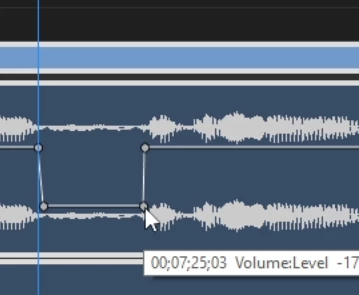
My mouse it over the keyframe, but premiere doesn't register the mouse over the keyframe until it is one or two pixels to the left of this location.
Oddly, this seems to be inconsistent. In the above example, some of the keyframes will trigger the tool change from the cursors to the keyframe adjust cursor when the mouse is a few pixels away from the keyframe. But the one above will not. The mouse has to be left of center in order for the tool change to occur.
This mouse tracking issue occurs at other times as well. Sometimes I will try and trim a clip but premiere doesn't register the release of the mouse click right away and it ends up trimming at the mouse location something like 10-20+ms later. This results in having to undo and then redo the edit.
Please re-evaluate the mouse position hitboxes in the timeline across multiple resolutions.
 AdChoices