


Participant
January 1, 2020
해결됨

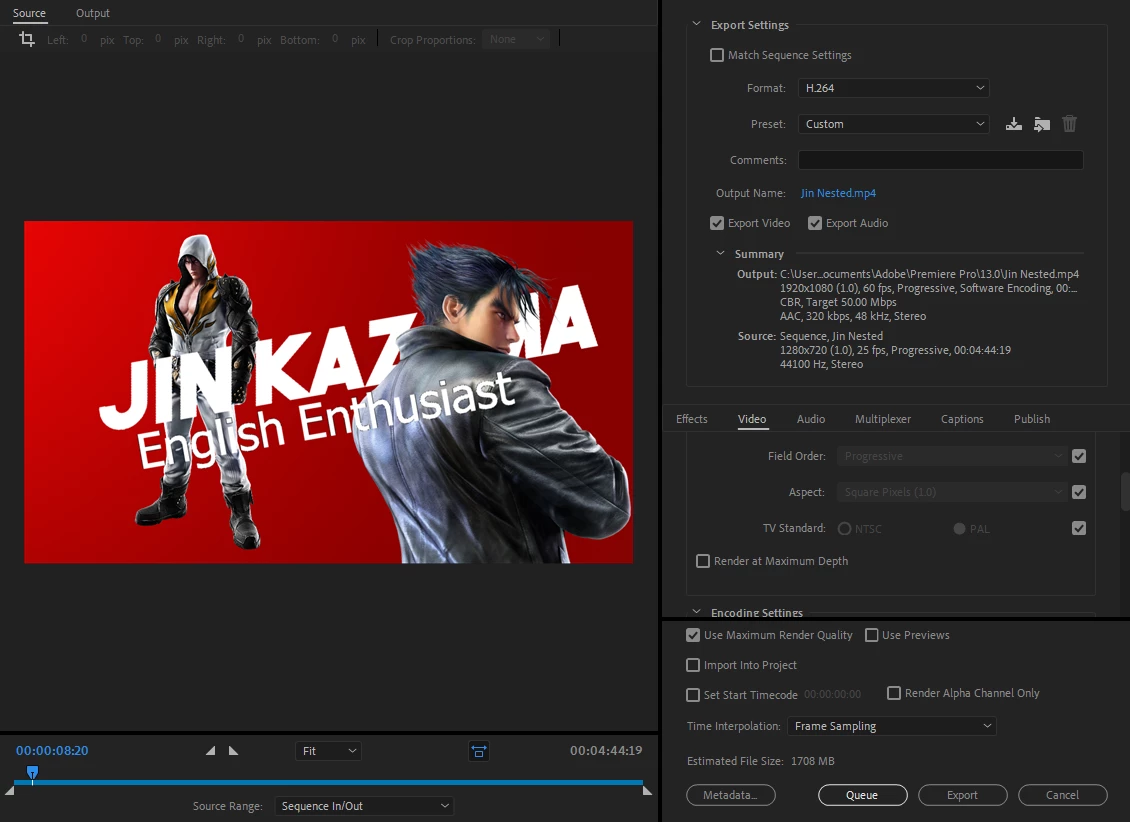
My Footage is 60fps but when rendered comes out at 25?

  • January 1, 2020
  • 1 답변
  • 7439 조회

Hey guys I've been looking at multiple posts but I can't seem to find any help.

Basically I've been making a gaming video that the raw footage is at 60fps, I think my source input is at 25fps from the start and my final render keeps coming out at 25 because of this. I don't know how to change it but I think that might be the issue.

I have made a copy of my original sequence and pasted it into a nest in a new 60fps sequence but the issue still occurs, any help would be appreciated.


이 주제는 답변이 닫혔습니다.
최고의 답변: lonely akuma YT

Thank you so much, absolute lifesaver ❤️


My name is the old one, wtf? Anyway, thanks again man, saved my Overwatch video!

1 답변

Inspiring
January 1, 2020

If your source video is 60fps, and you want to end up with a 60fps export, then best practice would be to edit on a 60fps timeline, not the 25fps timeline you are currently editing on.

Also note that your current timeline is set to a pixel dimension of 1280 x 720 and you are scaling it up on the export to 1920x1080. This will degrade your image.

MtD 

JackS2000작성자
Participant
January 1, 2020

Hi thanks for your quick response.


So I made a new timeline with the settings set to 60fps from the start, copied the workload over to there accordingly but to keep my keyframes accurate I needed to nest it first (so I did)

After copying the nested sequence over to the 60fps timeline the video rendered at 25 frames again. But when I copied a singular clip to the 60fps timeline (without nesting because It didnt need keyframes) it rendered at 60fps properly??? I'm now unertain if nesting keeps the properties from the old timeline within it. Any suggestions?

Participant
August 12, 2023

Thank you so much, absolute lifesaver ❤️


My name is the old one, wtf? Anyway, thanks again man, saved my Overwatch video!