

Participating Frequently
January 20, 2024
질문

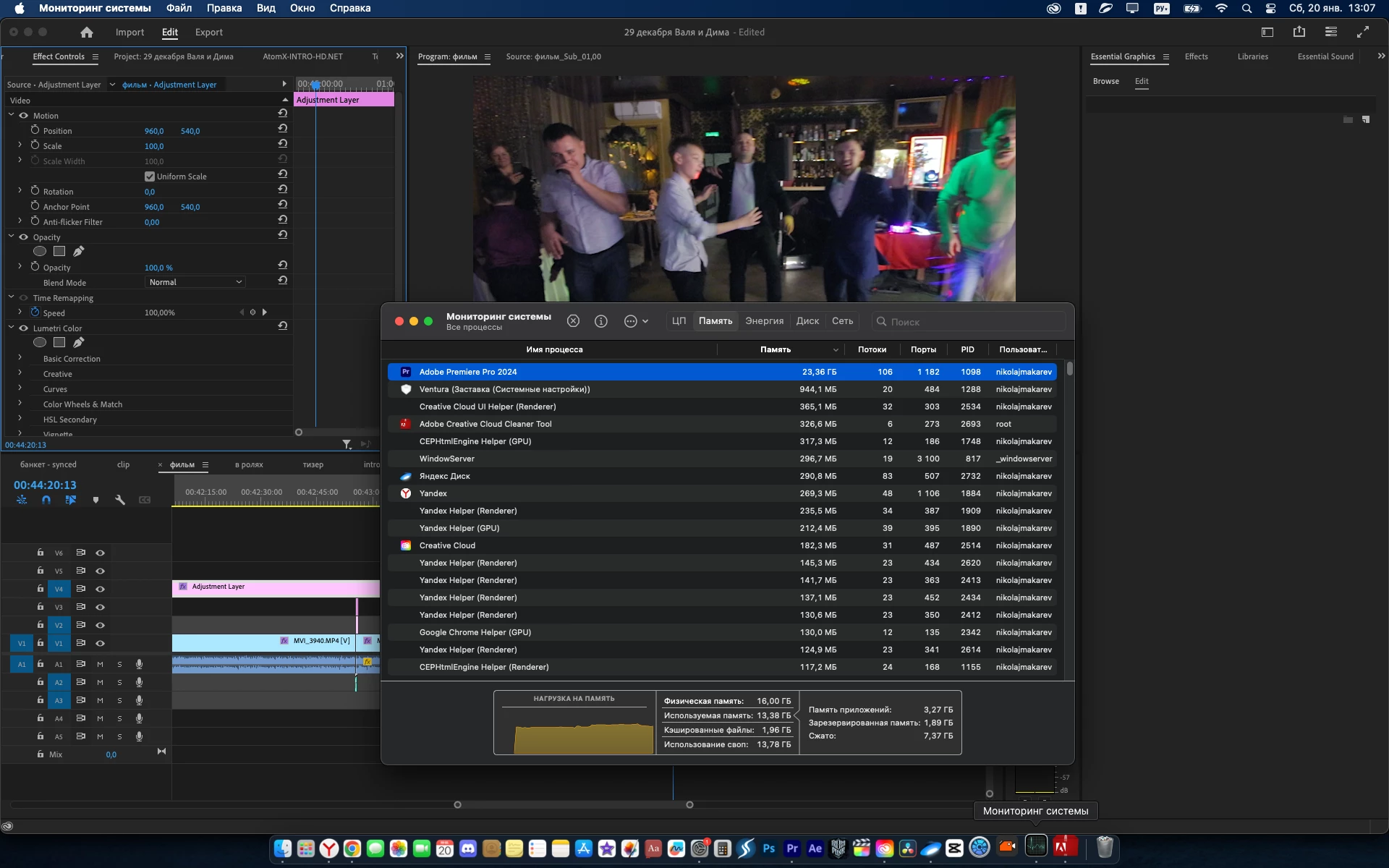
my Premiere 2024 takes up all the memory of the MacBook

  • January 20, 2024
  • 3 답변들
  • 5593 조회

I’m working on a MacBook M2Pro 16 memory, I updated Premier 2024 to the latest version and all the memory started disappearing. Tell me what to do, I can’t work

이 주제는 답변이 닫혔습니다.

3 답변

Participating Frequently
August 12, 2024

So I have run into this issue today as well. I have never (from what I remenber) had many probelems with Adobe 2023 compared to 2024. 2024 also last year corrupted several projects of mine so I don't trust it at all. Because backversioning through the CC app is impossible with an already upgraded project, I used this nifty tool to go back to 2023 and it worked like a charm. Now my Memory levels are sitting comfy at about 2GB instead of an average of 35-150GB. I am working with 4K footage and using multicam. But the footage is proxied and even playing back at a low resolution and 2024 STILL had trouble with it. Also once the Memory would climb, it would just hang there and never go back down. Very concerning, very frustrating, very stupid. That's just Adobe for ya. Anyway - hope this helps someone.

http://downgrader.elements.tv/

*Make sure you allow your browser to do this. I had a bit of a block at first because it said it's not "secure" but hey, it worked lol. I attached some files showing the error message, and then I showed how 2023 is using very little ram.

Conrad_C
Community Expert
Community Expert
February 14, 2024

This is definitely a thing, and I don’t remember running into it before. The screen shot below is for a relatively simple project, tutorial videos. So the 1080p sequences are almost completely cuts-only edits on a single video track with no effects, and the media format is 100% screen captures created using native macOS screen recording. Each sequence is about half an hour long, in Premiere Pro 24.2.0. (It was also happening before the last update.)


With that memory usage in mind, note that my Mac (M1 Pro MacBook Pro, macOS 13.6.4) has 32GB of unified memory, and rarely complains about memory usage in Adobe photo and video apps. It is alarming to see these Adobe applications requesting many times more memory than is physically installed in the Mac. But I don’t necessarily panic about that, because I understand that the reason macOS doesn’t reach that error state until memory usage is well beyond 100GB is because of the way macOS can use RAM compression and swap files to juggle the balls in the air as long as it can. The concern is that these apps managed to push macOS over the cliff, which I rarely see. This Mac is usually rock solid for weeks with Adobe apps.


There are only two features that are frequently used in these sequences. One is Essential Sound; I have applied Dialogue adjustments to all audio (it’s narration). I am using transcription to do text-based editing (very useful!); at one point I wondered if Premiere Pro was having trouble managing that new feature’s metadata or something because it was hard to think of other features in use that could cause such a problem.


Originally I had all sequences in one project, but because macOS was telling me that opening it made Premiere Pro want over 100GB of memory, exceeding even the ability of macOS to manage it, I broke it up so that each lesson uses one project with one sequence in it, and am now managing the job as a Production. But all that does is keep each individual project from overrunning macOS memory management, because each sequence can still use many tens of GB when opened.


At one point I tried exporting a project to XML and opening that back in Premiere Pro, in case there was corruption, but that didn’t help; the new version exhibited similar memory usage.


The Adobe Media Encoder memory usage is so high because I watched it add roughly 10GB of memory use for every 3 to 5 minute in-out segment of a sequence that I add. Now I stop adding to the queue when AME exceeds 100GB memory usage, render those, quit AME, and then restart it just so I can add more sequences to render.


Also — Premiere Pro and AME are not releasing memory when projects/sequences are closed or deleted. If AME racks up over 100GB memory usage and is finished rendering, the only way to free up that memory is to quit AME…because deleting all already rendered sequences from the queue doesn’t reduce memory usage at all.


I don’t know if this will help, but I have seen similar memory complaints in threads about other Adobe applications, for example in the Lightroom Classic community: Lightroom Classic memory usage spirals out of control, into the hundreds of GB, until macOS throws its hands up and cannot go on. I only mention this in case the Premiere Pro engineers need to confer with the Lightroom Classic engineers, like if it’s actually a bug in OS memory management. That link is just one example, there are numerous similar Lightroom Classic customer threads that you can easily find with a web search. 


The unpredictability is also similar, in that for both Premiere Pro and Lightroom Classic, it isn’t happening to everyone. It isn’t even consistent for me. Although I have obviously seen this problem in Premiere Pro, I spend even more time in Lightroom Classic and have never seen it misbehave with memory like some are describing.

Participating Frequently
March 3, 2024

thanks for your reply! But you won’t believe it, I deleted Adobe Creative through which I updated Prime and the problem disappeared. I've been working without creative cloud for two months now.

Participant
March 27, 2024

Hi Nikolas, has this continued to work for you? using Premiere without Cloud?
Im definitely experiencing the same thing.  Premiere is currently using 30gb as it idles, without a project even open.

Kevin J. Monahan Jr.
Community Manager
Community Manager
January 23, 2024

Hi @Nikolas33508345nhwv,

Thanks for writing in. That looks alarming. Can you try creating a new project and then importing the older project into the new one as a test? Perhaps you have a corrupt project file. That can happen if updating mid-project. Let us know if that helps.


Thanks,
Kevin

Kevin Monahan - Sr. Community and Engagement Strategist – Adobe Pro Video and Audio
Participating Frequently
January 24, 2024

I'm having the same issue with Premiere 2024 with a specific project. It causes premiere to use around 120 gb of memory although my total is 64. Premiere is clearly overriding the memory usage settings. It's causing my mac to crash. Before the crashes, my system is slowed down because it is clearly using memory swapping with the HD to get that 120 Gb.  It is apparenly premiere that is corrupting project files as I've never seen this in previous version. To add to that, Adobe deleted Premiere 2023, which is spcifically set it not to do. I have a very fast Mac Studio. So none of this should be happening. This is a bad show all around. 

Participant
January 31, 2024

Sorry to hear that troubleshooting is not working for you, @Divergence Studios. What are the specs of the footage you are working with? Is it 10-bit 4:2:2 4K H.264 media? Let us know. 


Thanks,
Kevin


Hi Kevin,


Here is info provided by the Media Info app: MPEG-4 (QuickTime): 2.19 GiB, 5 min 19 s
1 Video stream: HEVC
1 Audio stream: AAC LC

Overall bit rate mode: Variable
Overall bit rate: 58.9 Mb/s
Frame rate: 43.688 FPS
Encoded date: 2023-12-10 16:40:14 UTC

I believe it was shot on an iPhone. Is the variable bit rate a problem? I know in the past that Premiere didn't do well with VBR.