


Community Manager
October 14, 2024
Question

New Properties Panel in Premiere Pro 25.0

  • October 14, 2024
  • 6 replies
  • 21642 views

Premiere Pro 25.0 New Feature - The Properties Panel

Team Adobe is excited to announce the new context-aware Properties panel, now available in Adobe Premiere Pro 25.0. Surfacing frequently needed tools as you need them means working in Premiere Pro is more intuitive than ever before. Plus, beginners and pros can streamline their editing workflows with context-sensitive controls for video, audio, text, and graphics visible in a single panel, one-click access for additional tools, and simultaneous multi-clip property modifications.
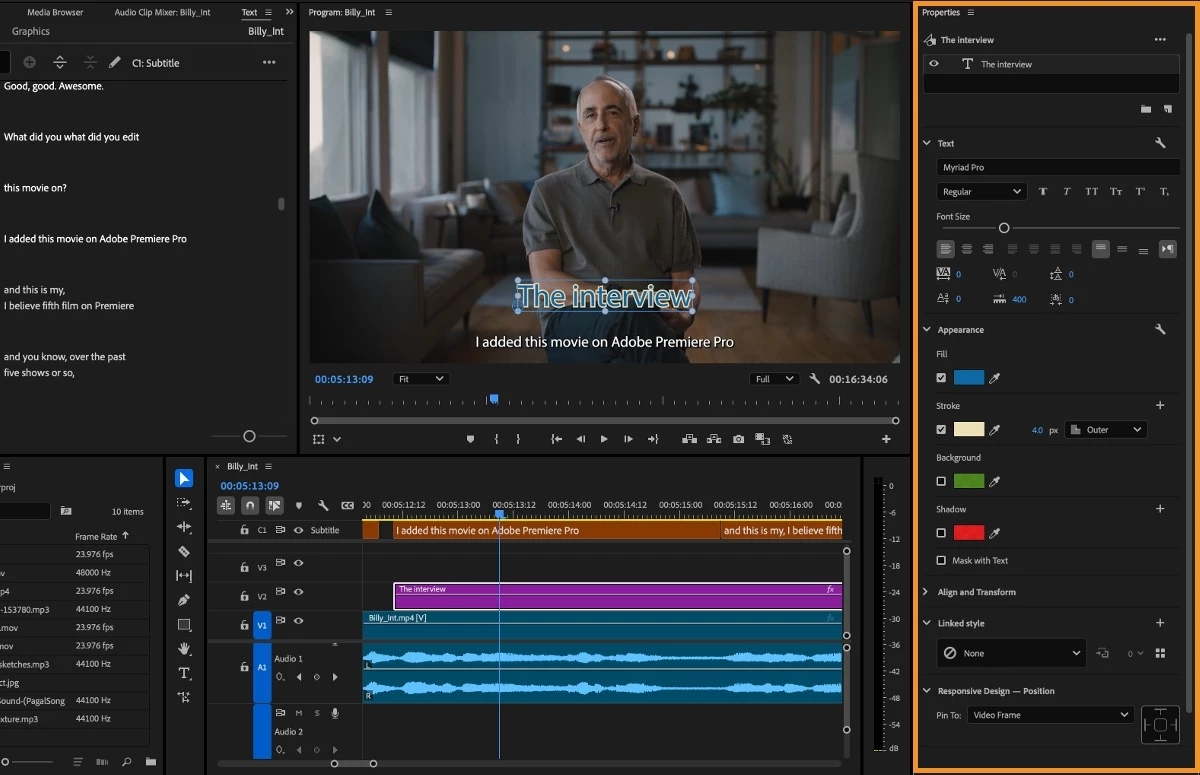
 

Key Features
These improvements aim to streamline the editing process by making it more accessible for new users while boosting productivity for professionals.

Context-Aware Interface

The Properties Panel is now context-sensitive, intelligently surfacing the most relevant tools and controls based on your selected timeline. This means:

- It shows only the most applicable options for video, audio, graphics, or captions, depending on what media type you're working with.
- You don't have to navigate multiple panels to find the necessary tools - they're right there when you select a clip.

Multi-Clip Editing

For the first time in Premiere Pro, you can modify the properties of multiple clips simultaneously. This allows you to:

- Change graphic fonts and sizes across multiple elements at once
- Adjust the scale or opacity of hundreds of clips in one go
- Modify volume levels for multiple audio clips together

Direct Manipulation in Program Monitor

The Properties Panel enables some new editing capabilities directly in the Program Monitor:

- Crop video clips visually
- Transform and reposition elements without switching to a separate panel

Quick Access to Advanced Controls

While simplifying the interface, the panel still provides fast access to more advanced settings:

- One-click buttons to open relevant specialized panels for deeper control.
- Easy navigation to additional tools when needed without extensive searching.

Streamlined Workflow

Overall, the new Properties Panel is designed to make editing faster and more intuitive:

- Reduces mouse travel across the interface.
- Makes the software easier to learn for beginners.
- Increases efficiency for experienced editors.


New Properties panel in action

How to use the NEW properties panel in Adobe Premiere Pro 2025 - AdobeCare

Properties Panel | What's New in Premiere Pro - Adobe Video and Audio

Adobe @ IBC2024 #3 - Properties Panel and new UI in Premiere Pro - RedShark News


What is new in Premiere Pro 2025? (Properties Panel) - Premiere Gal


Exploring the Premiere Pro Updates (Properties Panel) - @filmriot‬


New Feature Updates in Premiere Pro (Properties Panel)  - Javier Mercedes


6 replies

Participant
April 7, 2025

I cannot edit my captions. 

I select them and the properties panel states 'multiple clips selected' (as seen in attached screenshot) 

Stan Jones
Community Expert
Community Expert
April 7, 2025

@CooperM82007,


Show your timeline in the screenshot. This should work, and I could not find a selection option right away that did not work.


I have no difficulty in 25.2.0 selecting multiple captions in a caption track and seeing all the (available) properties to change.


Generally, for captions, however, I select one, change to the options I want for that track, and then create a caption track style which applies it to the whole track.


Unrelated to your question, but a big deal: Note that in 25.2, you can have multiple caption tracks visible for burn in.


Stan


Participant
April 7, 2025

Heres a better screenshot @Stan Jones 

Participant
March 26, 2025

I can see the Properties panel when selecting my captions but I can only change a few things like font and text alignment but I can't edit the font size! nor the thickness or background. Please help! this change is not helping us!

Stan Jones
Community Expert
Community Expert
March 26, 2025

@Andrés Felipe Gualdrón,


I suspect you have EBU, Australian, or Teletext subtitles that limit the caption parameters. We can see the "single height" option. Do you need to use that subtitle format? If not, change to Subtitle format and you'll have a lot more control for burn-in subtitles. But you'll be limited to SRT sidecar export with little control over style export.


Stan


Reznik
Participating Frequently
February 8, 2025

Hello, the Properties panel is cool, but does not work for my CC track.

I can not edit the CC style. I have to upgrade it to graphic and than i can not mass paste my linked style. I am really frustrated by this.

Stan Jones
Community Expert
Community Expert
February 8, 2025
Participant
January 31, 2025

Worst update ever. Where the hell is the capitals or colour palet for CAPTIONS???? ridiculous. Basic stuff forgotten about. Disgrace.If its actually in there its NOT easy to find or use. Im sure theres some over complicated way. probably got to download something then put the file in a folder then dock panel with two other panels simultaneously pressing control button ... am I right??? QWERTYUIOP{#$%^&*(OP{}

manuell69897417
Participating Frequently
October 23, 2024

Wenn ich ein Foto auf der Timeline zuschneide, wird der darunterliegende Effekt, hier Schlagschatten, nicht mehr angewandt.

Wenn ich "zuschneiden" als Effekt hinzufüge, und darunter schlagschatten anwende funktioniert der Schlagschatten. 
Das zuschneiden im Haupt-Panel ist so sinnlos, wenn darunter ein Effekt liegt.


Participant
October 16, 2024

新版本的字幕样式怎么修改呢?

Inspiring
October 17, 2024

It's under the new "Properties" panel. @阿宾100_2 

Participant
November 7, 2024

Nothing shows up under the new "Properties" panel when selecting a subtitle to change its style.