

Inspiring
April 30, 2020
Answered

New to Premiere Pro and I am stuck

  • April 30, 2020
  • 3 replies
  • 1297 views

I am new and have been trying to figure out how to access the effects in the project screen to implement transitions etc.  The effect option is not there, but the effect controls is in the source window.  Can anyone assist me in how I access this function.  I am at a stand still.


Michelle

This topic has been closed for replies.
Correct answer Brotherriver

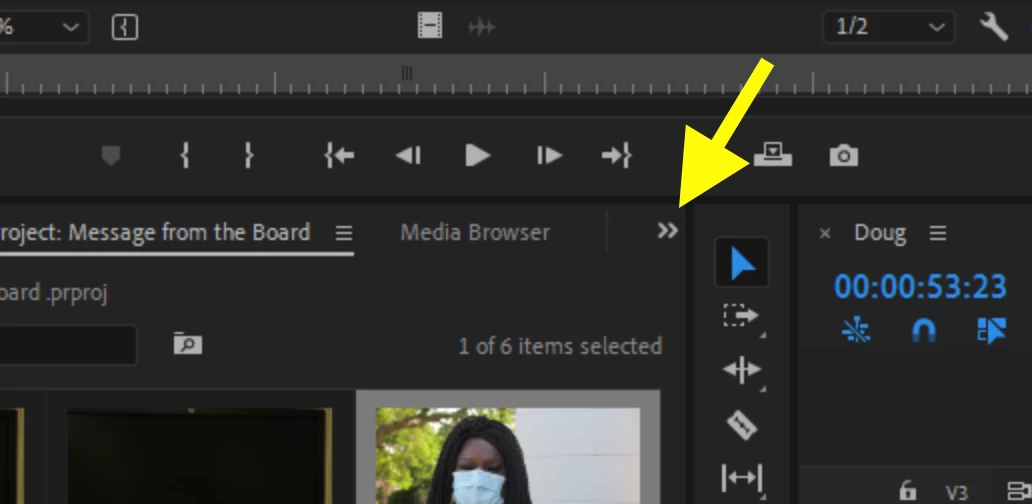
Click on the two arrows and see if the effects tab is there:
MtD


I  clicked on libraries and now it is showing on the right hand of the screen.  I think i have it.  Thanks.

3 replies

Ann Bens
Community Expert
Community Expert
April 30, 2020

This is your original screenshot.


Inspiring
April 30, 2020

I did find it there but won't drag.

Inspiring
April 30, 2020

Click on the two arrows and see if the effects tab is there:

MtD

Community Manager
April 30, 2020

Hi Brotherriver,


To access the Effects panel, click Window (in the menu bar) > Effects. Hope it helps.


Thanks,

Sumeet

Inspiring
April 30, 2020

Thank you.  I did do that and it is showing up but I don't see it in the project area.


Inspiring
April 30, 2020

MtD


Thank you.  I know I am missing something.  I clicked on editing and then edit workspaces and it comes up with the below.  I clicked on effects, and then ok. I viewed the tutorial and it has the "effects" in the project panel.  Can you implement the effects/transitions or access them in another area besides the project panel?


Inspiring
April 30, 2020

Go to the menu Window > Effects.

MtD
