



No duplicate frame markers for nested multi-cam sequences
I am cutting a 60min documentary in Premiere Pro 13.1.4 (Build 2). All of the interviews were first nested into multicam sequneces and then those nested multicam sequences were brought into the main sequences to be cut together into the story. Previously I have always cut these films together with the raw interview clips on the timeline, rather than nested multicam sequences.
The problem I'm having is that the clips I cut from the nested multicam sequences don't show duplicate frame markers.
The check marker for Show Duplicate Frame Markers is checked. Attached screenshot shows the problem in action.
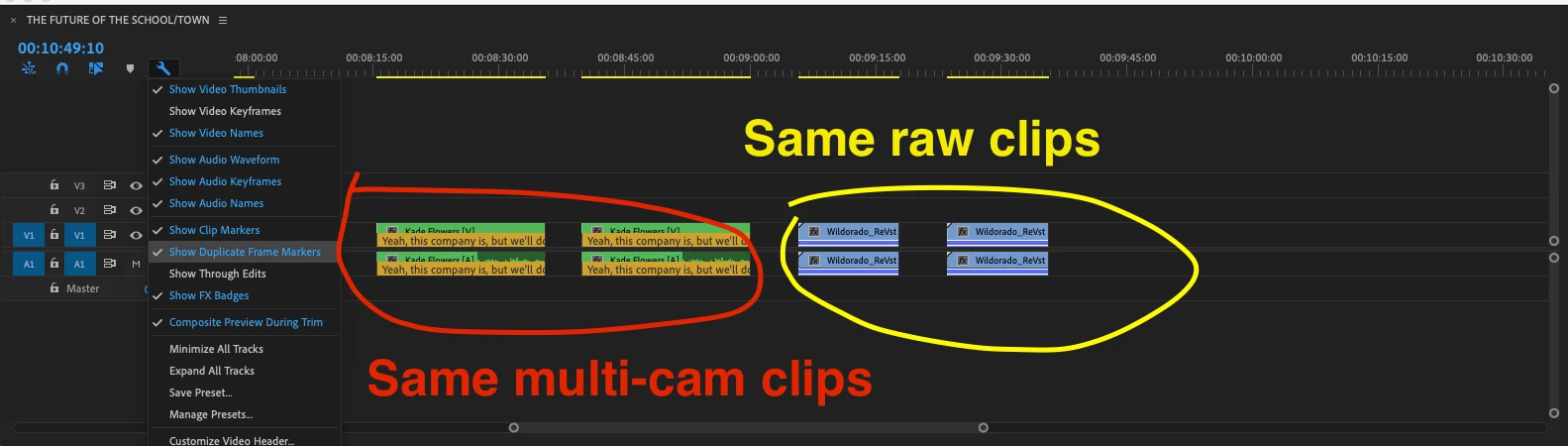
As you can see, the duplicate frame marker is present on the raw clips, but not on the nested multi-cam clips.
This is a serious issues as knowing which quotes are used in different parts of the film is something that is constantly being reevaluated and seeing where a quote has already been used elsewhere (by the presence of dupilcate frame markers) saves a tremendous amount of time in checking and rechecking the contents of each clip on the timeline.
I have not been able to find any other posts about this. Google shows one, but the link takes me to the adobe support home page so I belive it no longer exists.
Please help! This could save me hours and hours of work.
 AdChoices