



Greg @ Caprice
Inspiring
May 12, 2019
Question

No option to delete Media Encoder file

  • May 12, 2019
  • 3 replies
  • 3592 views

Hi,

I have a file that Media Encoder continues to process every time I open up ME.

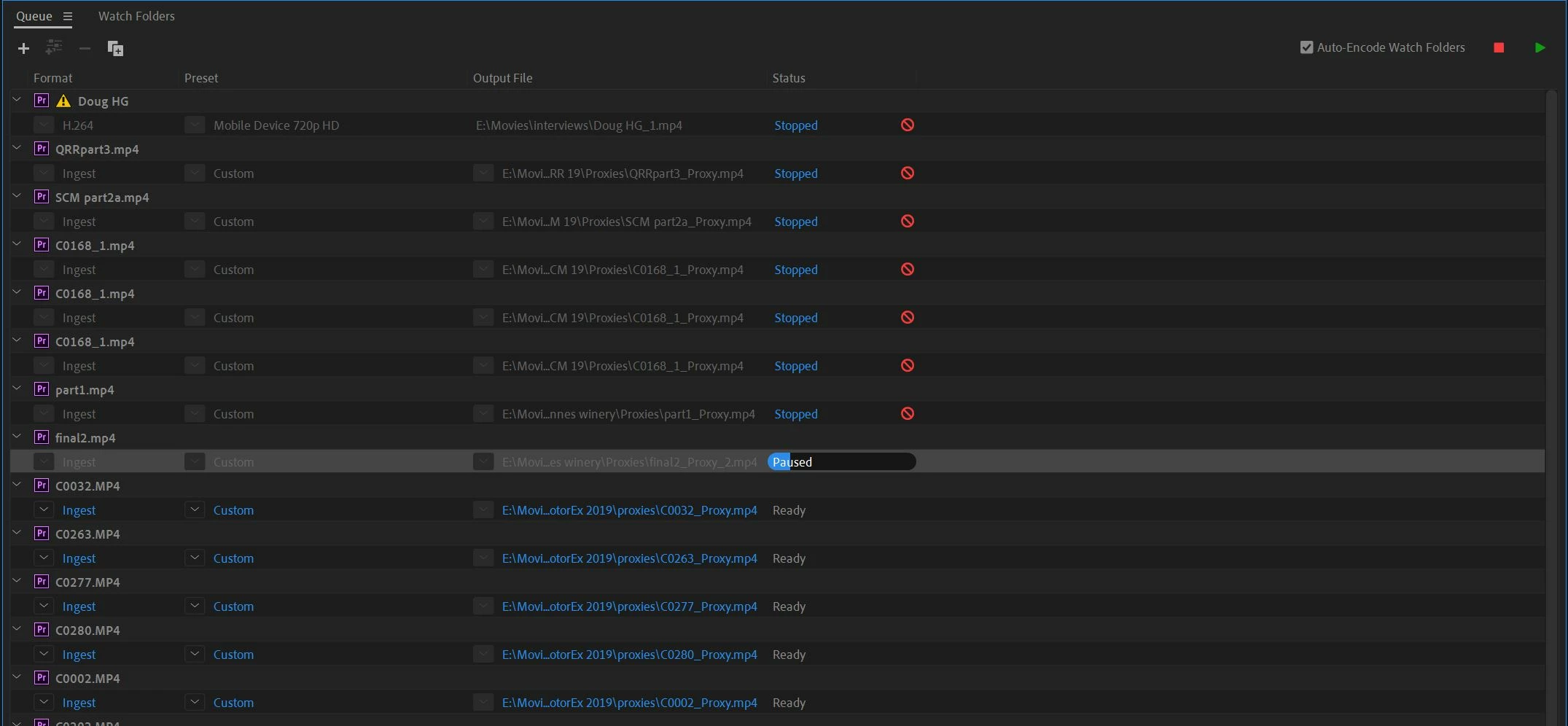
I can delete the completed file above and the yet to be processed file below but the delete option is not available for this file.

How do I delete the file so ME can continue to process the files I want to have encoded?
    This topic has been closed for replies.

    3 replies

    New Participant
    October 19, 2021

    Go to file and choose stop current item! After that you will able to remove!

    Ann Bens
    Community Expert
    Community Expert
    July 15, 2021

    Click on the file name.

    Or lasso and hit delete.

    R Neil Haugen
    Legend
    May 13, 2019

    Have you clicked on the line "Final ... " just above the highlighted (currently selected) line?

    Neil

    Everyone's mileage always varies ...
    Greg @ Caprice
    Inspiring
    May 13, 2019

    Hi Neil,

    Thanks for your response.

    I tried clicking anything but nothing would bring up an option to delete. At this point, ME must have restarted, it encoded the clip and I was able to delete it.

    Still curious as to why I didn't have a delete option even when paused. Can I not delete a file while it's being processed even when I've paused it?

    R Neil Haugen
    Legend
    May 13, 2019

    You click the bar above each clip, then you can use the minus-bar option up above to delete files in the queue.

    Puzzled me at first also.

    Neil

    Everyone's mileage always varies ...